Networking
LinkedIn for B2B Sales: Reach Several People at One Company
11 min read
Key takeaways
- A B2B purchase usually involves more than one person. Gartner says six to 10 for complex solutions, and LinkedIn says more than five. Neither number tells you how many people are in your deal.
- Start with three people at one company: the one who feels the problem, the one who controls the money, and the one who checks the details. Mark each one confirmed, likely or unknown.
- Write each person a separate note with their own reason. Changing only the first name does not count.
- When someone replies, ask who else should see it. Do not go around the person who is helping you.
- Keep one line per person with a next date. If one person leaves or goes quiet, you still have the others.
Short answer: Treat each company as a small group, not one person. Pick one account and find three people: who feels the problem, who decides on the money, and who checks the details. Write each a separate note with its own reason, one at a time. Track every person with a next date.
In this article
Why is selling B2B on LinkedIn different from selling to one person?
How many people should you reach at one company?
How do you map one account in 15 minutes?
What should you write to each person?
What if one person already replied?
How do you keep track of one account with several people?
Most of your list is not buying today. What does that change?
What about Sales Navigator, tools and automation?
Where does a simple follow-up tracker fit?
What do we not know?
FAQ
Do this today
Why is selling B2B on LinkedIn different from selling to one person?
Dev (an example, not a real person) sells shift-scheduling software to warehouses. A warehouse manager replies twice and says it looks useful. Then she goes quiet for three weeks. Dev only ever wrote to her. He does not know who signs off on spending, or who has to check the data side. With nobody else to ask, he has nothing to do but wait.
That is the B2B problem in one story. A company buys as a group, and you are talking to one member of it. If you want the basic weekly routine first, start with LinkedIn for sales: a simple weekly routine. This post is the next step: what to do when one account means several people.
Gartner's page on the B2B buying journey says the typical buying group for a complex B2B solution involves six to 10 decision makers. It also says buyers spend only 17% of the purchase time meeting potential suppliers, and when they compare several suppliers, time with any one rep may be only 5% or 6%. The page shows no survey year or sample size, so read it as a direction, not a measurement of your deal.
How many people should you reach at one company?
The published numbers do not agree. LinkedIn's playbook for the buying committee says the average B2B purchase involves more than five decision makers, with no source. An older LinkedIn post cites CEB for an average of 5.4, with no year. Gartner says six to 10, for complex solutions.
So the honest answer is "a handful, and it depends on the deal." Do not try to reach all of them. Woodpecker, a cold email tool, advises against a fixed target such as five contacts per account. Its rule is to stop adding people once you can explain how the decision gets made and who the important roles are.
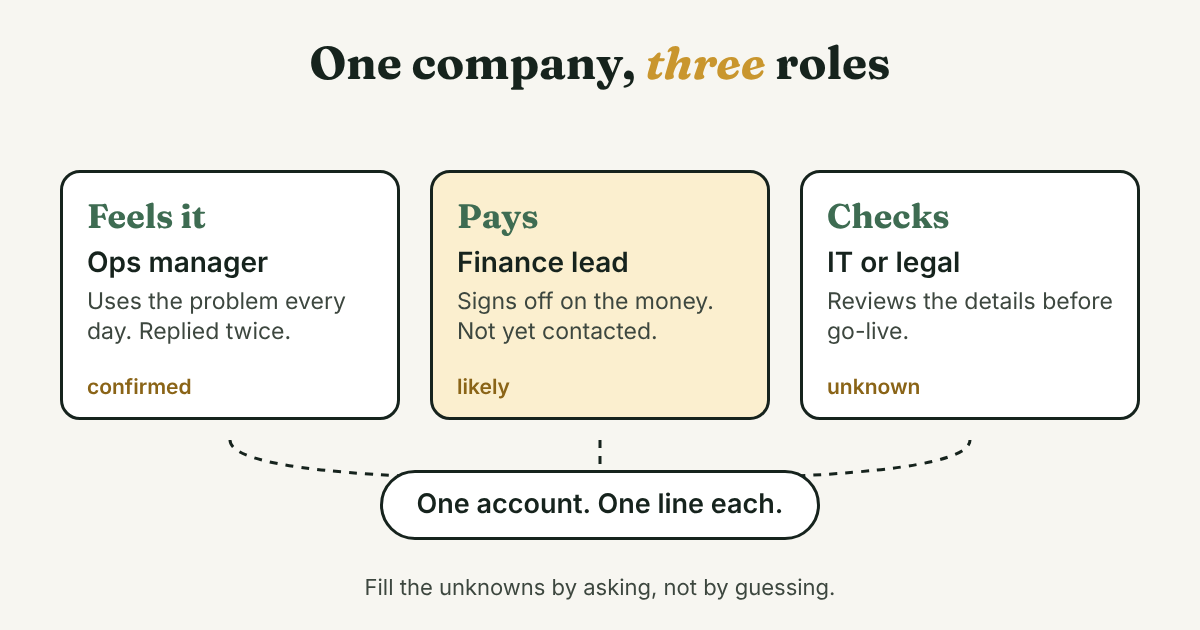
Our rule of thumb: start with three people, one for each role in the picture above. You can add a fourth when a reply tells you someone else matters.
How do you map one account in 15 minutes?
You do not need Sales Navigator for this. LinkedIn's older post says you can search by industry, seniority and tenure without it.
Search by company and title
Search for the company, then for the titles that fit each role. For a scheduling tool sold to warehouses, that could be "operations manager", "finance" and "IT". LinkedIn's older post suggests looking above, below and beside the person you already know.
Write one line per role
Use the three roles and label what you know. Woodpecker uses three labels, and we like them: confirmed, likely and unknown.
[Company] | Feels the problem: [name, title] (confirmed) | Controls the money: [name or title] (likely) | Checks the details: unknown
An unknown is fine. It tells you what to ask, not what to guess.
Look for a reason to write
Check each profile for a new job, a post about the problem, or a company announcement. No reason, no message yet.
What should you write to each person?
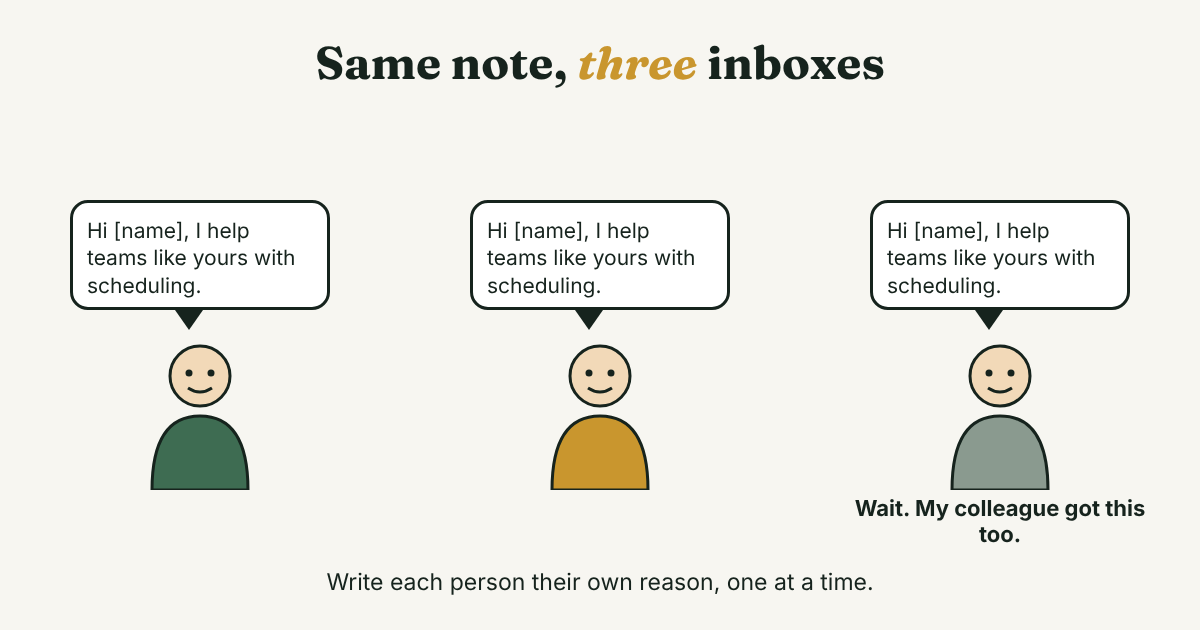
Each person has a different reason to care, so each note needs its own reason. Woodpecker puts it plainly: changing only the first name is not personalization. LinkedIn's playbook says the same in other words: each executive has their own stakes, goals and priorities.
Here are three short notes to edit. Write them one at a time, and not all in the same week.
The person who feels the problem. Start from their work:
Hi [first name], I saw your post about [problem]. I help [type of team] with [specific part]. Glad to connect either way.
The person who controls the money. Start from the result they answer for, not the feature:
Hi [first name], I work with [type of company] on [problem]. Is [problem] on your list this year, or already handled? Either answer helps.
The person who checks the details. Start with their question, not your pitch:
Hi [first name], I am talking to teams about [change]. Which questions do you usually ask before something like this goes live?
Mention a colleague by name only if that colleague said you may. Otherwise it reads like you went around them. For more wording, see our connection request messages for sales and LinkedIn follow-up templates.
When you can, look for a warm path first: a first-degree connection or a mutual contact who could introduce you. LinkedIn's playbook says the same, and cites a LinkedIn survey we could not see.
What if one person already replied?
Then she is your best source for the map. Do not go around her. Woodpecker gives the same warning: tell her why you want another person involved, and ask for an introduction.
Thanks for the call, [first name]. Who else on your side would want to see this before a decision? I can write to them myself, or you can forward a note. Whichever is easier.
If she says "no one else," believe her for now and write a date to ask again in a month. If she names someone, write to that person next and mention her name, since she offered it. LinkedIn's playbook adds a useful point: with several contacts, you do not start over when one leaves.
How do you keep track of one account with several people?
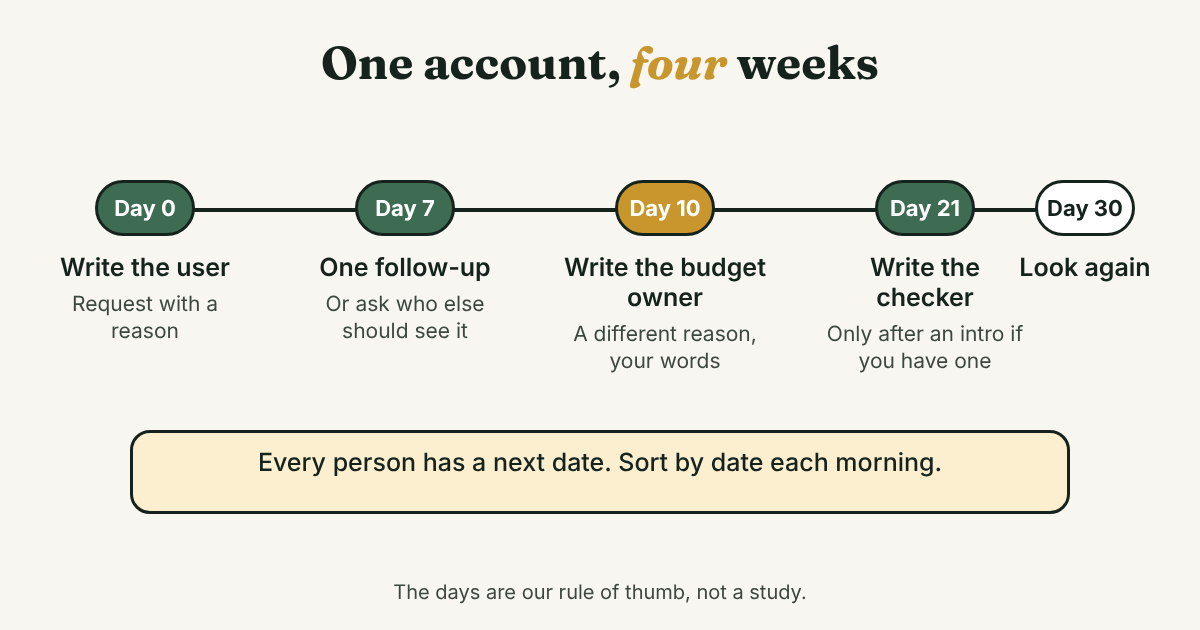
Track people, and keep the company name in every line. One line per person is enough: the account, the person, their role, the last thing that happened, the next step and a next date.
Warehouse company | Mia, ops manager (confirmed) | Replied twice, asked about price | Ask who signs off | Nov 14
Warehouse company | Finance lead (likely) | Not contacted yet | Write after Mia names them | Nov 17
Warehouse company | IT or legal (unknown) | Not contacted yet | Ask Mia who reviews | Nov 17
Sort by the next date each morning and message whoever is due. Then update the date before you close the list. Our post on whether you need a CRM for LinkedIn follow-ups explains when a spreadsheet stops being enough.
Most of your list is not buying today. What does that change?
In a Marketing Week article, two researchers at LinkedIn's B2B Institute say, citing Professor John Dawes, that only about 5% of B2B buyers are in the market at any time. The article gives no data or method, and the authors call the rule a mental model. So take it as an idea, not a statistic.
It still points to something useful. Most people on your list will not need you this month, whatever you write. So send a short note with a reason, not a pitch, and treat a next date a month out as part of the plan.
What about Sales Navigator, tools and automation?
Sales Navigator can help with search and alerts. LinkedIn's own posts promote it, and we did not check current plans or prices, so look at LinkedIn's pricing yourself.
Skip any tool that sends requests or messages for you. We do not recommend automation or mass messaging. Our post on why to avoid automating LinkedIn activities has the sourced reasons, and LinkedIn maximum connections per day covers the limits on requests.
Where does a simple follow-up tracker fit?
Full disclosure: we make GrowthSeeded, a simple follow-up tracker for LinkedIn, so we are biased. It tells you who to message each day, so you don't forget to follow up. It is not a complex CRM. You add each person and why they matter, and you can put the company and role in the reason. The next step follows what happened, such as an accepted connection or a reply.
You send every message yourself. It never sends anything and never connects to LinkedIn, so it adds no risk to your LinkedIn account. It is not built for deal values, a team working one pipeline or email sync. If you need those, a CRM fits better. More in how a tracker helps with LinkedIn follow-ups.
What do we not know?
- How many people are in your buyer's decision. The numbers we found are averages from sources that give no year or sample, and your deal can be smaller or larger.
- How often reaching several people at one company wins more deals. We found no study we could open that measures it.
- Whether the 5% in-market figure holds for your market. The article describes no data.
FAQ
How do I use LinkedIn for B2B sales?
Pick one company, find the three people who matter most to the decision, and write each a separate note with its own reason. Track every person with a next date, and follow up once with something new.
Should I message several people at the same company?
Often yes, but one at a time and with a different reason for each. Do not send the same note to everyone, and do not go around a person who is already helping you.
How many people are in a B2B buying decision?
Sources differ. Gartner says six to 10 for complex solutions, and LinkedIn says more than five. For your deal, ask the first person who replies.
Who should I contact first?
The person who feels the problem every day. That person is usually the easiest to start a conversation with, and the best source for who else should be involved.
Do I need Sales Navigator for B2B sales?
No. You can search for people at a company with a free account. A paid plan changes how you search, not how you write to people or keep track.
Do this today
- Pick one company you want to work with and write the three roles on one line.
- Find at least one person for each role on LinkedIn and mark each one confirmed, likely or unknown.
- Write a next date next to each name, so tomorrow you know who to message.
If you want the list to tell you who is due each day, GrowthSeeded can keep it. You send every message yourself, it never sends anything or touches LinkedIn, and the Free plan covers 5 active people at a time.
Sources
- The B2B buying journey, Gartner, checked 2026
- Your Playbook for Connecting with Each Member of the Buying Committee, LinkedIn Sales Solutions, checked 2026
- Ditch the Single-Threaded Approach, Win the Consensus-Based Sale, LinkedIn Sales Solutions, checked 2026
- Multithreading Sales: A B2B Playbook for Multiple Stakeholders, Woodpecker, 2026
- The 95:5 rule is the new 60:40 rule, Marketing Week, checked 2026
About the author
Anisur Rahman Fagun is a marketing and content strategist with more than 9 years of experience in SEO, content, paid advertising and brand growth. He holds a master's degree in mass communication and journalism, and has led content and SEO strategy, built editorial teams and worked with product, design and sales teams. He also builds simple tools that turn marketing data into clear decisions. He writes the GrowthSeeded blog, which shares practical ways to build professional relationships on LinkedIn.