Networking
LinkedIn Prospecting: Decide Who Is Worth a Message First
15 min read
Key takeaways
- Prospecting ends when you send the first request. Everything before it is finding people and deciding who is worth a message.
- Salesforce's 2026 survey says reps spend almost a full day a week on prospecting, and 47% of reps call cold outreach one of the worst parts of the job. A short list with a reason beside each name saves that time.
- Score each person from 0 to 2 on fit, reason, way in and timing. The top scores get a message this week. The middle gets a warm-up. The bottom gets a date or a delete.
- Most of any list is not ready to talk. LinkedIn's B2B Institute puts the in-market share at about 5%, though its article shows no data. Plan for the rest with a next date.
- Skip tools that scrape names or message for you. Search by hand and write each note yourself.
Short answer: LinkedIn prospecting means finding people who fit what you offer, then deciding who gets a message now. Find names with search filters, a best customer's profile and job changes. Score each person on fit, reason, way in and timing. Message the top scores, warm up the middle, and park the rest with a date.
In this article
What is LinkedIn prospecting, and where does it stop?
Where do you find people worth adding?
How do you decide who is worth a message?
What does a scored list look like?
What do you do with the warm-up and parked people?
Which mistakes quietly ruin a prospect list?
How do you prospect on LinkedIn without Sales Navigator?
Where does a simple follow-up tracker fit?
FAQ
Do this today
What is LinkedIn prospecting, and where does it stop?
You have 60 names saved from last month. Pick one at random. Can you say in one sentence why you would write to that person today? If you cannot, the list is not ready, and any message you send from it will be a guess.
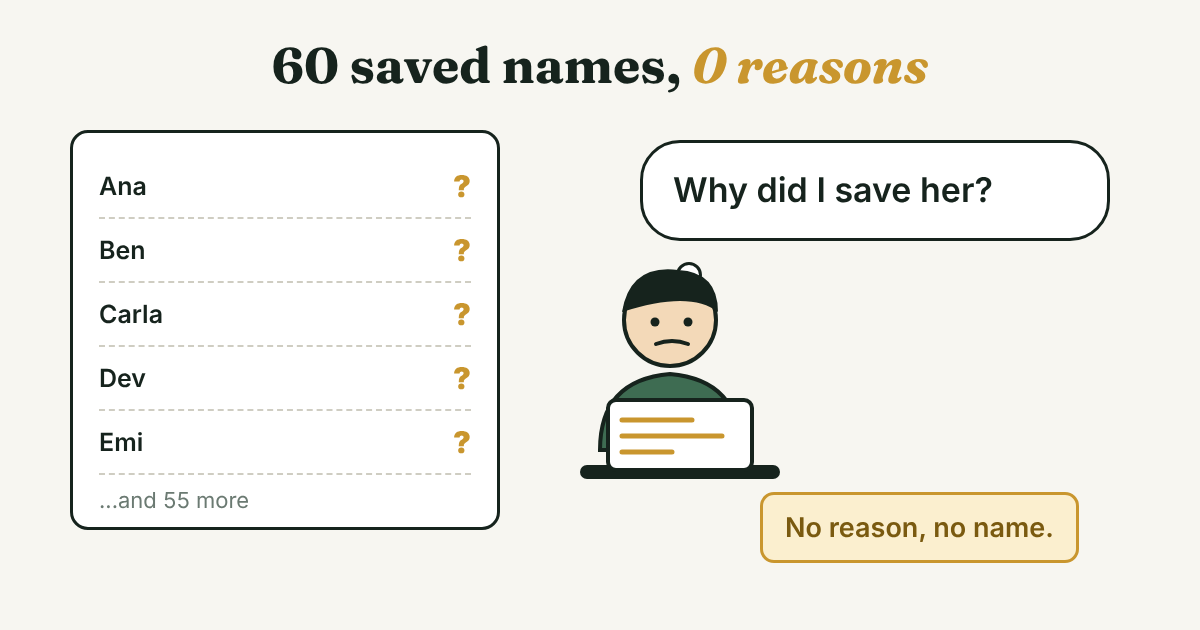
That is the problem prospecting solves. It starts when you ask who might need what you offer. It stops when you send the first connection request. The request, the reply and the follow-up are separate jobs. If you want the weekly routine that runs after the list exists, start with LinkedIn for sales: a simple weekly routine.
Three popular guides sit near the top for this topic: HubSpot's nine ways to find prospects, GMass's five techniques and Snov.io's prospecting guide. HubSpot and GMass are good at the finding. Snov.io spends its tool section on automation tools. None of them gives you a way to decide which of the people you found deserve a message this week. That decision is what the rest of this guide is about.
It is worth doing well because the hours are real. Salesforce's State of Sales report (2026 edition) surveyed 4,050 sales professionals in August and September 2025. It says reps spend almost one full day of the workweek on prospecting, and 47% of reps agree that cold outreach is one of the worst parts of a sales job. Salesforce sells sales software, and the survey is about sales teams in general, not about LinkedIn. Even so, it matches what many people say: they spend the hours, and the hours do not feel productive.
Where do you find people worth adding?
These are the places the top guides use, from the cheapest to the most work. You do not need all eight. Pick two and use them for a week.
- A best customer's profile. HubSpot (updated January 2025) suggests the "More Profiles to Browse" sidebar on a best customer's profile. Look for what the people shown have in common, such as industry or city.
- Job changes in your network. HubSpot suggests the Catch up page, then Job changes, with a weekly reminder. LinkedIn Sales Solutions lists a job change among its ten trigger events (2017) and says to check the new role and reach out early.
- Your connections' connections. HubSpot suggests browsing a first-degree connection's connections for people at companies you want. Its note: if that connection is a competitor, research the person without involving them.
- People who comment where your prospects talk. HubSpot suggests reading who comments on a prospect's posts. They are already talking about the topic you care about.
- A school's alumni page. HubSpot suggests the Alumni tab, filtered by place, industry or company. A shared school gives you an honest reason to write.
- Search filters. GMass lists connection degree, location, school, current or past company and industry as filters. It says company size and seniority need a Premium plan. LinkedIn's own Sales Navigator page names "40+ filters" in that paid product, including Function, Seniority and Company Headcount.
- A web search. HubSpot and GMass both describe searching Google for LinkedIn profiles with quotation marks and AND, OR and NOT. A string to copy and edit: site:linkedin.com/in "[job title]" "[city]" "[industry word]"
- People who already engaged with you. HubSpot suggests checking who liked or commented on your own posts. LinkedIn Sales Solutions (2017) counts profile views and comments as triggers, but adds that they are not always a buying signal. Treat them as a reason to look, not a reason to pitch.
LinkedIn's own help pages would not open for our fetch tool, so the filter names above come from GMass and LinkedIn's Sales Navigator page. The filters you see depend on your account. Open your search panel and check.
Do not export names with a scraper or let a tool collect them for you. The sourced reasons are in Why to avoid automating LinkedIn activities.
One rule while you search: write the reason when you add the person, not later. Later never comes, and the name turns into the kind of saved name from the start of this guide.
How do you decide who is worth a message?
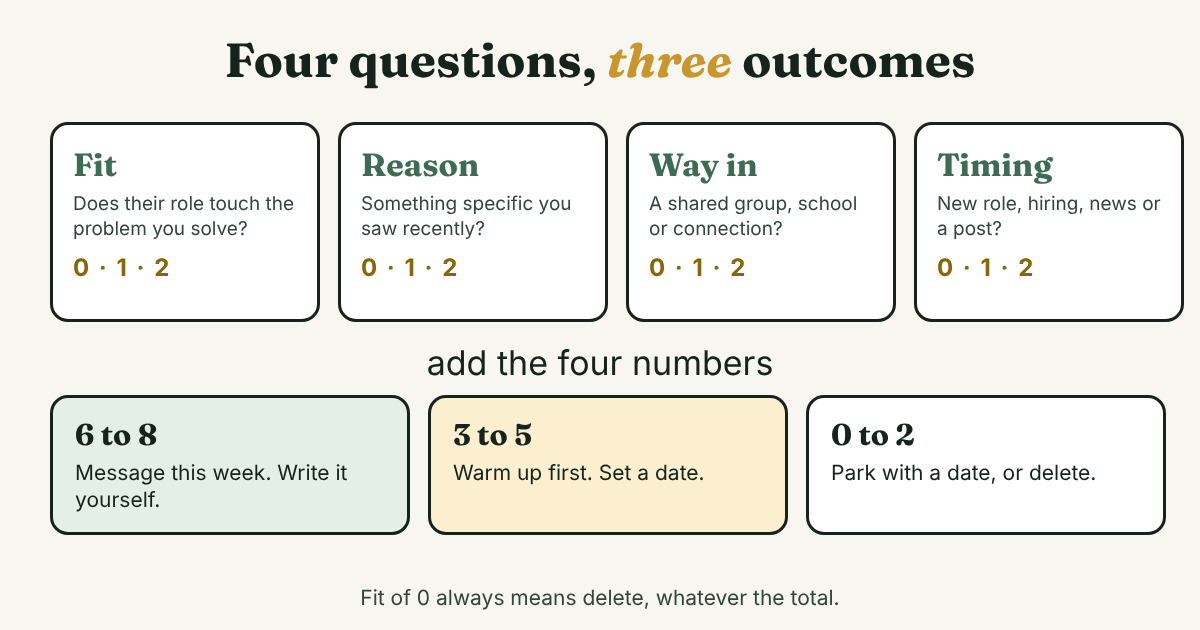
Four questions, each scored 0, 1 or 2. They are quick once you have the reason written down.
- Fit. Does this person's role touch the problem you solve, at a company like the ones you serve? 0 is no, 1 is maybe, 2 is clearly.
- Reason. Is there something specific you can say that you saw recently? 0 is nothing, 1 is about their company only, 2 is about them.
- Way in. Do you share a group, a school or a connection, or did they react to something of yours? 0 is nothing, 1 is weak, 2 is real.
- Timing. Is there a recent change: a new role, hiring, news, or a post about the problem? 0 is none known, 1 is maybe, 2 is clear.
Add the four numbers. A total of 6 to 8 means message this week. A total of 3 to 5 means warm up first. A total of 0 to 2 means park the person with a date, or delete. One more rule: a Fit of 0 means delete, whatever the total. A friendly person with no need for what you offer is not a prospect.
These cutoffs are a method, not a finding. No study sets them. Run one list through the score, see how it sorts, and move the lines if the groups feel wrong.
The score is built on two points from research. Gartner surveyed 646 B2B buyers in August and September 2025. Its March 2026 release says 67% prefer a rep-free experience. The release does not define "rep-free", so it does not tell you how buyers feel about a short, relevant note. It does tell you that most of the buyers surveyed would rather buy without a rep, so a stranger's message has to earn its place.
The second point is timing. Peter Weinberg and Jon Lombardo of LinkedIn's B2B Institute write in Marketing Week that only 5% of B2B buyers are in the market to buy at any moment, and that 95% will not buy for months or years. They credit research with Professor John Dawes of the Ehrenberg-Bass Institute, and the article gives no sample or year. So treat 5% as a way of thinking, not a number for your market. It still explains why the middle and bottom of your list should get a date, not a pitch.
Here is the line to copy for each person:
[Name] | [role, type of company] | Fit [0-2] Reason [0-2] Way in [0-2] Timing [0-2] = [total] | [Message / Warm up / Park / Delete] | [next step] | [date]
What does a scored list look like?
Rohan (an example, not a real person) runs a payroll service for restaurants with two to six locations. On Tuesday, November 10, he has eight names. Here is the list after scoring.
Ana | Owner, 4-location restaurant group | Fit 2 Reason 2 Way in 2 Timing 2 = 8 | Message | Mentioned in a post that late pay runs cost her two cooks. Both are in a local restaurant association group. Write about the pay-run post. | Nov 11
Farid | Owner, opened a new place last month | Fit 2 Reason 2 Way in 0 Timing 2 = 6 | Message | Congratulate the opening, ask how he set up payroll for the new team. | Nov 11
Ben | General manager, 2-location cafe | Fit 2 Reason 1 Way in 0 Timing 2 = 5 | Warm up | The company opened a second site, but nothing is about him. Comment on the opening post, then send a request. | Nov 18
Carla | Bookkeeper at a restaurant group | Fit 1 Reason 2 Way in 1 Timing 0 = 4 | Warm up | Not the decision maker, but may know who is. Comment on her post about month-end, ask one question later. | Nov 17
Gina | Owner, 3 locations, no posts in a year | Fit 2 Reason 0 Way in 1 Timing 0 = 3 | Warm up | No reason yet. Follow the company page and look for one. | Nov 24
Emi | Owner, one food truck | Fit 1 Reason 0 Way in 0 Timing 1 = 2 | Park | Too small today. Check job changes and news again. | Dec 10
Dev | CFO, 40-location chain | Fit 0 Reason 1 Way in 0 Timing 1 = 2 | Delete | Too large for a small service. Fit is 0. | none
Hal | Franchise operator, head office runs payroll | Fit 0 Reason 0 Way in 1 Timing 0 = 1 | Delete | He does not choose the payroll service. | none
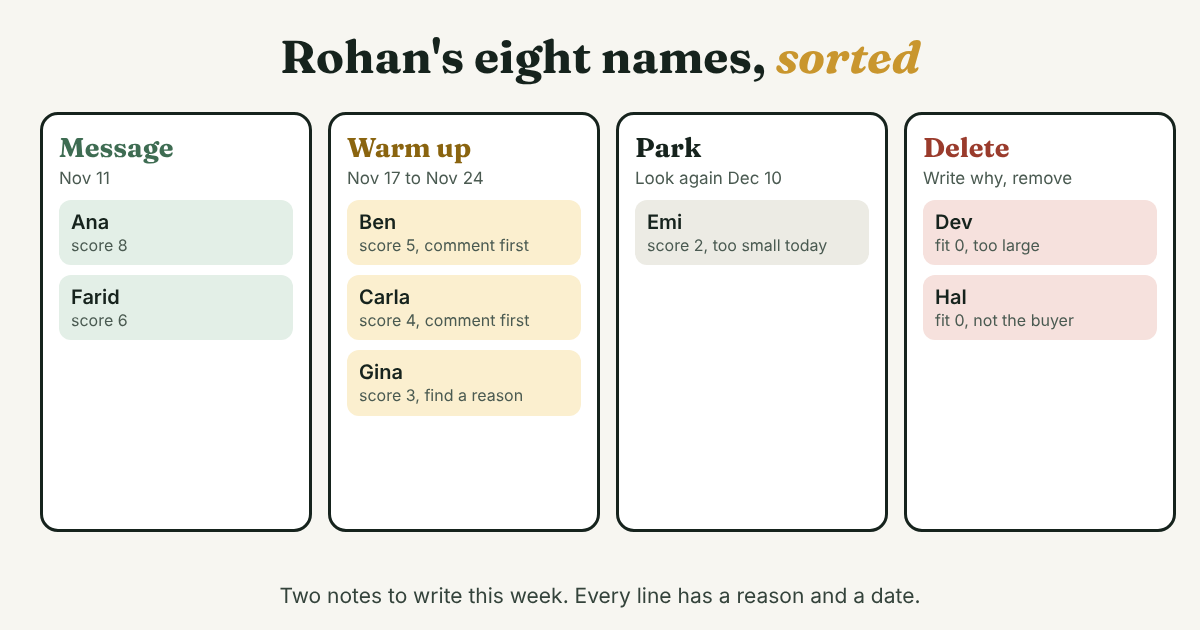
Look at what the score did. Rohan writes two notes this week, to Ana and Farid, and each note has its own reason. Three people get a small action with a date. One is parked. Two are gone, and the line says why, so he will not add them again next month.
A list of eight is small on purpose. The point is not the size. Every line has a reason, a next step and a date, so tomorrow morning he knows who is due.
What do you do with the warm-up and parked people?
This is the part the top guides skip. They end with a full list. A full list is where most of the waste starts.
Warm up. Do one small, public thing that is real. Comment on a recent post with a point you actually have. A fact, a question or a short example works. Skip "Great post!". Then, a few days later, send a request that says why you are connecting. LinkedIn Connection Request Message for Sales: 4 Examples has the wording. Send them one at a time, and keep an eye on LinkedIn's limits. LinkedIn maximum connections per day explains why a weekly view is safer than a daily one.
Park. Write the date you will look again, and what you will look for. Job changes and news are the usual things to check. LinkedIn Sales Solutions names a contact in the news and a job change among its triggers, and says timing triggers vary by industry and circumstance. A month is a common gap. You pick the date, and the only rule is that you will actually look.
Delete. Write one line on why, then remove the name. A list that only grows is a list nobody reads.
Move on after the accept. When a warm-up person accepts your request, they leave the prospect list and enter your follow-up. Ask one question about their work and set the next date. The weekly routine in LinkedIn for sales covers that step. If the person works at a company where several people matter, LinkedIn for B2B sales: reach several people at one company shows how to keep each one separate.
Which mistakes quietly ruin a prospect list?
- Saving names with no reason. The name feels like progress, but you cannot write a note from it. Fix: no reason, no name.
- Scoring on job title alone. A title tells you Fit and nothing else. The Reason and Timing questions are the ones that make the note specific.
- Messaging the whole list in one week. It is tempting when the list is fresh. It also runs into LinkedIn's weekly invitation limits and leaves you with a pile of replies you cannot answer well. Fix: the top scores first, the rest on their dates.
- Treating a profile view as a buying signal. LinkedIn Sales Solutions says these actions "aren't always indicative of a buying signal". A view is a reason to look at the person, not a reason to pitch.
- Copying one note to everyone on the list. A copied note ignores the Reason column you just built. Write each one yourself.
- Using the same list forever. People change jobs and companies change. Look at the parked names on their dates, and delete the ones that no longer fit.
How do you prospect on LinkedIn without Sales Navigator?
Start free. The eight places above work with a free account, and the score does not depend on any paid feature.
LinkedIn's Sales Navigator page lists what the paid product adds: more than 40 filters, personas, account lists, a Job Changes spotlight and Shared Experiences for finding alumni and past colleagues. The page does not say which plan includes each feature, and it quotes no price. Check LinkedIn's pricing page yourself, because prices and plans change.
A sensible test is to prospect free for two weeks. If your searches keep hitting the same wall, for example you cannot filter by company size, then paying may be worth it. If your wall is deciding who to message today, a filter will not fix that.
Skip any tool that sends requests or messages for you, or that exports names in bulk. Snov.io's guide, for instance, gives a full section to automation. This blog does not recommend that route.
Where does a simple follow-up tracker fit?
Full disclosure: we make GrowthSeeded, a simple follow-up tracker for LinkedIn, so we are biased. It tells you who to message each day, so you don't forget to follow up. You add a person and why they matter, and its due-today view shows who to follow up with. The next step follows what happened, such as an accepted connection or a reply. The reason you wrote at the list stage is the "why they matter" you add.
It is not a complex CRM. You send every message yourself. It never sends anything and never connects to LinkedIn, so it adds no risk to your LinkedIn account. It does not find people for you or score them. It is not built for deal values, a team working one pipeline or email sync, and a CRM fits better if you need those. More in how a simple tracker helps with LinkedIn follow-ups.
FAQ
What is LinkedIn prospecting?
It is the work before the first message: finding people who fit what you offer and deciding who is worth writing to now. It ends when you send a connection request. What comes after is outreach and follow-up.
Is LinkedIn good for B2B prospecting?
It can be a place to find people and start conversations. No source we opened measures how often that leads to a sale. Gartner's March 2026 survey of 646 buyers suggests many prefer to research alone first, so a short, relevant note matters more than volume.
How do I prospect on LinkedIn without paying?
Use the free search filters, a best customer's profile, job changes in your network, alumni pages and comments on your prospects' posts. Write a reason next to each name. Then score the list and message only the top.
How many people should I add to my list?
Add as many as you can write a real reason for, and no more than you can follow up in a week. LinkedIn's weekly invitation limits also cap how many requests you can send, so a long list will wait anyway.
Is prospecting the same as lead generation?
In this guide, prospecting means the finding-and-deciding step for one-to-one outreach. Lead generation often covers more, such as content and ads. Different sources use the two terms loosely.
Do this today
- Open your saved names and write one reason next to each. Delete anyone you cannot write it for.
- Score the first ten people on fit, reason, way in and timing.
- Put a date next to everyone in the middle and the bottom. Then write a note to your top two, each in your own words.
If you'd like those dates to become a short list each morning, GrowthSeeded is a simple follow-up tracker for LinkedIn. You add the person and why they matter, and you send every message yourself. It never sends anything or touches LinkedIn, and the Free plan covers 5 active people at a time.
Sources
- 9 Little-Known Ways to Find New Prospects on LinkedIn, HubSpot, updated January 2025
- LinkedIn Prospecting: 2026 Guide, GMass, updated January 2026
- LinkedIn Prospecting 101, Snov.io, updated September 2026
- State of Sales, 7th edition, Salesforce, 2026
- Gartner Sales Survey Finds 67% of B2B Buyers Prefer a Rep-Free Experience, Gartner, 2026
- The 95:5 rule is the new 60:40 rule, Marketing Week (Peter Weinberg and Jon Lombardo, LinkedIn B2B Institute), checked 2026
- Sync Your Sales Outreach with These 10 Trigger Events on LinkedIn, LinkedIn Sales Solutions, 2017
- 5 Most Important Timing Triggers for Selling on LinkedIn, LinkedIn Sales Solutions, 2018
- How to use LinkedIn Sales Navigator, LinkedIn, checked 2026
About the author
Anisur Rahman Fagun is a marketing and content strategist with more than 9 years of experience in SEO, content, paid advertising and brand growth. He holds a master's degree in mass communication and journalism, and has led content and SEO strategy, built editorial teams and worked with product, design and sales teams. He also builds simple tools that turn marketing data into clear decisions. He writes the GrowthSeeded blog, which shares practical ways to build professional relationships on LinkedIn.