Networking
LinkedIn Prospecting Tools: Pick by the Job, Not the Rank
15 min read
Key takeaways
- LinkedIn prospecting tools do five different jobs: find people, check a contact detail, store people, send messages and follow up. Name the job you did worst last week, then look for one tool for that job.
- The lists we opened rank their own product first, and they disagree on price. LinkedIn's own plan page (updated September 27, 2026) lists Sales Navigator Core at $119.99 a month, or $1,079.88 a year.
- You can cover every job for $0: LinkedIn search, Hunter's free 50 credits a month, HubSpot's free CRM for up to 2 users, and messages you write yourself. Pay only after a test shows a limit you keep hitting.
- Skip tools that send or scrape for you. ZoomInfo's own 2026 list says "Neither architecture eliminates risk entirely," and LinkedIn sued a scraping company in October 2025.
- Test before you pay. Two weeks, one job, a number to beat, and a stop date you write on day one.
Short answer: LinkedIn prospecting tools split into five jobs: finding people, checking contact details, storing people, sending messages and following up. Start with free versions of the first three and send every message yourself. Pay for a tool only after a two-week test shows a limit you keep hitting. Skip any tool that sends for you.
In this article
Which job is slowing you down?
What do the top lists leave out?
What does each job cost?
What does a year cost at three levels?
Which kinds of tools should you skip?
How do you test a tool before you pay?
What five questions should you ask a tool's page?
Where does a simple follow-up tracker fit?
FAQ
Do this today
Which job is slowing you down?
Kofi (an example, not a real person) sells accessibility audits to online shops. On Monday he searches for the best LinkedIn prospecting tools and opens twelve tabs. By the fifth, he cannot say what he wants a tool to do. Every page promises more replies, more meetings and more time back. None asks him what went wrong last week.
Start there. A tool skips one chore for you. If you cannot name the chore, you pay for a feature list. Nearly every prospecting tool does one of five jobs:
- Find. Searching for people who fit what you sell. How to decide who is worth a message is in LinkedIn prospecting: decide who is worth a message first.
- Check. Confirming a role, or finding a work email when LinkedIn does not show one.
- Store. Keeping the name, your reason for writing and the next date somewhere you will look.
- Send. Writing the connection note and the messages, and sending them.
- Follow up. Knowing who is due today.
Now ask one question: which of these did I skip, or do badly, last week? Maybe you spent two evenings searching. Maybe four people accepted your request and you wrote to none of them. That answer is your job.
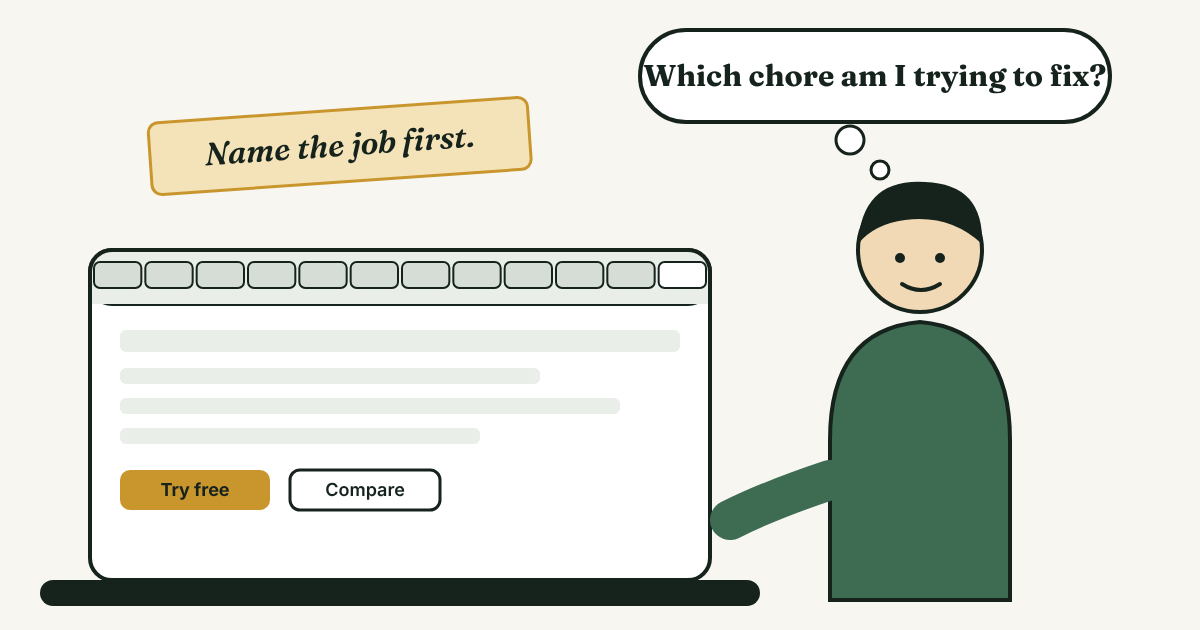
If the job you skipped was Send, no tool should take it from you. Writing each note yourself is the point, and it is what the person on the other end can tell. The weekly routine these five jobs belong to is in LinkedIn for sales: a simple weekly routine, so start there if you have no routine yet.
What do the top lists leave out?
Three guides sit near the top for this search. folk's "12 Best LinkedIn Prospecting Tools of 2026" (last updated August 27, 2026) puts folk's own CRM first. Instantly's guide (updated May 7, 2026) puts Instantly's Lead Finder first. ZoomInfo's list of automation tools (2026) puts ZoomInfo first. That does not make them wrong, because they know their tools. But read them as shop windows, and look for three gaps.
- The prices disagree. Instantly's list and LinkedIn's own comparison page both show Sales Navigator Core at $119.99 a month. folk's list shows a different Sales Navigator figure, $99.99. When two lists differ, go to the vendor's page and read the date on it.
- None shows how to test a tool. Each offers a trial link. None of the three gives a way to try a tool for two weeks and decide whether it helped.
- Most of each list is about getting the first message out. Instantly's guide does mention "task prompts for manual LinkedIn touches," but it does not treat follow-up as a job of its own. Yet it is where a lot of people slip: they forget.
This guide does not rank tools. It sorts them by job and uses the vendors' own pages for prices.
What does each job cost?
The prices below come from each vendor's own page, checked November 11, 2026. They change, so check the page before you pay.
- Find. LinkedIn search is free. Of the paid options, LinkedIn's Premium Business starts "from $69.99/month" and lists 15 InMail credits a month and basic search filters. Sales Navigator Core, which LinkedIn labels for "individual sellers," is US$119.99 a month or US$1,079.88 a year, with 50+ search filters and 50 InMail credits a month. LinkedIn says a Sales Navigator subscription includes Premium Business features. Core and Advanced have free trials, but the page gives no length, and you are not eligible if you have a paid LinkedIn subscription or a LinkedIn trial in the past 365 days.
- Check. Hunter's free plan "includes 50 credits per month, no card needed, and it has no time limit." One search that returns an email costs one credit, and a search that finds nothing is free. One catch: Hunter says it first matches an address against public addresses on the web, and if there is no match it considers "the likely permutations of the person's name on that domain." So a result can be an educated guess. Look for the Verified mark before you use it. Hunter's paid plans (Starter, Growth and Scale) raise the monthly credits to 2,000, 10,000 and 25,000, and the price is on Hunter's pricing page. You may not need this job at all, because a LinkedIn message works without an email.
- Store. A spreadsheet works. HubSpot's pricing page lists its free tools at "$0/mo" and says "Free for up to 2 users." Its CRM page calls the free CRM "100% free with no expiration date." Pipedrive's Lite plan is US$14 per seat per month billed annually, with a free 14-day trial and no card. Its Growth, Premium and Ultimate plans are US$39, US$59 and US$79 on the same terms, and its prices exclude VAT. Whether a CRM is worth it at all for one person is covered in Should you use a CRM for LinkedIn follow-ups?
- Send. Free, and yours. The next sections explain why this job stays with you.
- Follow up. A calendar reminder, a spreadsheet column with a date, or a tracker. A date next to every name is enough to start.
One warning about vendor prices. HubSpot's pricing page lists its Starter plan at "$7/mo/seat," and its CRM page says Starter "starts at $15/month per seat." Both were live on the day we checked. A vendor can show two prices on two pages, so pay what the checkout says, and read what it says about annual billing.
What does a year cost at three levels?
Here are three setups, built only from the prices above and before tax.
- Level 1, $0 a year. LinkedIn search, Hunter's free plan, HubSpot's free CRM or a spreadsheet, and messages you write yourself.
- Level 2, $1,079.88 a year. Add Sales Navigator Core on annual billing. That is $89.99 a month on average. On monthly billing, Core would cost $1,439.88 over twelve months, so the yearly price is $360 lower.
- Level 3, $1,247.88 a year. Core on annual billing plus one Pipedrive Lite seat at US$14 a month billed annually, which is $168 a year. That is about $103.99 a month.
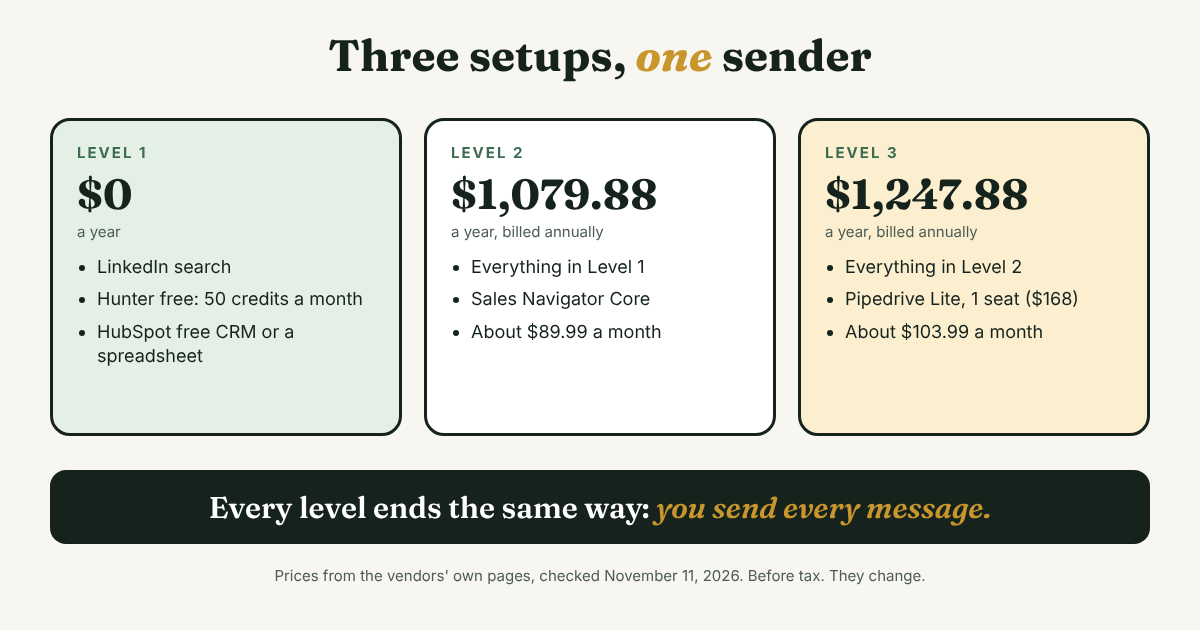
Look at what every level shares: the sending line is you. None includes a tool that sends for you, and that is on purpose. The gap between Level 1 and Level 2 is $1,079.88 a year. Whether it is worth it depends on one question: is search your wall? If you can fill a good list with free search in an hour a week, Core does not fix your problem. If you keep hitting a filter you cannot set, such as company size, it might.
Which kinds of tools should you skip?
Skip any tool that sends requests or messages for you, clicks through profiles for you, or exports names in bulk. This is the category that fills most "best tools" lists, so it helps to see what the lists themselves say about it.
- The vendors flag the risk. folk's list attaches a risk line to the automation tools it lists. Waalaxy gets "Automation can create LinkedIn account risk if overused." Expandi gets "Automation still carries LinkedIn account risk."
- ZoomInfo says the same in its own list. It writes that "LinkedIn's terms of service restrict automated activity, and enforcement is inconsistent," and that "Neither architecture eliminates risk entirely." It is talking about browser-extension tools and cloud-based tools.
- LinkedIn treats scraping as a legal matter. In October 2025, LinkedIn sued ProAPIs and its CEO. Security Affairs and The Record report that LinkedIn alleged a network of millions of fake accounts used to scrape member data, which was then rented out for up to $15,000 a month. We did not find a ruling. The case is about a data seller, not about people who message by hand, so it does not tell you how LinkedIn treats any one tool's users. It does tell you the company takes scraping seriously.
LinkedIn's own help pages blocked our fetch tool, so read the current automation rules in your account's Help Center before you test anything. For the longer sourced case, see why to avoid automating LinkedIn activities. For a fair look at one popular automation tool and what it costs, see the Waalaxy alternative comparison.
How do you test a tool before you pay?
Most people test a tool by clicking around the trial. A better test takes two weeks and a number. Here is the card to copy and fill in before you start any trial:
Job: [find / check / store / follow up]
Last week: this job took me [minutes], and I skipped or did badly for [number] people.
Tool and plan: [name, price, billing, trial end date]
Test: [14] days, the same job, the same list size.
Pass if: [the minutes drop by half / no one is missed / ...].
Stop date: [date]. If it did not pass, I cancel on [date].
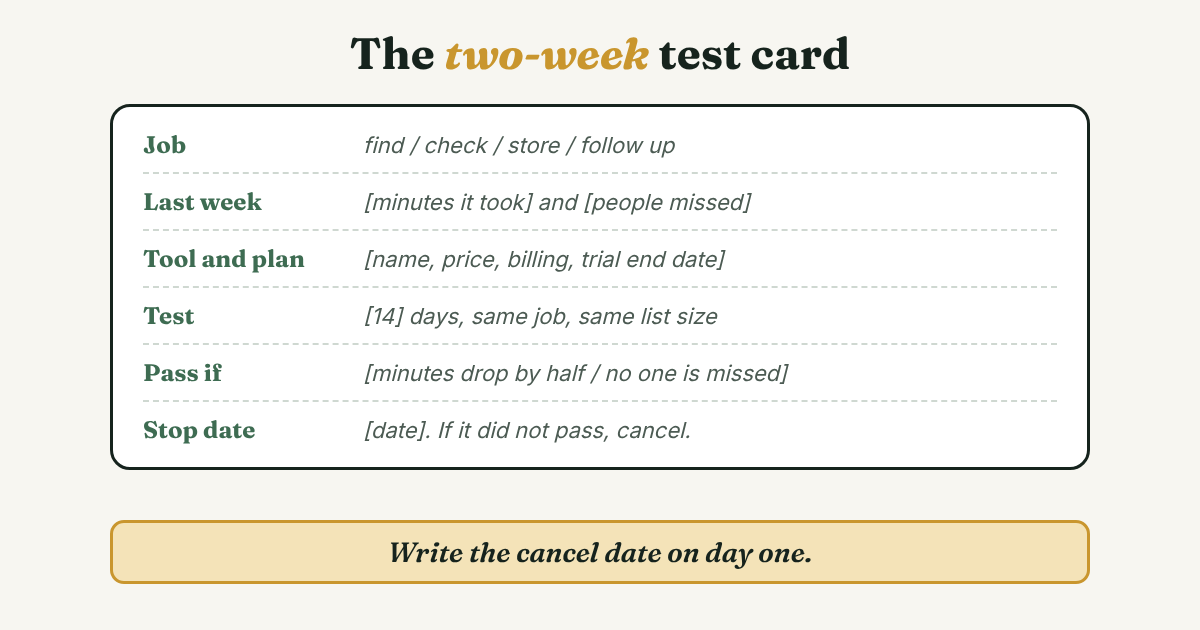
Four rules make the card work. Put the cancel date in your calendar on day one. Count minutes and missed people, not features. Test one tool at a time, or you cannot tell which one helped. And pick your trial dates with care: LinkedIn's page says you are not eligible for a Sales Navigator trial if you had a LinkedIn trial in the past 365 days, so you get one try a year.
Here is how Kofi (an example, not a real person) used it. Last week, finding ten good names took him 90 minutes. He also wrote down a second number: of 14 people who accepted his requests in the past month, he had sent a second message to 8. He started a Core trial with this pass rule: "Ten good names in under 45 minutes." After two weeks the same task took 75 minutes. The filters helped a little, but they did not pass his rule.
The second number told him more. Six accepted people had heard nothing since the first note. Search was not his wall, so he did not buy Core. He spent the next week writing six follow-ups and putting a next date beside each name. He would never have seen that from a feature list. He saw it because he counted.
What five questions should you ask a tool's page?
Before you start a trial, find the answer to each of these on the vendor's own pages. If you cannot find an answer, treat that as a no.
- Does it need my LinkedIn password, cookies or a browser extension that clicks for me? If yes, skip it.
- Does it send anything for me? If yes, skip it. Every message should be one you wrote to one person.
- What does the free plan or trial cap, and what happens at the cap? Hunter's page is a good model: 50 credits a month, and no credit is used when nothing is found.
- Can I take my data with me? Check for an export before you type in 100 people.
- What is the price after the trial, per person, and how is it billed? Pipedrive shows its plan prices as billed annually and excluding VAT. HubSpot shows two Starter prices on two pages. Read the fine print, then the checkout.
Where does a simple follow-up tracker fit?
Full disclosure: we make GrowthSeeded, a simple follow-up tracker for LinkedIn, so we are biased. It tells you who to message each day, so you don't forget to follow up. You add a person and why they matter, and a due-today view shows who is next. The next step follows what happened, such as an accepted connection or a reply.
It covers two of the five jobs, Store and Follow up, and nothing else. It does not find people, check emails or score anyone. It is not a complex CRM, and a CRM fits better if you need deal values, a team working one pipeline or email sync. You send every message yourself. It never sends anything and never connects to LinkedIn, so it adds no risk to your LinkedIn account. More in how a simple tracker helps with LinkedIn follow-ups.
FAQ
What are the best LinkedIn prospecting tools?
There is no single best one. The best tool is the one that fixes your slowest job: LinkedIn search or Sales Navigator for finding people, Hunter for checking an email, a free CRM or spreadsheet for storing people, and a simple tracker for follow-ups. You send every message yourself.
Is Sales Navigator worth it for prospecting?
It is worth it if search is your wall. LinkedIn lists 50+ search filters and 50 InMail credits a month on its plans, with Core at $119.99 a month or $1,079.88 a year (updated September 27, 2026). No source we opened measures how many sales it leads to. Use the free trial with a pass rule first.
What is a sales management tool for LinkedIn?
It is usually a CRM or pipeline tool that stores people and their stage, and sometimes captures profiles from LinkedIn. HubSpot and Pipedrive are two examples. For one person, a spreadsheet or a simple tracker is often enough. The CRM guide linked above shows how to decide.
Are LinkedIn prospecting tools safe to use?
It depends on what the tool does. A tool that only stores notes and dates does not touch your account. A tool that sends, clicks or scrapes for you carries risk, and vendors list it themselves. ZoomInfo's 2026 list says no tool architecture eliminates it.
Can I prospect on LinkedIn for free?
Yes. LinkedIn's search is free, Hunter has a free plan with 50 credits a month, and HubSpot's CRM is free for up to 2 users. A spreadsheet with a next date also works.
Do this today
- Write the five jobs on a page and mark the one you skipped or did badly last week.
- Count it: the minutes it took and the number of people it missed. Those are your baseline.
- Pick one free option for that job, and write a stop date before you start.
If the job you marked was follow-up, GrowthSeeded is a simple follow-up tracker for LinkedIn. Add the person and why they matter, and it shows who to message today. You send every message yourself, it never touches LinkedIn, and the Free plan holds 5 active people at a time.
Sources
- Sales Navigator: Compare Pricing and Plans, LinkedIn, updated September 27, 2026
- LinkedIn Sales Navigator vs. Premium Business, LinkedIn, updated August 1, 2026
- HubSpot CRM pricing, HubSpot, checked 2026
- Free CRM Software for Small Businesses, HubSpot, checked 2026
- CRM Pricing Plans, Pipedrive, checked 2026
- How does pricing work in Pipedrive?, Pipedrive Knowledge Base, updated September 3, 2026
- What's included in Hunter's Free Plan?, Hunter Help Center, checked 2026
- Email Finder, Hunter, checked 2026
- 12 Best LinkedIn Prospecting Tools of 2026, folk, updated August 27, 2026
- Best Tools and Strategies for LinkedIn Prospecting in 2026, Instantly, updated May 2026
- Best LinkedIn Automation and Prospecting Tools in 2026, ZoomInfo, 2026
- LinkedIn sues ProAPIs for $15K/Month LinkedIn data scraping scheme, Security Affairs, October 2025
- LinkedIn sues data scraping company, The Record, October 2025
About the author
Anisur Rahman Fagun is a marketing and content strategist with more than 9 years of experience in SEO, content, paid advertising and brand growth. He holds a master's degree in mass communication and journalism, and has led content and SEO strategy, built editorial teams and worked with product, design and sales teams. He also builds simple tools that turn marketing data into clear decisions. He writes the GrowthSeeded blog, which shares practical ways to build professional relationships on LinkedIn.