Networking
LinkedIn Sales Solution: What You Get and Who Needs It
15 min read
Key takeaways
- LinkedIn's sales pages use the name Sales Solutions, and the product you buy there is Sales Navigator. It comes in three plans: Core for one seller, Advanced for teams, and Advanced Plus for 10 or more seats.
- On LinkedIn's own page, Sales Navigator starts "From $119.99/month." Two 2026 reviews list Core at $1,079.88 a year on annual billing and Advanced at $1,799.88.
- LinkedIn's big results come from its own study of 600+ customers and a Forrester study that LinkedIn paid for, built on a 250-seat company. Neither measured one seller on Core.
- CRM sync is an Advanced Plus feature on LinkedIn's own page, though its comparison table also lists it under Advanced. Ask before you buy Core to get it.
- Do the break-even math with one number, your profit from a first sale. Then use the one free trial a year with a written test card.
Short answer: LinkedIn Sales Solutions is LinkedIn's sales line, and its paid tool is Sales Navigator: 50+ search filters, 50 InMail credits a month and saved leads. Core suits one seller, Advanced a team, Advanced Plus CRM sync. Buy it only if free search is your real limit, and test it first.
In this article
What is LinkedIn Sales Solutions, and what do you actually buy?
Which plan is for one seller, and which is for a team?
What does it cost for a year?
What do LinkedIn's results numbers actually measure?
Where does Sales Navigator stop?
Should you buy it? Do this math first
How do you use the one free trial well?
What stays your job after you buy?
FAQ
Do this today
What is LinkedIn Sales Solutions, and what do you actually buy?
The first number on LinkedIn's sales page is "From $119.99/month," and it isn't the number that decides anything. The one that decides is something you already know: what a first sale is worth to you. This guide gets you to that number, with LinkedIn's plans, prices and claims checked on the way.
Take Tomás (an example, not a real person), who sells scheduling software to small clinics. He types "linkedin sales solution" into a search box and lands on three plan names and a button that says Start your free trial. His real problem is that he knows about 40 clinic owners and talks to six of them. Would better search fix that? That's the question to answer before paying.
Start with the name. LinkedIn's sales pages use the address /sales-solutions, which now points to its /sell pages, and the product on them is Sales Navigator. LinkedIn's comparison page says it "offers three plans: Core, Advanced, and Advanced Plus." This guide says Sales Navigator for the tool and Sales Solutions for LinkedIn's sales line.
Here is what the tool does, using LinkedIn's own pages. Its comparison page, updated August 1, 2026, lists "50+" sales search filters, where the cheaper Premium plans list "Limited" filters. It lists 50 InMail credits a month and calls that "the most of any LinkedIn subscription plan." LinkedIn's trial page lists 1,500 saved leads on Core and 5,000 on Advanced. That's the product: deeper search, a place to save people, and a monthly allowance of messages to people you aren't connected to.
It doesn't send anything for you. If you want the weekly routine this tool would slot into, start with LinkedIn for sales: a simple weekly routine. Come back here when you want to know whether to pay for the search.
Which plan is for one seller, and which is for a team?
This section is current as of November 11, 2026. LinkedIn can change plan details at any time, so check its page before you pay.
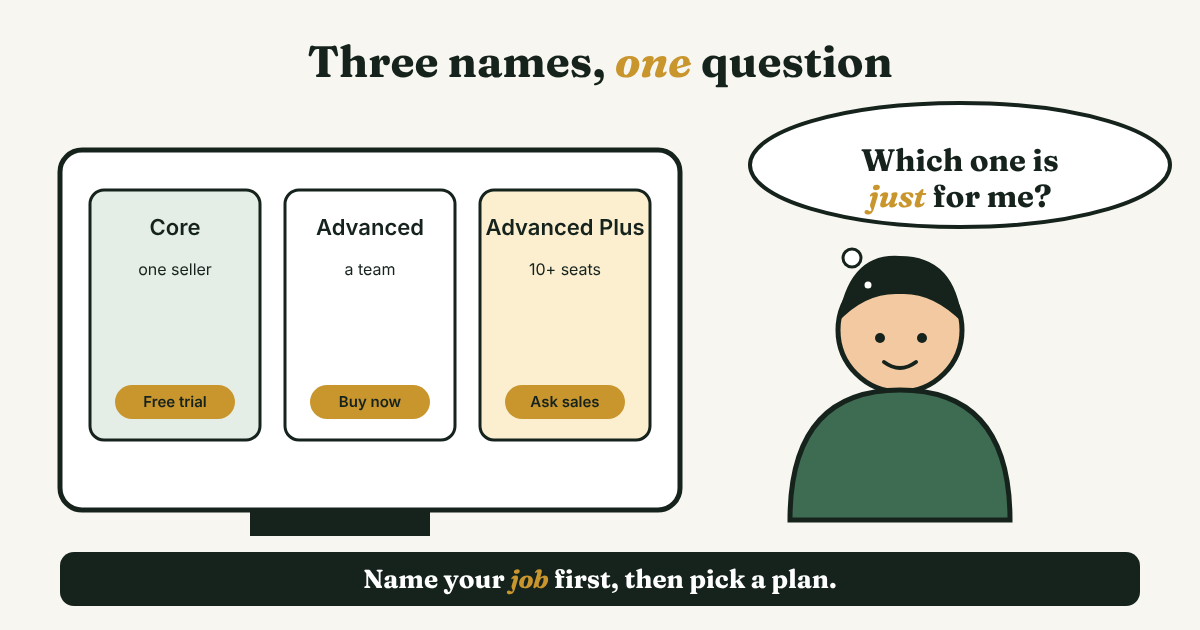
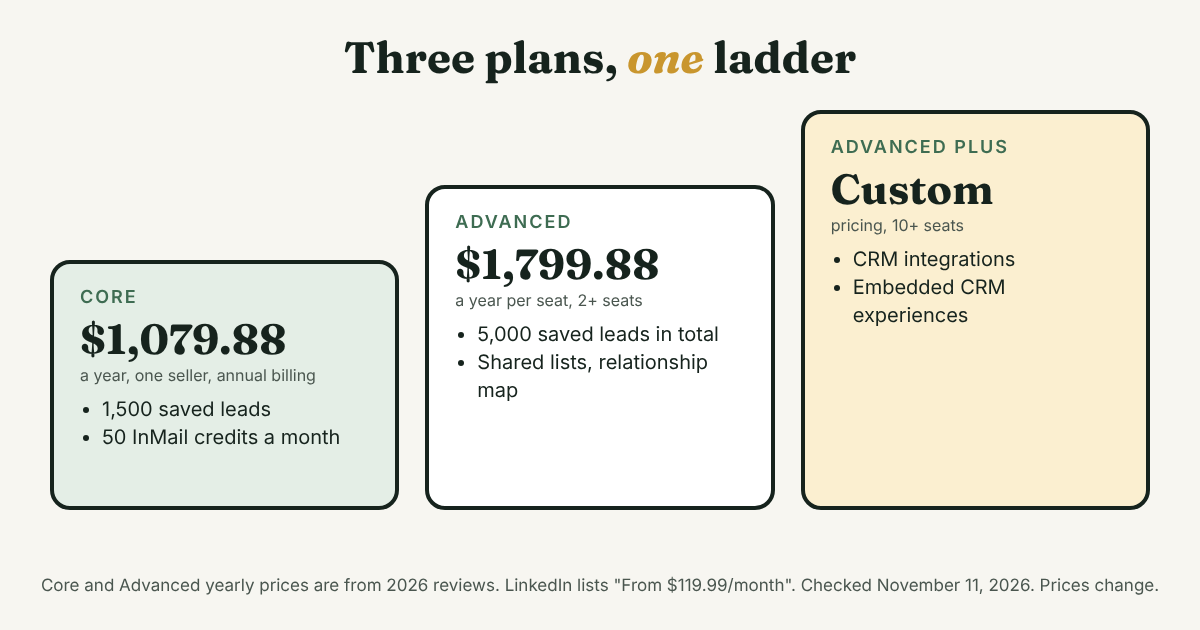
- Core. For one seller, with one seat. LinkedIn's trial page lists 1,500 saved leads and 50 InMail credits a month. Salesforce's guide calls Core "best for individual sales professionals."
- Advanced. For teams of two or more. LinkedIn's trial page lists 5,000 saved leads in total. LinkedIn's comparison page lists shared lists, a relationship map and unified billing for it.
- Advanced Plus. For teams of 10 or more. LinkedIn's page says "Advanced CRM Integrations is an Advanced Plus plan feature." ZoomInfo's 2026 breakdown says Advanced Plus has custom pricing.
Two details trip people up.
CRM sync. LinkedIn's comparison table shows CRM sales integrations in the Advanced column, then adds a footnote that the same feature is "Available only on Advanced Plus." Salesforce's guide says basic sync starts at Advanced. That's three pages and two answers. If CRM sync is why you're buying, ask LinkedIn and your CRM's vendor in writing which plan you need. The common mistake is to buy Core and expect it to talk to a CRM. If you're not sure you need one at all, should you use a CRM for LinkedIn follow-ups gives four questions that settle it.
The free trial. LinkedIn's comparison page says "only one free trial is allowed every 365 days." The pages we read don't state the trial length, so look at the length shown when you sign up. That one-a-year limit is why the trial section below starts before you click anything.
What does it cost for a year?
LinkedIn's comparison page lists Sales Navigator "From $119.99/month." A footnote says prices are estimates, may leave out tax and promotions, and can change. The page doesn't name which plan the $119.99 belongs to, and it gives no yearly price. Reviews published in 2026 fill in the rest:
- Core: $119.99 a month, or $1,079.88 a year on annual billing, per SyncGTM (updated September 30, 2026) and Cleanlist (updated September 14, 2026). Both sell competing data tools. $1,079.88 divided by 12 is $89.99 a month.
- Advanced: $159.99 a month for two seats or more, per ZoomInfo (August 2026), or $1,799.88 a year per seat on annual billing, per SyncGTM and Cleanlist.
- Advanced Plus: custom pricing, per ZoomInfo, for 10 or more seats. Forrester's 2023 study assumed $1,250 per user per year for it. That number is three years old.
Prices drift, so don't trust any single article, this one included. Salesforce's guide from January 2025 lists Core at $109.99 and Advanced at $169.99 a month. A 2026 review from LeadHunter, which sells a rival tool, lists Core at $99.99.
For scale, LinkedIn's cheaper plans on the same comparison page are Premium Business "From $69.99/month" with 15 InMail credits, and Premium All-in-One "From $89.99/month" with 30.
One more way to read the price: Core's $119.99 a month divided by its 50 InMail credits is $2.40 a credit if you use every one. That number only matters if InMail is why you're buying. ZoomInfo says unused credits roll over for up to 90 days, with a cap of 150, and that you can't buy more.
What do LinkedIn's results numbers actually measure?
LinkedIn's pages carry big numbers. Each one has an owner and a limit, and the limit matters more than the number.
- "+15% more pipeline," "+17% higher win-rate," "+42% larger deal sizes." LinkedIn's trial page says these "are based on the average results of a LinkedIn study across 600+ customers." LinkedIn ran the study, the page names no outside group, and it shows no date. It can't tell you what changes for you.
- "Paid for itself in less than 6 months." This comes from a Forrester Total Economic Impact study from October 2023, "commissioned by LinkedIn." Forrester interviewed nine customers, and LinkedIn supplied their names. It modeled one company: a software vendor with 250 Sales Navigator users and $250 million in revenue, on Advanced Plus. It reports a 312% return over three years. That is a model of a big team, not of one seller on Core.
- "5x more connections to Director+ leaders" and "up to 11.9x" response rates. The page cites "LinkedIn data" from October 2025 and March 2026. It doesn't say how users were compared with non-users.
- Capterra's reviews. Capterra shows 4.6 out of 5 from 179 reviews, updated September 28, 2026. The reviews it shows first are sorted by "Most Helpful," so they lean positive. The complaints are specific: one reviewer calls it "Not worth the price," another says data "can occasionally be stale," and a third says they "can only see the first 100 pages" of a search with "4k+ people."
No source we read measured the results of a single seller on Core. Treat the numbers as LinkedIn's case for the product. Your own two-week test, described below, is the evidence that counts for you.
Where does Sales Navigator stop?
These gaps come up across the sources we read. Three of them sell competing tools, so weigh their wording. The gaps do match what LinkedIn's own pages leave out.
- It finds people. It doesn't give you their email or phone. SyncGTM says it is "not enough as a standalone prospecting tool." Cleanlist lists "Zero contact data export." ZoomInfo says there is no CSV or XLS export.
- Your saved leads live inside LinkedIn. If there's no export, the reason you wrote to each person lives only in LinkedIn too. Keep your own copy of who, why, last message and next date.
- It doesn't automate anything. LeadHunter's guide lists "Doesn't include automation" as a drawback. For a manual seller, that's a feature. The case against automating is in why to avoid automating LinkedIn activities.
- It can be slow to learn. One Capterra reviewer says the platform "occasionally has a steep learning curve for newcomers."
One more check before you pay is whether free search is really stopping you. A 2019 guide from CrankWheel says LinkedIn limits how many searches a free account can run each day, and that the limit resets at midnight Pacific time. LinkedIn's own help pages blocked our fetch tool, so we can't confirm today's rule. Run a few searches on your free account and see whether LinkedIn tells you that you've reached a limit.
Should you buy it? Do this math first
Use one number: what a first sale is worth to you in profit. Divide the yearly price by it.
Yearly price ÷ profit from one first sale = extra sales you need to cover the year.
Tomás (an example, not a real person) earns about $2,400 in first-year profit from a new clinic. Core on annual billing is $1,079.88. $1,079.88 ÷ $2,400 is 0.45, so one extra clinic covers the year with room to spare.
Hana (an example, not a real person) is a freelance designer. A logo project earns her about $300 in profit. $1,079.88 ÷ $300 is 3.6, so she needs four extra projects, from a tool that promises none.
Both sums are arithmetic, not a forecast. Sales Navigator finds people. It doesn't write to them or make them reply. LeadHunter, which sells a $49 rival, says to skip Sales Navigator if your average deal is under $5,000. Hana's numbers show why a flat rule like that is too blunt. Use your own number.
Then answer five questions before you open the trial:
- Can you name three searches you tried and could not run on free LinkedIn? If not, your wall isn't search.
- How many new people will you really write to each week? If it's five, 50 InMail credits a month is more than you'll use.
- Do you need CRM sync? If yes, ask which plan includes it.
- Do you know your cancel date before you start? Write it down first.
- What will you do with each person you save? A saved lead isn't a follow-up. Tomás already knows 40 clinic owners and talks to six. Better search would not change that.
For the step before search, deciding who is worth a message, see LinkedIn prospecting: decide who is worth a message first.
How do you use the one free trial well?
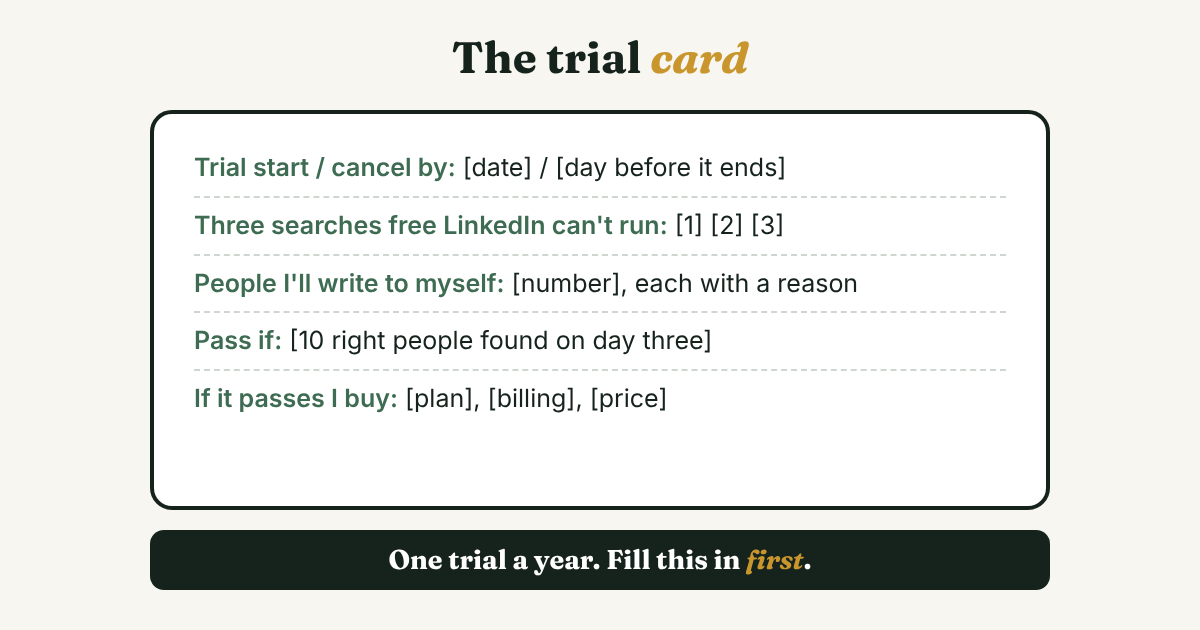
You get one trial a year, so don't spend it clicking around. Fill in this card first. Copy it into a note and replace the [brackets].
Trial start: [date]. Cancel by: [the day before the trial ends].
Searches I could not run on free LinkedIn: [search 1], [search 2], [search 3].
People I will save and write to: [number], each with a reason for writing.
Pass if: [for example, I find 10 right people on day three that free search never showed me].
If it passes, I buy: [plan], [monthly or annual], at [price]. If not, I cancel on [date].
Then run the trial in this order. Scale the days to the trial length LinkedIn shows you at sign-up.
- Day one: put the cancel date in your calendar. Do it before anything else.
- First few days: run your three searches. Save only people you'd write to this month.
- Middle of the trial: write each message yourself, one at a time. For each person, record who they are, why you're writing and the next date, in a list you own.
- Last two days: count. How many right people did you find that free search missed? Compare it with your pass rule and decide.
If you're weighing other tools next to this one, LinkedIn prospecting tools: pick by the job, not the rank shows a $0 setup and a two-week test for any tool.
What stays your job after you buy?
Everything that makes a message work. Sales Navigator helps you find people and keeps them in a list. You still decide who deserves a message, write it, send it, and follow up when nobody answers. Skip any add-on that sends or clicks for you.
Full disclosure: we make GrowthSeeded, a simple follow-up tracker for LinkedIn, so we are biased. It doesn't find people, so it's not a rival to Sales Navigator. It tells you who to message each day, so you don't forget to follow up. If search is your wall, Sales Navigator is built for that. If your wall is the people you already found, how GrowthSeeded helps track LinkedIn follow-ups shows what it does and what it doesn't.
FAQ
Is LinkedIn Sales Solutions the same as Sales Navigator?
Almost. Sales Solutions is the name on LinkedIn's sales pages, and Sales Navigator is the paid product on them. It comes in three plans: Core, Advanced and Advanced Plus.
How much does LinkedIn Sales Navigator cost?
LinkedIn lists "From $119.99/month." Two 2026 reviews list Core at $1,079.88 a year on annual billing and Advanced at $159.99 a month or $1,799.88 a year. Advanced Plus has custom pricing. Prices were checked November 11, 2026, and they change.
What is the difference between LinkedIn Premium and Sales Navigator?
LinkedIn's comparison page lists Premium Business from $69.99 a month with 15 InMail credits and limited search filters, and Premium All-in-One from $89.99 with 30 credits. Sales Navigator starts at $119.99 with 50 credits and 50+ search filters.
Does Sales Navigator connect to my CRM?
LinkedIn says advanced CRM integrations are an Advanced Plus feature, and lists HubSpot Smart CRM, Oracle Sales, Microsoft Dynamics 365 and Salesforce. Salesforce's own guide says basic sync starts at Advanced. Ask before you pay.
Does Sales Navigator send messages for me?
No. It gives you a monthly allowance of InMail credits, and you send each message yourself. LeadHunter's guide lists the lack of automation as a drawback, and for a manual seller it's a feature.
Do I need Sales Navigator to sell on LinkedIn?
No. A free account can search, and the $0 setup in the tools guide linked above covers every job. Pay only if a test shows a limit you keep hitting.
Can I get email addresses from Sales Navigator?
Not from an export. ZoomInfo says there's no CSV or XLS export, and Cleanlist and SyncGTM say it gives no contact data. All three sell tools that do, so check the plan page for what you'd get.
Do this today
- Write down one number: your profit from a first sale. Divide $1,079.88 by it.
- Write three searches that free LinkedIn can't run for you. If you can't name three, skip the trial for now.
- If you do start the trial, fill in the card above and set your cancel date before you click Start.
If your list looks like Tomás's, 40 names and six conversations, GrowthSeeded is a simple follow-up tracker for LinkedIn. Add a person and why they matter, and it shows who to message today. You send every message yourself, it never touches LinkedIn, and the Free plan holds 5 active people at a time.
Sources
- LinkedIn Sales Navigator vs. Premium, LinkedIn, updated August 1, 2026
- Sales Navigator, LinkedIn, updated September 29, 2026
- Sales Navigator free trial, LinkedIn, checked 2026
- The Total Economic Impact of LinkedIn Sales Navigator, Forrester Consulting, commissioned by LinkedIn, October 2023
- What is LinkedIn Sales Navigator & How Does it Work?, Salesforce, January 2025
- LinkedIn Sales Navigator Features: Full Breakdown [2026], ZoomInfo, August 2026
- LinkedIn Sales Navigator Review 2026, SyncGTM, updated September 30, 2026
- LinkedIn Sales Navigator Review 2026, Cleanlist, updated September 14, 2026
- LinkedIn Sales Navigator Reviews 2026, Capterra, updated September 28, 2026
- Is LinkedIn Sales Navigator Worth It in 2026?, DEV Community, by the LeadHunter team, 2026
- How to get around LinkedIn's Commercial Use Limits, CrankWheel, 2019
About the author
Anisur Rahman Fagun is a marketing and content strategist with more than 9 years of experience in SEO, content, paid advertising and brand growth. He holds a master's degree in mass communication and journalism, and has led content and SEO strategy, built editorial teams and worked with product, design and sales teams. He also builds simple tools that turn marketing data into clear decisions. He writes the GrowthSeeded blog, which shares practical ways to build professional relationships on LinkedIn.