Networking
How to Find Decision Makers on LinkedIn: Titles Are Only Clues
17 min read
Key takeaways
- A decision maker is rarely one person. 6sense's 2024 report release puts the average B2B buying group at 11 people, though it does not say how it counted. Look for three roles: who feels the problem, who owns the area and who approves the money.
- A title is a clue, not proof. Mailshake, a sales software vendor, warns that the person with the power to decide is sometimes not the one with the top title.
- Titles follow the job and the company size. In a team of 20, try the owner and the manager of the area. In a large company, start a layer or two below the top and expect finance, legal or procurement to join.
- Read each profile for the work the person says they run, who their team reports to, and what they post about. Two clues together beat a good title alone.
- When the clues disagree, ask one person one short question: who else is involved in this? You write that message yourself, to one person at a time.
Short answer: Search the company for the job that owns your problem, then read each profile for who runs the work and who controls the money. A title is a clue, not proof. If the clues disagree, ask one person who else is involved in the decision, and write that message yourself.
In this article
Who is the decision maker, and why is it never one person?
Which titles should you try first?
What does a worked example look like?
Which clues show who really decides?
How do you ask one person who decides?
What about the CEO, gatekeepers and hidden buyers?
What can a free search do, and when does Sales Navigator help?
How many people at one company should you write to?
Where does a simple follow-up tracker fit?
FAQ
Do this today
Who is the decision maker, and why is it never one person?
Eleven. That is the average size of a B2B buying group, according to the 6sense 2024 Buyer Experience Report release. The release does not say how the group was counted or how many companies were asked, so treat it as a sign, not a rule. LinkedIn's own Sales Navigator page on buying committees says committees are usually around 6 to 10 people and can reach 20, with no source given. The Starr Conspiracy, a B2B marketing agency, wrote in October 2026 that people should stop quoting six to 10 as current. The three disagree on the number and agree on the point: more than one person has a say.
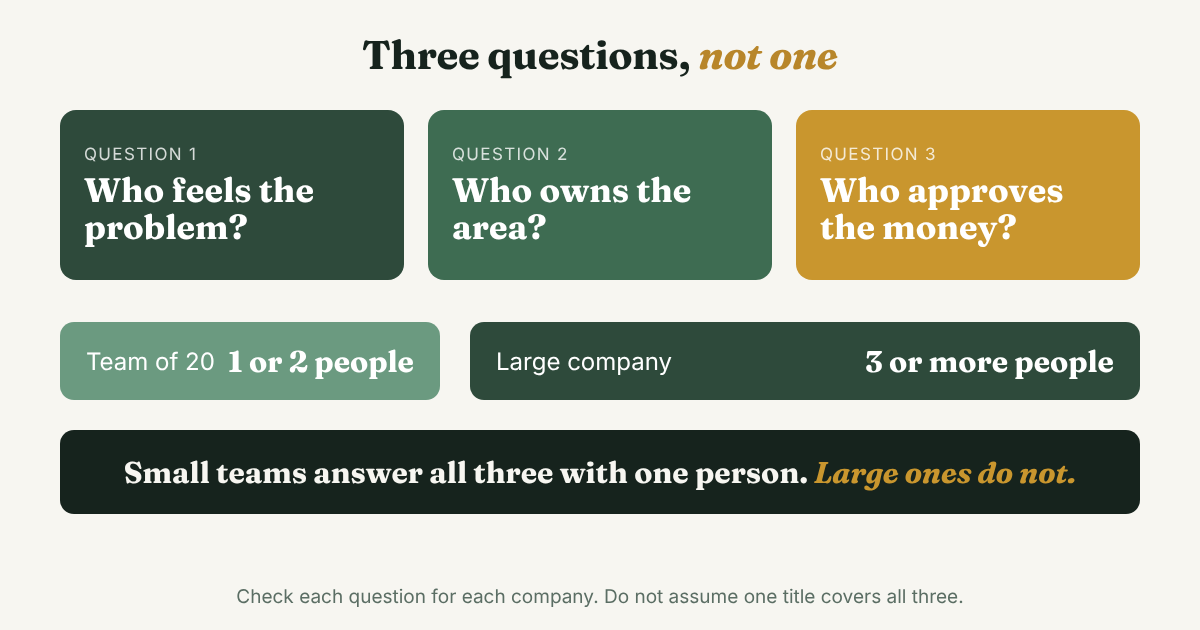
LinkedIn's page names four roles. The champion pushes for the new thing. The financial buyer controls the budget and approves the purchase. The technical buyer checks that it fits. The user works with it every day. That makes "who is the decision maker?" three smaller questions you can answer one at a time: who feels the problem, who owns the area, and who can approve the money.
In a small company, one person can wear all three hats. Mailshake says a startup with 20 employees likely has only one or two decision makers, and a company with 1,000 or more has more. In a large company, three hats are usually three people. Your search is different in each case, and the next section shows how.
There is one more reason to care. The same 6sense release says buyers are nearly 70 percent through their purchase before they talk to a seller, and that they start the first contact more than 80 percent of the time. A message to the right person may reach someone who has already started looking. So ask where they are. Do not open with a pitch.
If you are still choosing how to look for a person at all, the guide to finding people on LinkedIn matches each clue you have to a place to look. This post starts after that: you know the company, and you need to know who decides.
Which titles should you try first?
Titles follow the job. Start with the function that owns your problem, not with the word "decision maker." In Founding Sales, an early-stage sales handbook, Pete Kazanjy gives examples on Holloway (updated 2022): for a recruiting tool, think VP of Talent, Director of Recruiting or Recruiting Manager. For a sales tool, think VP of Sales, CRO or Sales Operations. He also says stage matters, because an early company is less likely to have a Sales Operations Manager, and the work may sit with the VP of Sales. He calls the method cascading points of contact: write down every plausible title, then narrow. The advice is four years old and the idea still holds.
Write three titles before you search. One title near the work, one that manages it, one with budget. For a scheduling tool sold to restaurant groups that could be General Manager, Director of Operations and Owner.
Size changes who sits at the top of that list. Use these as starting points, then test them against what you see.
- About 1 to 20 people. Try the owner or founder and the one manager who runs the area. Belkins, a lead-generation agency, says that in smaller companies (under 200 employees in its study), even when a functional lead champions a vendor, the CEO keeps final approval.
- Roughly 200 to 1,000 people. Belkins says mid-market CEOs "don't evaluate vendors directly" and that their role is closer to final approval. Try the VP or Director who owns the function first.
- 1,000 people or more. Belkins says buying decisions at this size sit two to three layers below the C-suite. That is the agency's view, not a measurement. Try a Director or senior manager in the function, and expect finance, legal or IT security to get involved. Belkins says those groups can kill a deal and rarely champion one.
Belkins also published numbers, and they are worth reading with care. In its 2026 buying committee study, companies filling in a form to hire Belkins listed 4.6 decision-maker titles on average if they had under 200 employees, 5.6 if they had 200 to 1,000, and 6.0 if they had more. The sample was 1,871 forms from January 2024 to February 2026. The CTO was the most named title at every size, from 65.4 percent to 77.1 percent. Belkins itself says the titles show "intended targeting, not necessarily successful outcomes." They show who vendors want to reach, not who signs. Use them to see that groups grow with company size, and stop there.
If you have sold before, use your own history. LinkedIn's sales blog (a 2018 post, so the idea is the lasting part) tells sellers to look at their last 20 closed deals and note the decision maker's job title, the company size, the industry and how long the person had held the role. Your own wins beat any list in this post. Put those five facts in a note and search for more of that person.
What does a worked example look like?
Kofi (an example, not a real person) sells shift-scheduling software to restaurant groups with 3 to 12 locations. He has picked Juniper Kitchen Group, a made-up company with seven restaurants. The numbers below are invented to show the steps. Yours will differ.
Minute 0, write the question. "Who decides how shifts get scheduled, and who can say yes to paying for software?" His three titles: General Manager (near the work), Director of Operations (manages it), Owner (budget).
Minute 3, search. He opens the company page, clicks People and types "operations" into the keyword box. Nine people come up. Owner. Director of Operations. Two regional managers. A controller. An HR manager. Three general managers.
Minute 8, read three profiles. He opens three and writes one line for each.
- Director of Operations. The role description says "I run day-to-day operations for all seven restaurants, from labor cost to openings." Labor cost is the budget his product touches. Strong clue.
- Controller. The title is about money, but the profile talks about month-end close and nothing about staffing. Weak clue for his problem.
- Owner. Posts twice a year, mostly about new locations. Final say, probably, and likely busy. Keep for later.
Minute 14, check the reporting line. The group's careers page has a Regional Manager opening that "reports to the Director of Operations." Now he has a second clue that points the same way: the Director of Operations owns the area.
Minute 17, decide. The Director of Operations is his likely owner. A regional manager is closest to the work. He will not write to the Owner. He writes one line on his decider card (below), opens a note to one regional manager, and closes the tab.
Copy this card and fill it in for each company. It takes about two minutes per name.
Company: [name, size] · Problem I help with: [one sentence] · Feels the problem: [name, title, clue] · Owns the area: [name, title, clue] · Approves the money: [name, title, or "not sure"] · Clues that agree: [role description, reporting line, post, job post] · Who I will ask first: [name] · Asked on: [date]
For Kofi: Juniper Kitchen Group, 7 restaurants · Problem: shift swaps and last-minute gaps · Feels it: regional managers · Owns it: the Director of Operations (role description says labor cost; job post reports to this role) · Approves the money: not sure, maybe the Owner · Clues that agree: 2 · Ask first: a regional manager · Asked on: Nov 16.
Which clues show who really decides?
A title tells you where a person sits. It does not tell you what they control. Surfe, a sales data vendor, says in a November 2025 guide that job titles do not always reflect actual position, and suggests reading role descriptions, reporting lines and team scope to judge influence. Mailshake puts it more bluntly: hunting purely for titles loses you chances.
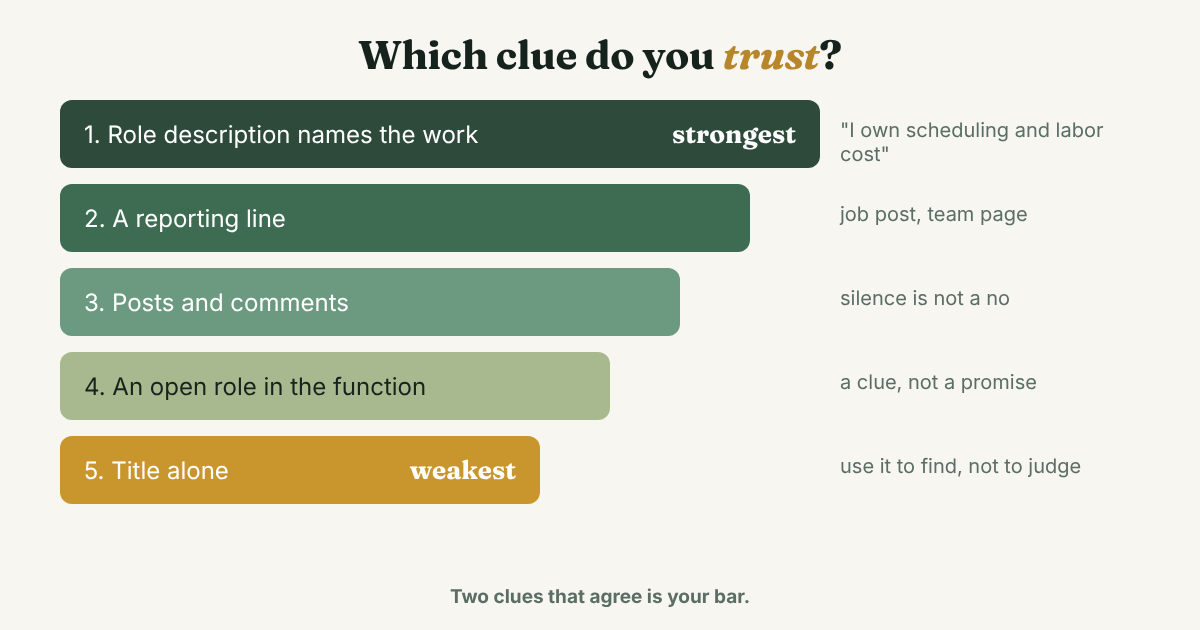
Rank what you see from strongest to weakest.
- The person describes the work you care about. "I own scheduling and labor cost for seven restaurants" beats "Director." The words that matter are own, lead, run, budget and responsible for.
- A reporting line. A job post, a team page or a profile that says who someone reports to. This shows the layers, which matters most in a company of 1,000 or more.
- What the person posts and comments on. Someone who writes about your problem has already thought about it. Someone who never posts tells you nothing, so do not read silence as a no.
- Where the team is growing. An open role in the function means the area has budget now. It is a clue, not a promise.
- The title alone. Use it to find the person, not to judge them.
Two clues that agree is your bar. One strong clue and a title is enough to write a careful first message, but not enough to say "you are the person who decides." Never write that line.
Holloway adds a warning for sellers who find a user. A data scientist or a rep using a tool at the company "doesn't necessarily mean" they are the right point of contact. Users are valuable, because they feel the problem. They are just not always the buyer. That is why the next step is a question, not a pitch.
How do you ask one person who decides?
This is the step most guides skip. When the clues disagree, or you cannot tell, ask. Mailshake lists questions worth asking once you are talking: "Who else is involved in this decision?" and "What needs to happen for this purchase to be completely approved?" You do not need to ask them on the first message. First you need one person who will answer.
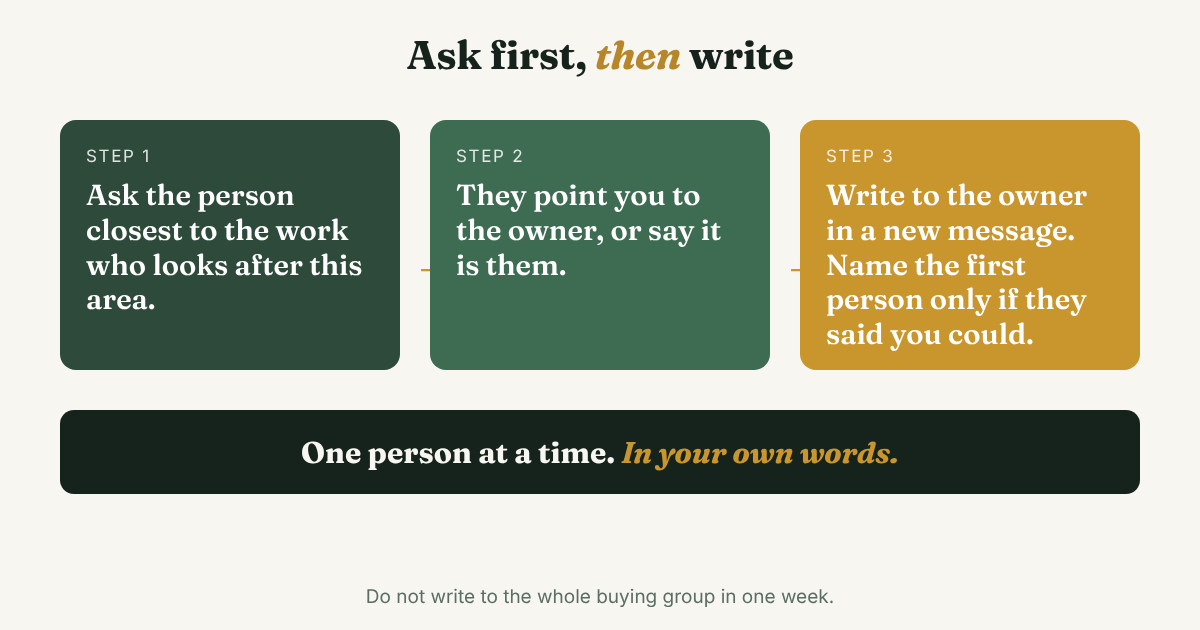
Ask the person closest to the work. They feel the problem, so they often know who owns it. Keep it short, make it easy to say "not me," and make it about their work.
Hi [Name], I saw you run scheduling for [Company]'s [number] locations. I'm looking into how groups your size handle [problem in plain words]. Are you the right person to ask, or is someone else on your team closer to it? Either answer helps.
Ask a mutual connection. If you share a link, this is often better than anything else. Ask them, not the decision maker.
Hi [Name], I'm trying to find who looks after [area] at [Company]. You know them better than I do. Who would you ask first?
Ask the likely owner, with a way out. Use it when two clues agree and you have no mutual connection.
Hi [Name], I read that you lead [area] at [Company]. I work on [one plain sentence about your offer]. Is this something you look after, or should I talk to someone else?
Three rules for all of them. Write each one yourself and change a line that fits the person. Send one at a time. If nobody answers, wait before you try the next person at the same company. If someone says "talk to X," thank them and write to X in a new message, with the first person's name only if they said you could use it.
For the first note to someone who is not yet a connection, the notes for a stranger's connection request show what to put in the first few lines.
What about the CEO, gatekeepers and hidden buyers?
The CEO. Holloway says CEOs often have an assistant who triages email. Belkins says mid-market CEOs rarely do hands-on vendor research, and that enterprise sellers who chase the CEO are solving the wrong problem. Those are opinions from people who sell. The practical read: in a team of 20, write to the owner. In a larger company, start nearer the work, and let the owner come in at approval.
Gatekeepers. An assistant, an office manager or a coordinator may control who gets through. Be polite and plain. Mailshake suggests asking "who would be the best person to talk to" instead of a general question.
Hidden buyers. LinkedIn's Ty Heath, speaking at B2BMX in 2026 and reported by Demand Gen Report, said hidden buyers, often in finance, legal or procurement, can make or break a deal. You will not find them by searching a function. You find them by asking, "What needs to happen for this to be approved?" once a conversation has started. The answer often names them.
What can a free search do, and when does Sales Navigator help?
The example above uses three screens: the company page, its People tab and the profiles. Check what your account shows, because menus change and LinkedIn's own help pages would not open for our tools. The sources we read disagree on which filters need a paid plan. Folk's June 2026 guide says to open a company page's People tab and filter by seniority, and does not say which plan that needs. Surfe says Sales Navigator adds filters for seniority, function and job changes. LinkedIn's 2018 sales post lists job title, company type and size, and a keyword as Sales Navigator filters.
If a title has three wordings, put them in one search with capital OR, as the Boolean search guide shows. If you search for decision makers every week and the free filters are not enough, the post on what LinkedIn Sales Solution gives you and who needs it compares the plans. Do not buy it to find one person.
Skip any tool that scrapes profiles or sends bulk messages to a list of titles. It adds account risk and does nothing for the step that matters: reading the clues and asking one person.
How many people at one company should you write to?
Fewer than the buying group. You do not need to reach all 11. You need one person who answers, and the next person they point to.
Open ten profiles at most. Pick one person for each of two roles. Write to the one who is closest to the work first. If they point you to the owner, write to the owner next. The guide to LinkedIn for B2B sales covers how to reach several people at one company without doubling up, and LinkedIn prospecting covers how to decide who is worth a message at all.
A short list makes follow-ups easier too. Three names with a reason each are easy to remember. Eleven are not.
Where does a simple follow-up tracker fit?
Full disclosure: we make GrowthSeeded, a simple follow-up tracker for LinkedIn. It does not find decision makers or read company pages. Once you have your two or three names and the clue behind each, it keeps each person with your reason, and each day it tells you who to message, so you don't forget to follow up. You send every message yourself. A notebook or a spreadsheet works too for three people. It gets harder when the answers start coming in on different days.
FAQ
How do I find the decision maker at a company on LinkedIn?
Search the company, open the People tab and look for the job that owns your problem. Read each profile for the work the person says they run and who they report to. If you are not sure, ask one person who else is involved.
Is the CEO always the decision maker?
No. In a team of about 20, the owner or CEO often decides. In a larger company, Belkins says the CEO is more often the final approver, while a VP or Director does the hands-on work. Both are the agency's view, so check against your own deals.
How many decision makers are there in a B2B purchase?
6sense's 2024 release says the average buying group has 11 people. LinkedIn says committees are usually 6 to 10 and can reach 20. Neither shows its method in the pages we read, so treat both as a sign that more than one person has a say.
Can I find decision makers on a free LinkedIn account?
For the basics, yes: a company search, its People tab and reading profiles are where every guide we read starts. What you see varies by account, and the sources disagree on which filters, such as seniority, need a paid plan, so check All filters on your own screen.
What if I find the wrong person?
Ask. A short message that says "are you the right person, or should I talk to someone else?" gives them an easy way to point you on. Most of what you need is one name.
Do this today
- Pick one company and write three titles: one near the work, one that manages it, one with budget.
- Read three profiles and write one line for each with the clue behind it. Keep the two that agree.
- Send one short message from this post to the person closest to the work, and write the date on your card.
Picked two or three names at a company? Add them to GrowthSeeded, a simple follow-up tracker for LinkedIn, with the clue that made you pick each one. It tells you who to message each day, so you don't forget to follow up. You send every message yourself, and it never connects to your LinkedIn account. The Free plan holds 5 active people at a time.
Sources
- What Is a Buying Committee? Key Roles, Dynamics, and B2B Sales Strategies, LinkedIn Sales Navigator, 2025
- How to Identify Pivotal B2B Decision Makers on LinkedIn, LinkedIn Sales Solutions blog, 2018
- 6sense Launches 2024 Buyer Experience Report Unveiling Global B2B Buyer Trends, 6sense via Business Wire, October 2024
- B2B Buying Committee Study: Which Titles Actually Matter in 2026, Belkins, May 2026
- LinkedIn's Ty Heath on B2B Marketers Solving Buyability: Lessons from B2BMX 2026, Demand Gen Report, May 2026
- Point of Contact Discovery, from Founding Sales, Holloway, updated August 2022
- How to Identify the Decision Maker in a Company + Qualifying Questions, Mailshake, 2026
- B2B Buying Committee Benchmarks, The Starr Conspiracy, October 2026
- How To Find And Reach B2B Decision-Makers, Surfe, November 2025
- Master LinkedIn People Search: Find Key Decision-Makers, folk, June 2026
About the author
Anisur Rahman Fagun is a marketing and content strategist with more than 9 years of experience in SEO, content, paid advertising and brand growth. He holds a master's degree in mass communication and journalism, and has led content and SEO strategy, built editorial teams and worked with product, design and sales teams. He also builds simple tools that turn marketing data into clear decisions. He writes the GrowthSeeded blog, which shares practical ways to build professional relationships on LinkedIn.