Networking
How to Find Employees of a Company on LinkedIn: Pick Roles First
16 min read
Key takeaways
- Pick two or three roles before you open the company page. A list of 600 names helps nobody, but a short role card tells you when to stop.
- The People tab on a company page can be filtered by location, role, skills, school and connection degree, according to Boston University's career office (2026). Add one filter at a time and read the list after each.
- Employee lists come from what members type on their own profiles. Business of Business compared 2017 company filings with LinkedIn profile counts and found gaps in both directions: about 196,500 more IBM profiles than IBM employees, and far fewer Capgemini profiles than employees.
- Check a name on three signals before you write: when the current job started, a recent post or mention, and a second place that confirms the person works there.
- Keep it by hand and keep it small. Open ten profiles at most, pick three people, and write down why you picked each one.
Short answer: Search the company, open its page and click People. Filter by location and role, then read the top results. Choose two or three roles first and one or two people per role. Profiles go stale, so check the job start date and one sign of recent activity before you write.
In this article
Who do you actually want to reach at this company?
Where is the employee list, and what can you filter?
What does a worked example look like, start to finish?
How do you pick two or three roles?
Why does the list look wrong, and how do you check a name?
What if the person you want is not on the list?
How many people should you open, and when do you stop?
What do you do with the three names?
FAQ
Do this today
Who do you actually want to reach at this company?
Lena (an example, not a real person) sells appointment-reminder software to veterinary clinic groups. On Monday she opens the page for Harbor Vet Group, a made-up company, and clicks People. The page lists 640 names. By the third scroll she has a vet tech, a recruiter and a regional manager open in three tabs, and no idea which of them she is supposed to write to.
The page is not the problem. It lists everyone who says they work there, and it cannot know why you came. The work is deciding who you want before you look. When you know that, the list gets short fast.
If you are still choosing between methods, the guide to finding people on LinkedIn matches each clue to a place to look. This post covers one case: you know the company, and you need the right two or three people inside it.
Before you open LinkedIn, copy this role card into a note and fill it in. It takes three minutes.
Company: [name] · Why I am writing: [one sentence] · Role 1: [the job that does the work I care about] · Role 2: [the job that manages it] · Role 3, nearest to me: [shared school, same city, or a 2nd-degree link] · Stop after: [3 people or 20 minutes]
Role 3 is easy to skip. A shared school or a mutual connection gives the person a reason to answer you. Boston University's career office builds its advice on company pages around alumni, as the next section shows.
Where is the employee list, and what can you filter?
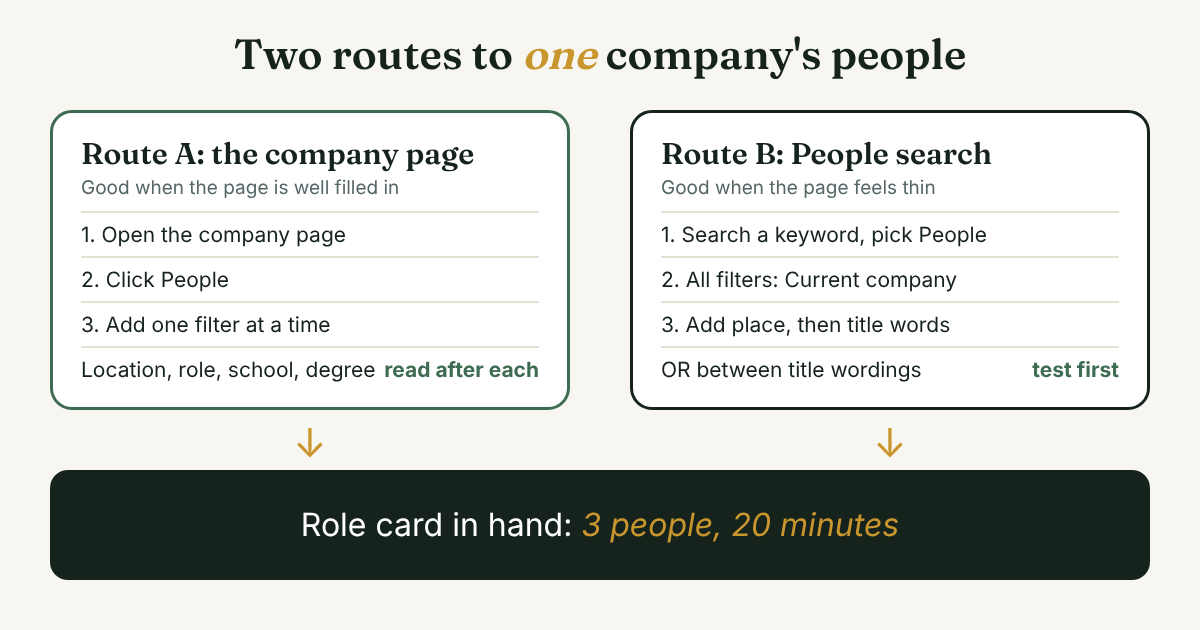
There are two routes. Both end at the same place, a filtered list of people who say they work at one company.
Route A: the company page.
- Type the company name in the search bar and open the company page, not a person's profile.
- Click the People tab.
- Add one filter, read the list, then add the next. Boston University's Center for Career Development, in a March 2026 guide updated in October 2026, lists these filters on the People tab: geographic location, alma mater, role, skills, program of study, and connection degree (1st, 2nd or 3rd).
Route B: People search with a company filter. Search any keyword, choose People, open All filters and set Current company. Linked API, a vendor guide verified in October 2026, lists the free filters as connection degree, locations, current company, past company, school, industry and keywords. Use this route when the company page feels thin, or when you want to add a title keyword at the same time.
Vendor guides agree on one thing: filters beat keywords alone. Valley, a prospecting-software vendor, warns that relying on keywords without filters "returns cluttered, irrelevant results." So set the company first, then the place, then the role.
There is an older third route. LinkedIn's own January 2017 post on its search described a company: operator that finds members by current company, next to title: and school:. It is nine years old, so test it on a company you know before you rely on it. The Boolean search guide covers what works today and the capital-letter rule for AND, OR and NOT.
Two limits matter here. SocialRails, a vendor guide updated in July 2026, says LinkedIn does not publish how many searches or profile views a free account gets each month, and that the quota resets at the start of the month. Linked API says a free account shows up to 250 results per search and that result counts are estimates. LinkedIn's own help pages would not open for our tools, so check what your screen shows, because menus change. The practical point holds either way: narrow the list before you scroll it.
What does a worked example look like, start to finish?
Back to Lena. Her role card says: Role 1: practice manager (the person who runs a clinic day to day). Role 2: client care lead (the person who handles reminders and no-shows). Role 3: anyone I share a link with. Stop after: 3 people or 20 minutes. The numbers below are made up to show the steps. Your counts will differ.
Minute 0, company page, People tab. 640 names. Far too many.
Minute 2, add Location: Ohio. Her first clinics are in Ohio. The list drops to 118.
Minute 4, add the role. She types "practice manager" and gets 14 people. She reads the headlines. Five say practice manager. Three say "hospital administrator", which is the same job at a larger clinic. Two say "clinic manager." Four are something else. This is the part that surprises people: the job has three titles. The Job Search School, a career-coaching site, makes the same point: job titles vary by company, so you may need to get creative when you search by title. Lena keeps all ten, not only the exact match.
Minute 8, check two candidates. She opens two practice managers.
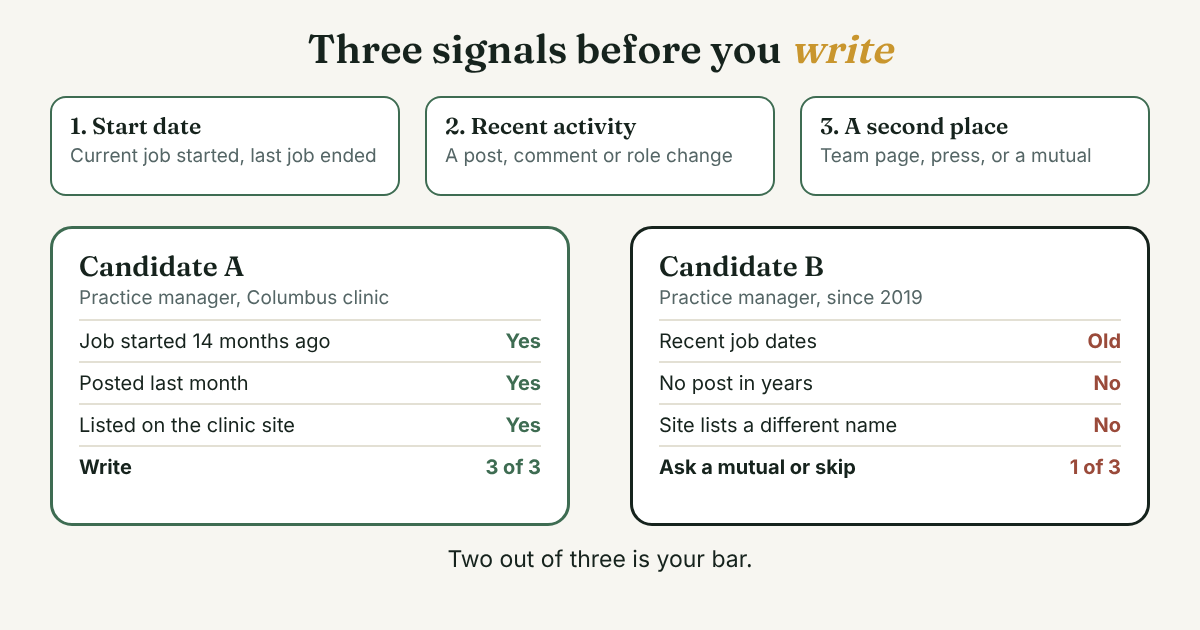
- Candidate A. Practice manager at the Columbus clinic. Current job started 14 months ago. Posted last month about a clinic opening. The company's website lists the Columbus clinic. Three signals, all good.
- Candidate B. Practice manager since 2019. No post in years, no photo, and the company website lists a different name for that clinic. One signal, and it is old.
She keeps A and drops B. She does not message B "just in case."
Minute 12, Role 2. She clears the title, types "client care" and gets 9 people. One is a client care lead at a clinic she already knows. She runs the same three checks and keeps her.
Minute 16, Role 3. She sets the connection filter to 2nd and finds an operations coordinator who is connected to a former coworker of hers. That is her third person. The first message goes to the coworker, asking whether the coordinator is the right contact.
Minute 19, log. She writes one line per person, in the format at the end of this post, and closes the tab. She has three names from 640, after opening about ten profiles. She has not written to anyone yet.
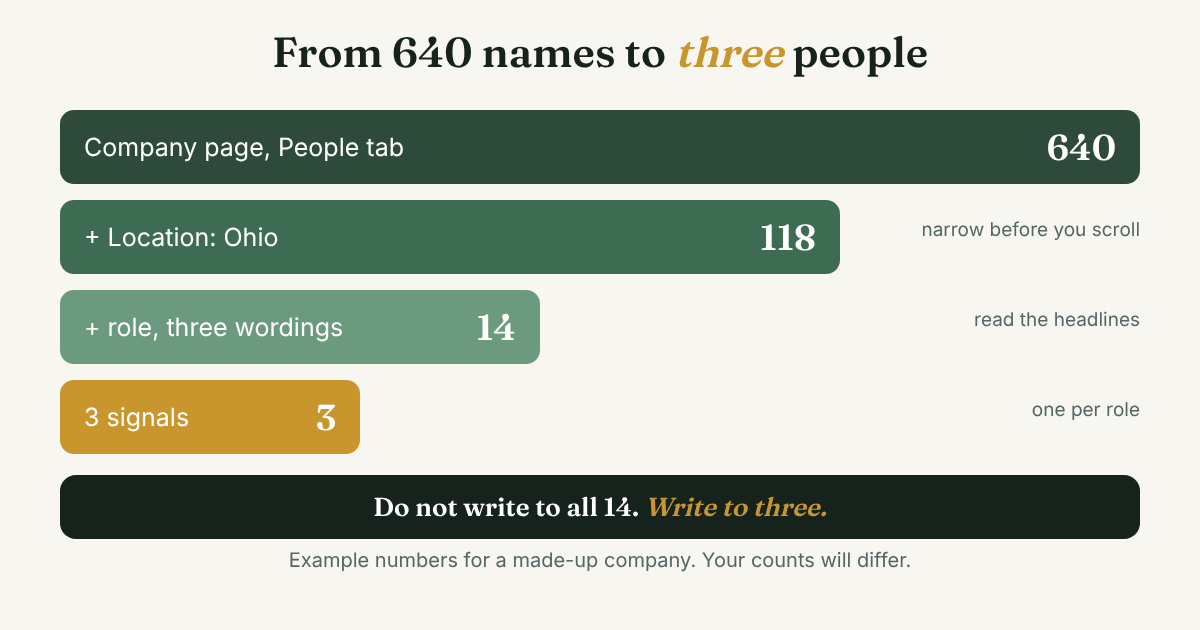
What Lena did not do matters as much. She did not message all 14 practice managers. She did not export the list. And she did not stop at the first title that matched.
How do you pick two or three roles?
Start from your reason, not from the org chart. The same company gives three different role cards to three different people.
- A job seeker who wants to work there. Role 1 is the person doing the job you want, because they can describe the work. Role 2 is the person who would manage it. Role 3 is an alumnus from your school, which is the Boston University approach: pick your school in the filter and the page shows which employees are fellow alumni.
- A seller, like Lena. Role 1 is the person who feels the problem every day. Role 2 is the person who owns that area. Role 3 is whoever you already share a link with. The guide to LinkedIn for B2B sales covers how to reach several people at one company without doubling up.
- A founder looking for a partner or an adviser. Role 1 is the person who runs the team you would work with. Role 2 is someone in the same job at a company that is a step ahead of yours.
Search for the job, not the title. Because titles vary, give LinkedIn three or four wordings. SocialRails suggests searches such as "marketing director" OR "VP marketing" OR "CMO", with OR in capitals and no wildcards. In the main People search with Current company set, that works. On the company page's People tab, run one OR search first and see whether the list changes. If it does not, run each title on its own.
Let company size change the role. In a company of five, the owner is every role, so Role 3 is the only one you need. In a group with hundreds of people, add a location or a team word first, or you will read the wrong region's managers. If you are not sure who owns an area, pick the person nearest the work and ask who to talk to.
Stop at three roles. A fourth role often means you are still unsure why you are writing. If that is the case, write the one-sentence reason on the card again before you search. The guide to LinkedIn prospecting shows how to decide who is worth a message at all.
Why does the list look wrong, and how do you check a name?
Company lists are built from what members choose to write. LinkedIn's statement, quoted by Business of Business, says it builds insights on companies "based on profile information of LinkedIn members." Aura, a workforce-data vendor, puts it plainly: the count tallies members who listed the company as their employer, and it is "member-provided data, not an audited HR count."
That is why the numbers drift. Business of Business compared 2017 annual-report headcounts with LinkedIn profile counts. IBM had 366,600 employees and 563,107 profiles. Apple had 123,000 employees and 180,180 profiles. Capgemini went the other way, with 193,077 employees and 14,077 profiles. The figures are old, so use them for the pattern and not for any company today. The pattern is that a profile count is not a headcount.
Newer sources describe the same thing. People Data Labs, a data vendor, wrote in September 2024 that LinkedIn showed nearly 4,000 employees for a software company called Railway whose own range was 11 to 50, because profiles of railroad workers were mapped to it. The same post says LVMH's count of over 146,000 includes all its subsidiaries. People Data Labs and Affinity, another vendor, both claim that only 10 to 20 percent of profiles hold complete and current employment information. Neither shares its method, and both sell competing data. Read that as a warning, not a measurement.
Here is a test that tells you how far to trust a list. Pick a company where you personally know five people. Open its People tab and its Current company search. Count how many of the five show up. If one is missing, find out why: past company, a different spelling of the company name, or a profile with no employer listed. It takes two minutes, and you learn how far to trust the list for your search.
Then run three signals on every name before you write. Two out of three is your bar.
- The start date. Does the current job start before today, and does the last job show an end date? An open-ended old job is the usual sign of a stale profile.
- Recent activity. A post, a comment, a new role or a mention within the last few months.
- A second place that confirms it. The company's own team page, a speaker list, a press mention, or a mutual contact who says yes.
If a name passes one signal, do not write. Ask a mutual contact, or pick the next person.
What if the person you want is not on the list?
The company page and the Current company filter both depend on a profile pointing to the right company. Sometimes it does not. Boolean Strings, a blog about recruiter sourcing searches, wrote in October 2023 about LinkedIn Recruiter, where many people whose profiles pointed to a company were not found by the company selection. Its examples were ExxonMobil and Ford Motor Company, and its advice was to search company names as text, not by selection. It tested two companies in a paid tool, so check the idea on your own account before you plan around it. Here is what to try, in order:
- Switch to Past company. If the person changed jobs, the current filter hides them.
- Try the brand, the parent and the old name. A group may list its clinics under one name and its parent under another. Type the most distinctive word and pick from the list.
- Search the company name as plain text. Put the name in the keyword box with People selected and no company filter, then add a title word.
- Use Google. The Google X-ray search guide shows how to search public profiles by hand, and what it misses.
- Check the company's own pages. Many companies list staff by team, and some job posts name a hiring contact. LinkedIn's 2018 announcement of its newer Pages said a company's Career Pages could show employees with similar titles, with name, title, location and your connection degree. That was a 2018 product, so look for it, but do not count on it.
- Ask one person who works there. If you know anyone at the company, one question is faster than an hour of searching.
Keep every search by hand. Bulk scrapers and employee exporters exist, and they are the kind of tool that puts a LinkedIn account at risk. Skip them.
How many people should you open, and when do you stop?
Set the stop rule before you start: 20 minutes, ten profiles opened, three people chosen. It is a limit you can change, but have one.
There are two reasons. The first is the quota. LinkedIn does not publish the number, SocialRails says, so you cannot see the wall until you hit it. Keep your opening runs short. The second is how it looks on the other end. Three people from one company each hear from you once, in their own words. Ten people from one company hearing from you in one week can look like a campaign, even if each note is different.
Write to one person per role. If that person does not answer, wait before you write to the next one at the same company. The LinkedIn for B2B sales guide covers how to space several people at one account.
What do you do with the three names?
Do not close the tab yet. Write one line per person while the checks are fresh. In two weeks you will not remember why you picked the second one.
[Name] · [role] at [company] · checked by [start date, recent post, team page] · why I want to write: [one sentence] · first message by: [date]
For Lena it reads: Joanna Whitfield · practice manager at Harbor Vet Group, Columbus · checked by start date, a post last month, clinic site · why I want to write: reminders for no-shows · first message by: Nov 18.
Then write the first message yourself. If you do not share a link with the person, the notes for a stranger's connection request show what to say in the first few lines.
Full disclosure: we make GrowthSeeded, a simple follow-up tracker for LinkedIn. It does not find employees or read company pages. After you have your names, it keeps each person and your reason, and each day it tells you who to message, so you don't forget to follow up. You send every message yourself. A notebook or a spreadsheet also works for three people.
FAQ
Can I see every employee of a company on LinkedIn?
Not reliably. The list shows members who say they work there, and free accounts see a limited number of results per search. Use filters to reach the people you need, and treat the total as a rough count.
Why does the People tab show more or fewer people than the company really has?
Because members type their own employer. Business of Business found profile counts above and below real headcount in 2017 filings. Parent companies can also include subsidiaries, as People Data Labs says about LVMH.
How do I find employees at a company by job title?
Open the company page, click People, and use the role filter or a title keyword. Try three wordings, because titles vary by company. In the main People search, set Current company and use capital OR between titles.
How do I find former employees of a company?
Use People search and set Past company instead of Current company. Linked API lists past company among the free filters. A past-company list is a good place to find people who can tell you what the company is like to work for.
Can I find a company's employees without a LinkedIn account?
Partly. Some public profiles show up in Google, but you see less and the results go stale. The X-ray search guide explains what Google can and cannot show you.
Do this today
- Pick one company and fill in the role card with a reason, two roles and a nearest person.
- Open its People tab and add one filter at a time. Stop at ten profiles or 20 minutes.
- Run the three signals on your top names and write one log line for each of the three you keep.
Picked three people at a company? Add them to GrowthSeeded, a simple follow-up tracker for LinkedIn, with one line on why each one. It tells you who to message each day, so you don't forget to follow up. You send every message yourself, and it never connects to your LinkedIn account. The Free plan holds 5 active people at a time.
Sources
- How to use LinkedIn's 'People' Feature to Find Fellow Alumni at Companies, Boston University Center for Career Development, March 2026 (updated October 2026)
- How to Make the Most of the New LinkedIn Search, LinkedIn Blog, 2017
- New LinkedIn Pages Gives You More Ways to Easily Engage and Connect with Candidates, LinkedIn Talent Solutions Blog, 2018
- LinkedIn's Members and Companies Disconnect, Boolean Strings, October 2023
- IBM has nearly 200,000 phantom employees on LinkedIn, and it's not alone, Business of Business, figures from 2017 annual reports
- Exploring Employee Headcount Accuracy: Pitfalls and Solutions, People Data Labs, September 2024
- Understanding employee headcount data accuracy, Affinity, updated July 2026
- LinkedIn Employee Count vs Real Headcount: Why Numbers Don't Match, Aura, 2025
- How to Search for People on LinkedIn: Complete Guide 2026, SocialRails, updated July 2026
- LinkedIn Advanced Search: Filters on Free, Premium and Sales Navigator, Linked API, October 2026
- Find Anyone at a Company on LinkedIn: 3 Methods That Work), Valley, updated August 2026
- How Do I Use the Filters Correctly on a LinkedIn People Search?, The Job Search School, updated July 2026
About the author
Anisur Rahman Fagun is a marketing and content strategist with more than 9 years of experience in SEO, content, paid advertising and brand growth. He holds a master's degree in mass communication and journalism, and has led content and SEO strategy, built editorial teams and worked with product, design and sales teams. He also builds simple tools that turn marketing data into clear decisions. He writes the GrowthSeeded blog, which shares practical ways to build professional relationships on LinkedIn.