Networking
Google X-Ray Search for LinkedIn: Do It by Hand, Know the Gaps
12 min read
Key takeaways
- A Google X-ray search puts site:linkedin.com/in/ in front of your words, so Google looks only at public LinkedIn profile pages. You do not need a LinkedIn account.
- Google's own help page documents three tools for this: site:, quotes and the minus sign. Capital OR and intitle: are not on that page, though two 2026 guides say they still work.
- Since early 2024, Google shows much less of each profile. Expect a name, a headline and a short snippet, then open the profile to check.
- Test the method on your own profile first. It takes five minutes and tells you how much to trust the results.
- Keep it manual. Ten results you read yourself are worth more than a thousand a tool exports.
Short answer: A Google X-ray search uses Google to look inside LinkedIn's public profiles. Type site:linkedin.com/in/, then a job title in quotes and a place or company in quotes, and add -recruiter to cut noise. It finds only public profiles Google has indexed, often just a name and headline, so open each profile to confirm.
In this article
Why does LinkedIn's own search miss the person you want?
What do you type into Google?
Does X-ray search still work? Run this 5-minute test first
Which strings should you copy?
How do you read a result without being fooled?
What does it miss, and what do you do then?
Is it safe to do this?
What do you do once you find someone?
FAQ
Do this today
Why does LinkedIn's own search miss the person you want?
Keiko (an example, not a real person) is a product designer who wants to talk to design managers at freight and logistics companies. She tries the filters. They give her design managers at software firms, and nothing close to what she wants. Or say she has no LinkedIn account, or she is logged out on a borrowed laptop.
There is another door. Google reads the public pages of LinkedIn profiles, so a Google search can find a profile by the words on it. Recruiters call this an X-ray search, because you look through Google into LinkedIn.
If you are still choosing a method, the guide on how to find people on LinkedIn compares them by what you already know. This post goes deep on one of them, and says plainly where it stops.
What do you type into Google?
Every string starts the same way: the site, then your words.
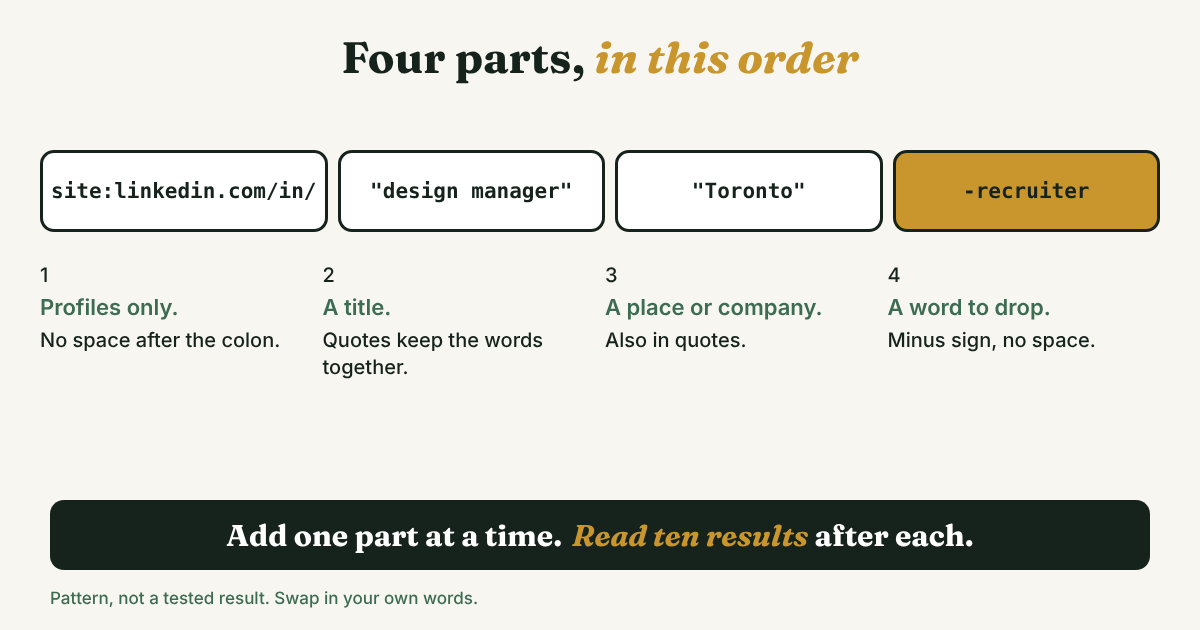
Here is what each piece does.
- site:linkedin.com/in/ keeps Google on profile pages. Google's help page says to enter site: in front of a domain, and not to put a space after the colon: site:nytimes.com works, site: nytimes.com does not (Google Search Help).
- Quotes keep a phrase together, so "design manager" is matched as those two words side by side (same page).
- A minus sign drops pages with a word. -recruiter removes anything that mentions recruiter. Put it right against the word, with no space (same page).
- OR in capitals widens a search: ("design manager" OR "head of design"). It is not on Google's help page, but Linked API (August 2026) and 100Hires (July 2026) both say it works in practice.
- intitle: looks at the page title. On a LinkedIn profile the title usually reads Name, a dash, the headline, then LinkedIn. Serpent API checked 125 profile results on one day in July 2026 and found all 125 in that shape. The help page does not list intitle:, so test it before you rely on it.
Build Keiko's string one piece at a time, and read ten results after each step.
- Start with the role: site:linkedin.com/in/ "design manager"
- Add the field she cares about: site:linkedin.com/in/ "design manager" logistics
- Add the other titles people use: site:linkedin.com/in/ ("design manager" OR "head of design" OR "design lead") logistics
- Drop what does not belong: site:linkedin.com/in/ ("design manager" OR "head of design" OR "design lead") logistics -recruiter -"talent acquisition"
If step 3 returns far fewer people than step 2 should, you probably typed a quote or a bracket wrong. Fix that before you add anything.
Does X-ray search still work? Run this 5-minute test first
Many guides hand you strings and say they work. The record is mixed, so check it on your own screen.
In December 2023, Talentis says, LinkedIn changed how much of a profile it shares with Google. Members can limit what is shared, but cannot opt in to sharing everything. In January 2024, the recruiter blog Boolean Strings reported that headline, About, experience and education had gone from many public profiles. A few weeks later the same blog wrote that Google had adjusted its index, so searches no longer matched those fields. A co-founder of the recruiting tool Jobin.cloud, writing on January 19, 2024, listed current title, summary, location and past employers among the fields that were no longer searchable, and called it unofficial.
By 2026 the guides disagree. 100Hires says LinkedIn narrowed several profile fields in what Google indexes, which makes results shallower. It still publishes strings that it says work. Linked API says the method works but only shows what members allowed.
None of these sources measured how often a phrase from someone's headline finds that person today. LinkedIn has not published it either. So run this test.
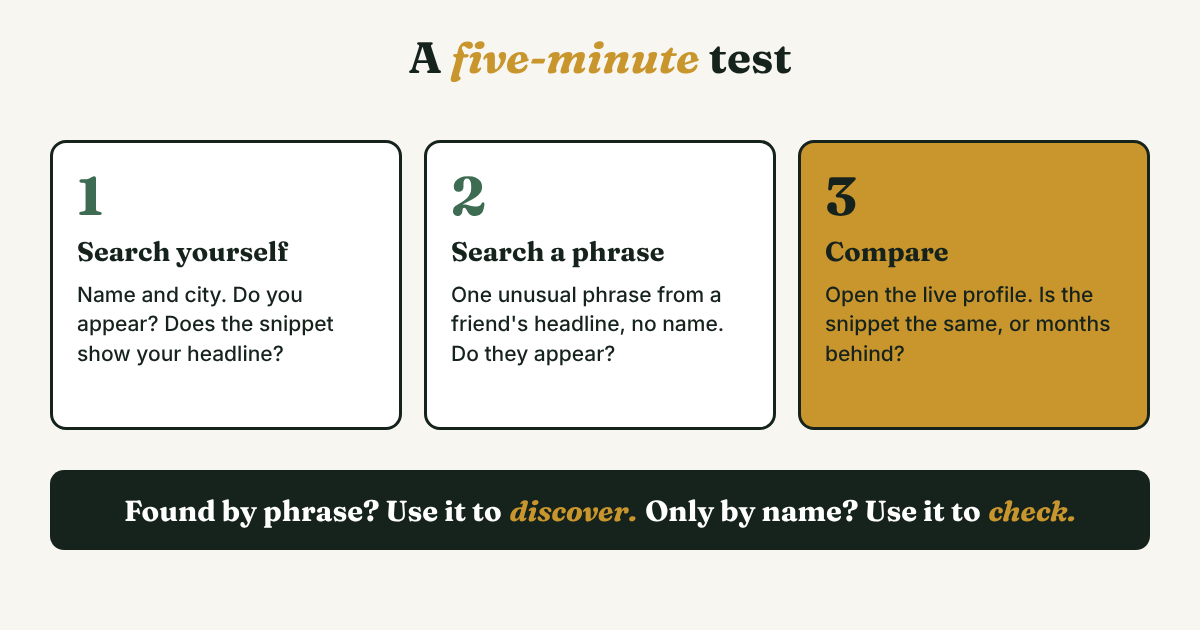
- Search yourself. Type site:linkedin.com/in/ "Your Name" "Your City". Do you appear? Read the snippet under your result. Does it show your current headline?
- Search by a phrase, without the name. Ask a friend, or pick a colleague, whose headline has an unusual phrase, such as a niche tool. Type site:linkedin.com/in/ "that phrase". If their profile appears, Google is matching headline words.
- Compare with the live profile. Open the profile. Is the headline or employer in Google's snippet the same as on the page? If not, you have measured how stale the index is. Linked API quotes LinkedIn Help as saying search engines can take weeks or months to detect profile changes.
Boolean Strings suggested a similar test in 2024: change your own headline, then watch how long Google takes to show it.
Read your result like this:
- Found by the phrase alone: the strings below will work for discovery. Still open every profile.
- Found only when you add the name: use X-ray to check a person you already know about, not to discover new ones.
- Not found at all: the member may have limited what is public. Linked API puts it this way: you only ever see what members allowed. Use LinkedIn's own search instead.
Which strings should you copy?
These are patterns, not tested results. Swap in your own words, run each one, and trim. Rafael (an example, not a real person) runs a small dental software business and wants clinic managers in Leeds. Keiko uses the same patterns for her design search.
- A title in a place. site:linkedin.com/in/ "clinic manager" "Leeds". A city word is a keyword, not a location filter. Serpent API found that in a search for software engineers in Austin, 17 of 28 results were people named Austin. Write the place as "Leeds, England" or "Austin, Texas" to cut those out.
- A title plus a company. site:linkedin.com/in/ "design manager" "[Company name]". Linked API calls this a mention of the company, not a current-employer filter. Someone who left two years ago can still match.
- Several titles at once. site:linkedin.com/in/ ("practice manager" OR "clinic manager" OR "clinic director") "Leeds, England" -recruiter.
- One country's profiles. site:uk.linkedin.com/in/ "practice manager". Linked API warns that a country subdomain is not a filter for people who live there.
- A school. site:linkedin.com/in/ "product designer" "[School name]". Good for finding alumni who share your background, and it gives you the first line of your message.
- Company pages, to learn who is who. site:linkedin.com/company/ "dental" "Leeds". Linked API shows the same pattern for company pages. Open the page, then read its People tab.
Two cautions. If you use Bing instead of Google, 100Hires says Bing keeps only the first 10 terms of a query, so long strings lose their tail. And skip the string in SalesBread's guide that hunts for personal email addresses inside profiles. An address on a profile is not an invitation to write to that inbox. Message people on LinkedIn, where they can ignore you.
How do you read a result without being fooled?
A result is a clue, not a fact. Before you act on one, run four checks.
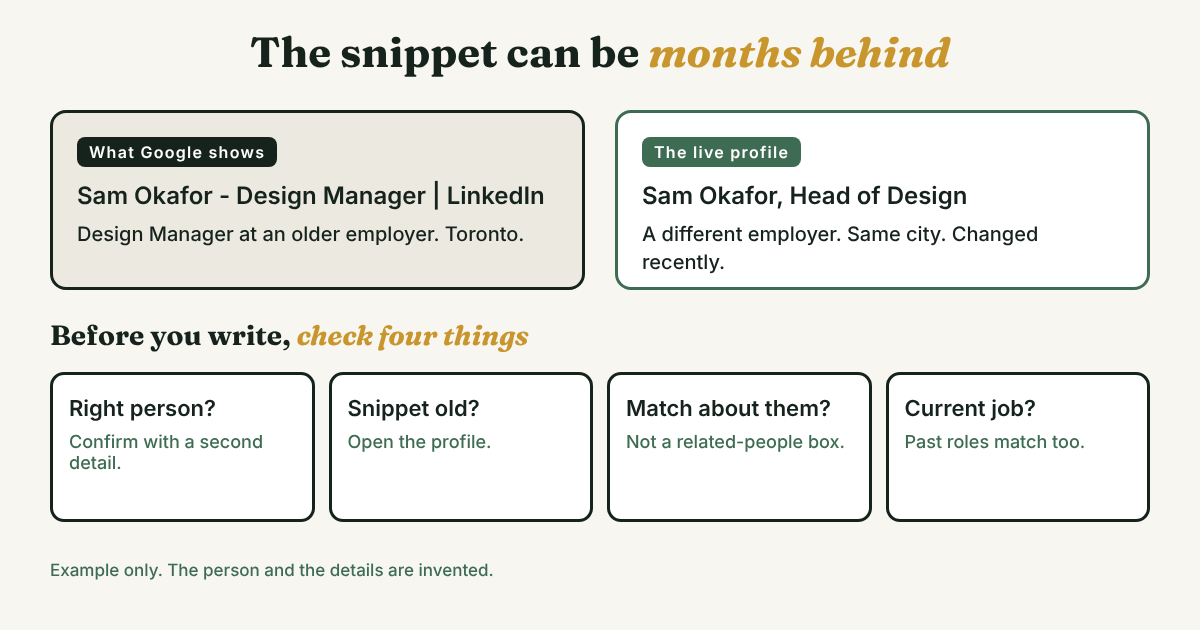
- Is it the right person? Common names and place words collide, as the Austin numbers show. Confirm with a second detail: the employer, the school, or a mutual connection.
- Is the snippet stale? Open the profile and compare. A headline in Google can be months behind.
- Is the match about them? Talentis says Google sometimes matches words from the related people shown on a profile page. Its example: a search for one company's CEO returned two seemingly random people who knew someone with that name. Check that your words sit in the person's own headline or role.
- Is it their current job? There is no current-employer field. A past role can match just as well as the present one.
When a profile passes, write a four-line card before you close the tab. It takes a minute and saves you from re-checking next week.
[Name] | confirmed by [employer, school or city] | profile checked on [date] | why I want to write: [one sentence]
Filled in for Rafael: Hana, practice manager | confirmed by her clinic's name on her profile | checked Nov 18 | runs a four-chair clinic that still books by phone, so my scheduling tool might fit. (An example, not a real person.)
What does it miss, and what do you do then?
Match the problem to the next move.
- The person never shows up. Members who restrict their public profile do not surface, and no query changes that, as Serpent API puts it. Try LinkedIn's own search, or ask a mutual contact.
- You get a name and an employer, nothing more. Talentis says the useful result is sometimes little more than that. Open the profile, or check the company page's People tab.
- Too many results. Google says site: does not necessarily return every URL it has indexed under the prefix (as quoted by Linked API). If the list is too long, add a title word or a place. If your real problem is the long list inside LinkedIn, LinkedIn Boolean search covers narrowing it there.
- The job looks old. Index lag is weeks or months. Treat any snippet as a guess about the past.
- You need exact filters, such as current company plus seniority. X-ray cannot do that, because it matches words and not fields. Use the filters in LinkedIn.
Is it safe to do this?
A single Google search you run yourself is an ordinary Google search. Linked API, which sells LinkedIn tooling, says a logged-out X-ray search leaves no activity on LinkedIn. That is a vendor's statement, so read it as that.
The risk grows when tools enter. 100Hires says: lower-risk is not risk-free, and LinkedIn's terms on data collection are broader than in-app automation. Tools that pull results in bulk and export a list are where the risk starts, and they also make every message the same. The sourced reasons are in why to avoid automating LinkedIn activities. One more point: if you keep a list of people in the UK or EU, data protection rules may apply to it. Serpent API and 100Hires both raise this. It is not legal advice.
LinkedIn's own pages on public profiles and prohibited software would not open for our tool, so read its terms on data collection yourself before you build any routine.
What do you do once you find someone?
Open the profile. Read the headline and the last two posts or roles. Decide what you really have in common, and write that down in the card above.
If you share no connection, a connection request message to a stranger has four notes to start from. Mention what you share, not the search that found them.
Full disclosure: we make GrowthSeeded, a simple follow-up tracker for LinkedIn. It does not search for people, on Google or on LinkedIn. Once you have chosen the few you want to write to, you add each person and the reason, and each day it tells you who to message, so you don't forget to follow up. You send every message yourself.
FAQ
Do I need a LinkedIn account to use X-ray search?
No. It runs on Google, and you see only what each member made public. Expect less than you would see when logged in.
Does OR work, and what about *?
Capital OR works, according to Linked API and 100Hires, though Google's help page does not list it. Skip the wildcard until you have tested it yourself.
Why does Google show an old job title?
Search engines can take weeks or months to pick up profile changes, according to Linked API quoting LinkedIn Help. Always open the profile.
Why do I get people whose first name is my city?
Place words are plain keywords. Serpent API found 17 of 28 results named Austin in an Austin search. Add the state or country, in quotes.
Is X-ray search against LinkedIn's rules?
A search you type yourself is a Google search. Bulk pulls and exports are the part to avoid, and LinkedIn's terms on data collection are broader than in-app automation, as 100Hires notes. Read LinkedIn's terms for yourself.
Does Bing work too?
It reads the same public pages. One guide, 100Hires, says Bing keeps only the first 10 terms of a query, so keep strings short.
Do this today
- Run the 5-minute test on your own profile: search yourself, search a friend by one headline phrase, and compare the snippet with the live page.
- Pick one string from the six. Swap in your own title and place, and read ten results.
- Write a four-line card for the best one or two people, and note why you want to write.
If your searches turn up people you mean to write to, and then they slip off your mind, GrowthSeeded is a simple follow-up tracker for LinkedIn. Add the person and your reason for finding them, and it tells you who to message each day. You send every message yourself, it never touches your LinkedIn account, and there is a free plan.
Sources
- Refine Google searches, Google Search Help, checked 2026 (no date on the page)
- LinkedIn X-Ray Search: Operators, Examples, and What Google's Index Can't See (2026), Linked API, August 2026
- LinkedIn x-ray search: copy-paste boolean strings that still work in 2026, 100Hires, July 2026
- X-Ray Sourcing After Google CSE: Rebuilding site:linkedin.com/in Search, Serpent API, July 2026
- LinkedIn Profiles Redacted, X-Ray Dying, Aggregators Will Suffer, Boolean Strings, January 2024
- LinkedIn X-Ray No More. Now What?, Boolean Strings, February 2024
- Death of LinkedIn X-Ray, What Next? (guest post by Ashfaq Ahmed), Boolean Strings, February 2024
- The Death of LinkedIn X-Ray Search: What, why and what's next?, Talentis, February 2024
- Bye bye LinkedIn X-Ray, Jobin.cloud, written January 2024
- LinkedIn X-Ray Search Made Simple (2026 Guide), SalesBread, December 2025
About the author
Anisur Rahman Fagun is a marketing and content strategist with more than 9 years of experience in SEO, content, paid advertising and brand growth. He holds a master's degree in mass communication and journalism, and has led content and SEO strategy, built editorial teams and worked with product, design and sales teams. He also builds simple tools that turn marketing data into clear decisions. He writes the GrowthSeeded blog, which shares practical ways to build professional relationships on LinkedIn.