Networking
How to Find Alumni on LinkedIn: Pick Five, Then Write
17 min read
Key takeaways
- Open your school's LinkedIn page (the School page, not a company page or a group), click Alumni, and filter by where they work and what they do. Career offices at Villanova, Santa Clara and Wentworth describe these steps.
- Do not work through the whole list. Pick five people with a five-question check: same school and program, a few years ahead, a job you can name, a path like the one you want, and recent activity.
- Guides disagree on the year filter. Newer sources say LinkedIn removed it. If you cannot find it, type a class year such as "Class of 2018" in the search box.
- Name the school in the first line of your note and ask about their path, not for a job. Keep the note under 200 characters, because the sources disagree on the exact limit.
- A directory is not a network. A Strada-Gallup survey of more than 5,100 graduates found only 9% said their alumni network had helped their career, so the conversation matters more than the list.
Short answer: Open your school's LinkedIn page, click Alumni, and filter by where they work and what they do. Pick five people a few years ahead on a path you want. Send each a note under 200 characters that names the school, ask about their path instead of a job, and follow up once.
In this article
Where is the Alumni tab, and why can't you see it?
Which filters help, and what happened to the year filter?
How do you pick five people out of thousands?
What if the Alumni tab is thin or your school does not fit?
What do you write to an alum?
What does a 30-minute session look like?
How much help should you expect?
Which shortcuts should you skip?
FAQ
Do this today
Where is the Alumni tab, and why can't you see it?
Tobias (an example, not a real person) finished a civil engineering degree last spring. He wants to move toward sustainability consulting, and he knows nobody in it. His school is on his profile, and thousands of people who now work where he wants to work list the same school. He has just never looked at them.
If you are in his spot and also unsure which school or company to start from, the guide to finding people on LinkedIn matches each kind of clue to a place to look. This post covers one case: you share a school.
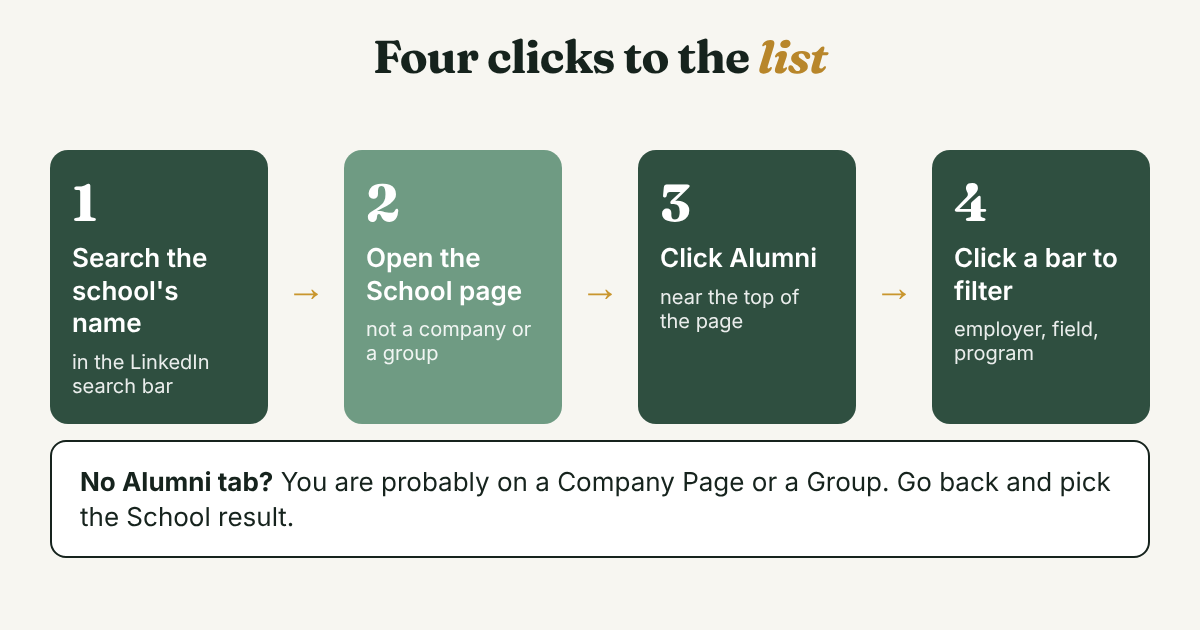
- Search the school's name and open the School page. Wentworth Institute of Technology's career office says to pick the School page, not a Company Page, a Showcase page or a Group. That is the usual reason the tab seems to be missing. Job-Hunt.org (2021) gives a second route: open the school from the Education section of your own profile.
- Click Alumni. Villanova's career office (2024) shows the address pattern, which ends in /school/villanova-university/people/, so you can swap in your school's name and jump straight there.
- Read the charts, then click a bar. Santa Clara's career center says the top of the page shows what they do, what they studied and what they are skilled at, and an arrow reveals where they live, where they work and how you are connected. Clicking a bar filters the people below it.
- Skip anyone still in school. UC Santa Cruz's career page notes that its dashboard includes current students, so the school name shows up a lot. A student cannot tell you what the job is like.
You can open a school you did not attend. Wentworth says the tool works for any school, and Job-Hunt.org says to type the school's name in the search bar. If you go that way, write what is true in your note: "I'm applying to the program" or "I'm exploring this field" is fine. "Fellow alum" is not.
A limit on all of this: LinkedIn's own Help page on the Alumni tab blocks automated readers, so the steps above come from career offices, and their screenshots age. A 2019 Aalborg University guide says you must have the school on your own profile, but it describes the older standalone tool, so check whether that still applies to you. None of the pages says what a free account sees compared with Premium. If the tab looks thinner than described, trust your screen.
Which filters help, and what happened to the year filter?
Names vary a little between guides. Most list the same six: where they work, where they live, what they do, what they studied, what they are skilled at and how you are connected. Emerson College's career center says filtering by company is usually the most effective. Use them in this order:
- Where they work. Start here if you can name two or three employers. Villanova says to use the magnifying glass to search for a company that is not in the top five on the chart.
- What they do. Use this when you have a field but no employer yet. Tobias picks the consulting field, then adds the keyword "sustainability" in the search box.
- What they studied. Choose your own program first. It is the easiest shared ground, and you are asking the one question these people can answer best: what came after this degree?
- How you are connected. Job-Hunt.org (2021) lists this as first, second or third level. A second-level alum has someone in common with you, which is worth a line in your note.
- Where they live. Use it if you want a coffee in person. Ohio Wesleyan's career office, reprinting a Vault article, suggests lunch or coffee, not dinner.
The year filter is where the sources split. Wentworth tells you to adjust the date range. Job-Hunt.org (2021) describes optional start and end year fields. Augustana College's page, edited in August 2026, says the direct year filter is gone and suggests typing a class year such as "Class of 2015" in the search bar. FrogHire, a vendor guide from July 2026, says LinkedIn's own notes say year filtering is no longer in the Alumni tab. The newer sources agree, so look for the filter on your screen and, if it is not there, use the class-year search.
Class year matters because one advice roundup republished by Wofford College (2026) quotes a coach who says to start with alumni five to ten years out. Five years ahead remembers what you are asking about. Someone twenty years ahead may not.
Size also matters. Bridgewater State University says its Alumni tab shows nearly 50,000 people. Aalborg's 2019 guide says clicking Show more reveals the top 15 for your search. You see the biggest slices, not everyone, so a narrow filter finds more than a wide one. Job-Hunt.org (2021) adds that the tool only shows alumni within your first three connection levels, so the size of your own network changes what you see. The other guides do not say this, so check it on your screen.
How do you pick five people out of thousands?
Most guides stop at "filter and connect." That leaves you staring at 40 profiles with no way to choose. Wofford's roundup suggests picking about ten people. Start smaller. Five notes this week is a number you can finish and follow up on.
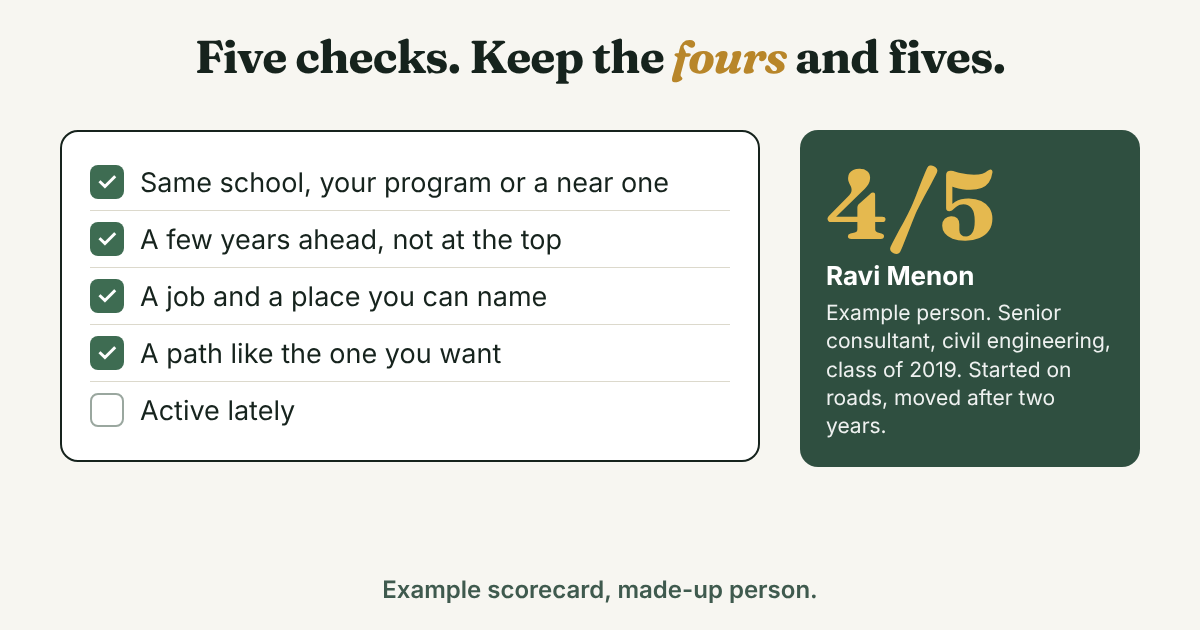
Give each profile one point for every yes:
- Same school, and your program or one near it. You share an answer to "what did you do after this degree?"
- A few years ahead of you, not at the top. One or two steps ahead is a path you can copy.
- A job you can name, at a place you can name. "Analyst at a construction firm" is something to ask about. "Consultant" alone is not.
- A path like the one you want. They changed fields, or started in your major and ended up somewhere else.
- Active lately. A post, a comment or a new job in the last year. It gives you a real line for your note and suggests the profile is checked.
Keep anyone with four or five. Take a three only if you are short of people. Skip profiles with no photo, no work history or a headline that says nothing.
Here is Tobias after ten minutes. He opens eight profiles, and these five score four or more. The people and the school (Northfield State, an invented school) are made up:
- Ravi Menon · senior consultant at an environmental consultancy · civil engineering, class of 2019 · started on road projects, moved after two years · 4 of 5
- Hana Okafor · sustainability analyst at a construction firm · same program, class of 2021 · started the job this year · 5 of 5
- Dmitri Volkov · climate risk lead at an infrastructure group · civil engineering, class of 2016 · posts about flood design · 4 of 5
- Layla Haddad · reporting manager on an energy team · environmental science, a near program · moved from a utility · 4 of 5
- Joel Ferreira · independent energy-efficiency consultant · civil engineering, class of 2018 · comments on retrofit projects · 4 of 5
Notice what the check does. It does not rank by title or company size. It ranks by how much the person can help with your next step. A manager at a famous firm who is twenty years ahead would score low, and that is the point.
What if the Alumni tab is thin or your school does not fit?
A small school, a new program or a year with few graduates can leave you with ten names. You have other routes.
- Go through the company. Open a company page you like, click People, and filter by school. The same guide describes this route, including the school filter.
- Use the people search filters. FrogHire lists company, location, school, industry, connection and keyword filters. It suggests keyword combinations such as "[school] [company] data science", then checking each profile for the school and the current employer.
- Check alumni groups. Findymail suggests searching "[School] alumni" and opening the Groups tab. Group posts also show who is active.
- Ask your career office. Emerson runs a mentor platform where alumni opt in to hear from students. An alum who opted in has already agreed to hear from students.
If LinkedIn starts showing a warning while you search, the LinkedIn search limit guide explains the two limits and what to do at each. A narrow filter on the Alumni tab uses fewer searches than ten wide ones.
What do you write to an alum?
There are two messages, and they have different jobs. The first is a short note on the connection request. It only has to give a reason to accept. The second goes after they accept, and it asks one small question.
How long can the note be? The sources disagree. lemlist's help page says notes are capped at 200 characters, up from a previous 300, and that free accounts get 3 custom notes a month. Bridgewater State says five personalized invitations a month and 200 characters. Emerson says 300. None of these is LinkedIn itself. Write under 200 characters and the note fits all three. Your invitation box shows your real limit. For the question of whether to spend a note at all, see note or no note.
The connection note: three versions
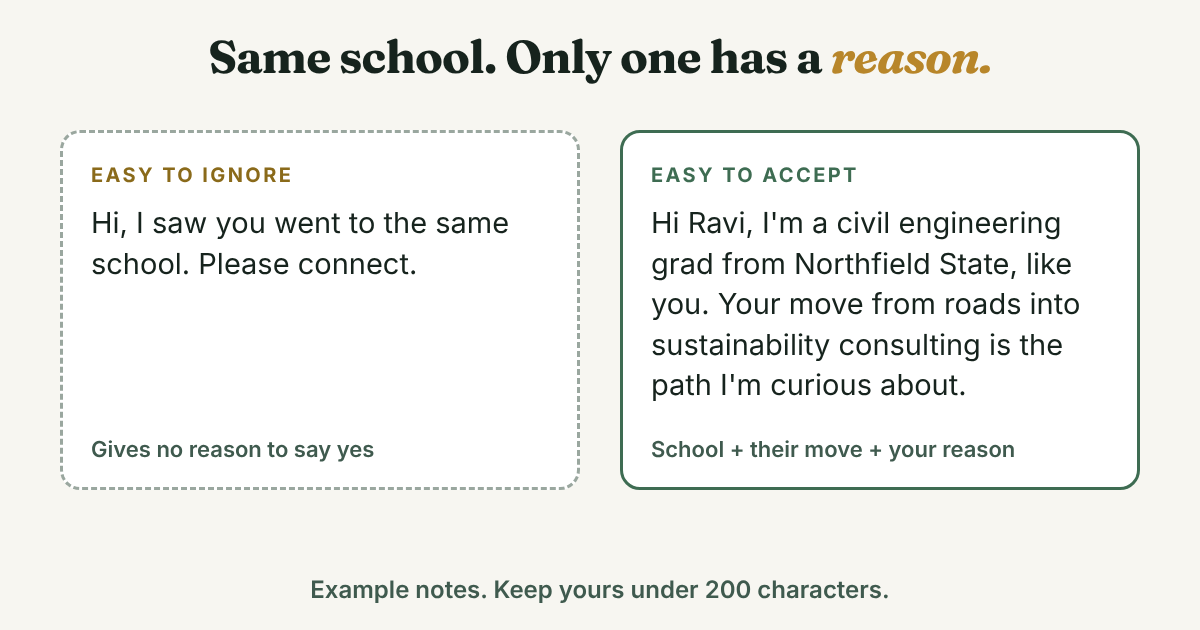
Same school and field: Hi [Name], I'm a [major] grad from [School], like you. Your move from [old field] into [new field] is the path I'm curious about. I'd love to connect.
Career changer: Hi [Name], fellow [School] alum here. I'm moving from [old field] to [new field], and your path to [role] looks close to mine. Glad to connect.
Still a student: Hi [Name], I'm a [year] [major] student at [School]. I'm reading about [field] and saw you work at [company]. Could I connect and ask one question later?
Tobias's note to Ravi, at 174 characters:
Hi Ravi, I'm a civil engineering grad from Northfield State, like you. Your move from roads into sustainability consulting is the path I'm curious about. I'd love to connect.
Augustana's page gives the rule to keep: the purpose of the connection is not to ask for a job. Wofford's roundup lists the mistakes that sink these notes: a copy-pasted template, asking for a job, and a vague "pick your brain." A note that only says "we went to the same school" and nothing else is the same mistake in a shorter form. If you have no shared school, the note ideas for a stranger use a shared group or something they wrote.
The message after they accept
Bridgewater State says to message after the invitation is accepted, to ask for an informational interview. Send it within a few days, while the accept is fresh, and ask one question they can answer in two lines. UChicago's career office says to prepare questions a web search cannot answer. Here is a starting point:
Thanks for connecting, [Name]. I'm [one line about you]. You went from [A] to [B] after [School]. What would you do differently in your first year? A short reply here is great, and I'd welcome 15 minutes if you have them.
The guide to messaging after someone connects has four more openings for different situations.
The one follow-up, and the thank-you
UChicago says to follow up once, after 5 to 7 days, and Emerson says to send a thank-you within 24 hours of any call or reply. Neither cites a study, but they agree. If there is no reply, write once:
Hi [Name], a quick nudge, no pressure. If a call is too much, one tip on [specific topic] would help a lot. Thanks either way.
Then stop. A second nudge turns a friendly note into pressure. If the person helped, UChicago says to check in every 4 to 8 months, so pick that date now.
What does a 30-minute session look like?
Put a timer on it. The list of alumni never runs out, so you need an end.
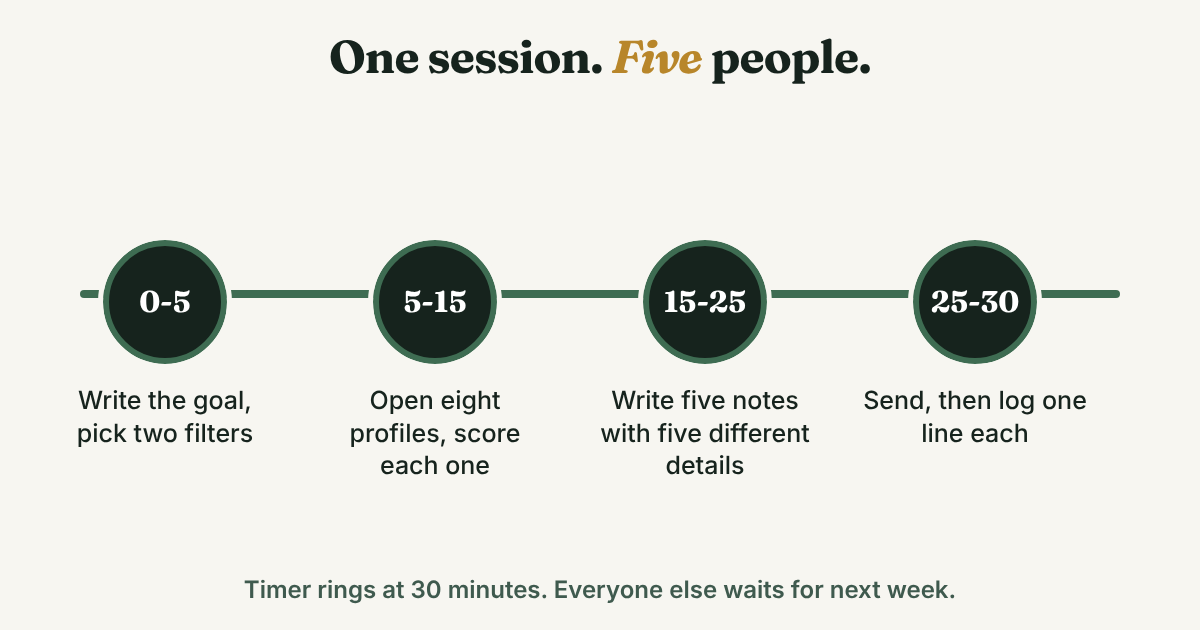
- Minutes 0 to 5: write the goal and pick two filters. One sentence, such as "I want to learn how civil engineers move into sustainability consulting." Then choose from the filters above.
- Minutes 5 to 15: open up to eight profiles. Score each one with the five checks. Stop when you have five with four points or more.
- Minutes 15 to 25: write the five notes. Use a different detail in each. The detail comes from the profile: a job move, a post, a project.
- Minutes 25 to 30: send, then log. If you are on a free account with few custom notes left, send the two best and hold the rest. Write one line per person:
[Name] · [role, company] · [school, program, year] · picked for [two checks] · request sent [date] · follow up [date]
For Hana: Hana Okafor · sustainability analyst at a construction firm · Northfield State, civil engineering, 2021 · same program and new job this year · request sent Nov 17 · follow up Nov 24.
Full disclosure: we make GrowthSeeded, a simple follow-up tracker for LinkedIn. It does not search for alumni or read a school page. You add the people you want to stay in touch with, and each day it tells you who to message, so you don't forget to follow up. You send every message yourself. For five alumni, a notes app does the same job. A tracker starts to matter when the list grows past what you can remember.
How much help should you expect?
A school name opens the door. It does not keep it open. The Strada-Gallup alumni survey, reported by Higher Ed Dive in 2019, asked more than 5,100 graduates to rate their undergraduate alumni network in their career so far. Only 9% called it helpful or very helpful. 69% said neither helpful nor unhelpful, and 22% said unhelpful or very unhelpful. It measured the network as a whole, not a note sent through LinkedIn, so it cannot tell you what your reply rate will be. It does tell you that a shared school alone does not do the work.
What does the work is the question. "What would you do differently in your first year?" gets an answer. "Can you help me get a job?" does not. Aim for one useful reply and a thank-you. If it goes well, ask for 15 minutes, and arrive with two or three questions a search could not answer.
Which shortcuts should you skip?
- Scrapers and export tools. Expandi suggests scraping alumni contacts from LinkedIn groups, and its own footer says you use it at your own risk. Findymail promotes exporting Sales Navigator results to a CSV. You need five names, not 500. Our automation guide covers the risks.
- One note to the whole list. Augustana's page says no mass emails. The Alumni tab can show tens of thousands of people, and a copied note to a hundred of them is the opposite of why you used it.
- Pretending to be an alum. If you did not attend, say what is true.
- Asking for a referral in the first message. FrogHire says to ask about a referral only once the person has enough context, and to leave room to say no.
- Waiting for the perfect filter. A rough filter and a good note beat a perfect filter and no note.
FAQ
How do I find alumni on LinkedIn?
Search your school's name, open the School page (not a company page or a group), and click Alumni. Filter by where they work, what they do or what they studied, then open profiles from the list. Pick five and send each a short note that names the school.
Can I find alumni from a school I did not attend?
Yes. Wentworth's career office says the tool works for any school, and Job-Hunt.org says to type the school's name in the search bar. Write only what is true in your note. You can say you are considering the program or exploring the field, but not that you are an alum.
Why can I not filter alumni by graduation year?
Some guides still describe a year filter, but Augustana College's page and a July 2026 FrogHire guide say LinkedIn removed it. Try typing a class year, such as "Class of 2018," in the search box on the Alumni tab. Look at the profile to confirm the years.
Do I need LinkedIn Premium to use the alumni tool?
None of the career-office pages we read mentions Premium for the Alumni tab. Messaging is different: Findymail says you can message only first-degree connections, and that InMail is a paid feature with monthly credits. A connection note is the usual way to reach an alum on a free account.
How many alumni should I message a week?
Start with five. UChicago's career office suggests three to five outreach messages a week during an active search, with no study behind it. Choose a number you can follow up on, because the second message is where most of these conversations happen.
Do this today
- Open your school's LinkedIn page, click Alumni, and filter by one employer or one field you care about.
- Score eight profiles with the five checks and keep the best five. Write one line for each: who they are and why you picked them.
- Send one note that names the school and gives a reason, then write the follow-up date in the log line.
Picked your five? Add them to GrowthSeeded, a simple follow-up tracker for LinkedIn, with one line about why each one matters. Each day it tells you who to message, so you don't forget to follow up. You send every message yourself, and it never connects to your LinkedIn account. The Free plan holds 5 active people at a time.
Sources
- Research and Network with the LinkedIn Alumni Tool, Wentworth Institute of Technology Co-ops + Careers, 2020, updated 2025
- LinkedIn Alumni Tool, Augustana College Career Development, updated August 2026
- LinkedIn Alumni Tool, Villanova University Career Connections, 2024
- LinkedIn Alumni Tool, Santa Clara University Career Center, checked 2026
- LinkedIn Profile & Alumni Tool, UC Santa Cruz Career Success, checked 2026
- Want to Connect with Emerson Alumni?, Emerson College Career Development Center, checked 2026
- How to Use LinkedIn to Network with BSU Alumni, Bridgewater State University Career Services, 2024
- Networking 101, University of Chicago Career Advancement, checked 2026
- LinkedIn alumni guide (PDF), Aalborg University Careers, about 2019
- Survey: Just 9% of graduates find alumni networks helpful, Higher Ed Dive, reporting the Strada-Gallup Alumni Survey, 2019
- LinkedIn connection requests: limits, best practices and avoiding restrictions, lemlist Help Center, checked 2026
- Hidden LinkedIn Networking Power Tool: Schools, Job-Hunt.org, 2021
- How to Use LinkedIn's Alumni Tool for Networking, Ohio Wesleyan University Career Services, reprinting Vault, 2024
- Cold outreach that doesn't feel cold: a script-free guide for recent grads, Wofford College Career Center, republished from College Recruiter, 2026
- How to find alumni at a company on LinkedIn, FrogHire, July 2026
- How to find alumni on LinkedIn, Findymail, 2024
- How to find alumni on LinkedIn, Expandi, 2023, updated 2024
About the author
Anisur Rahman Fagun is a marketing and content strategist with more than 9 years of experience in SEO, content, paid advertising and brand growth. He holds a master's degree in mass communication and journalism, and has led content and SEO strategy, built editorial teams and worked with product, design and sales teams. He also builds simple tools that turn marketing data into clear decisions. He writes the GrowthSeeded blog, which shares practical ways to build professional relationships on LinkedIn.