Networking
LinkedIn for Sales Teams: 4 Rules So Reps Don't Double Up
15 min read
Key takeaways
- The usual team mistake on LinkedIn is two reps writing to the same person in the same week. The fix is one owner per account and one shared place where each touch is logged before the message goes out.
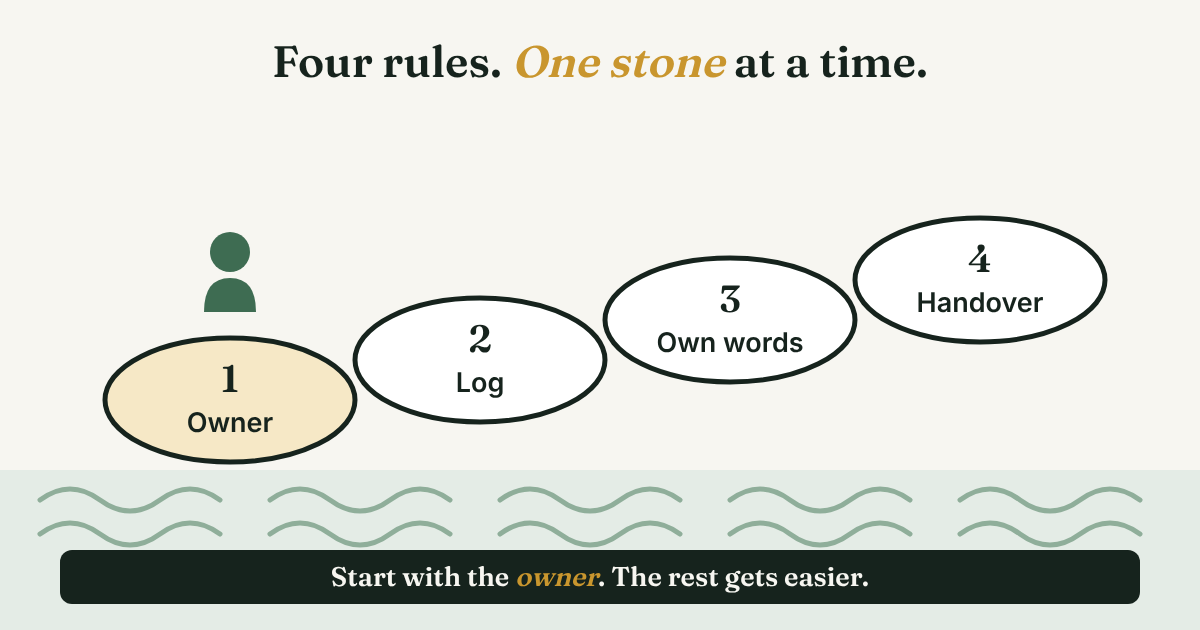
- Four rules cover most of it: one owner, one shared log, each rep writing in their own words, and a handover note that lives outside anyone's inbox.
- LinkedIn's team features (TeamLink, shared lists, shared alerts) need Sales Navigator Advanced or Advanced Plus. For a team of two to six, a shared sheet does the main job for free.
- A LinkedIn conversation sits in the inbox of the rep who had it. If a rep leaves, the log is the only history the next person gets.
- Review the log once a week for 25 minutes, and count conversations started, not messages sent.
Short answer: A sales team uses LinkedIn well when each account has one owner, every touch goes into one shared log before the message is sent, and each rep writes their own messages. Add a handover note for when someone leaves and a 25-minute weekly review. A shared sheet is enough to start.
In this article
What goes wrong when four reps use LinkedIn on the same accounts?
Rule 1: Who owns each account?
Rule 2: Where does the team log every touch?
What can LinkedIn show your team, and what costs extra?
Rule 3: What do reps agree on, and what stays personal?
Rule 4: What happens to the conversations when a rep leaves?
What does a 25-minute weekly review cover?
When does a shared sheet stop being enough?
Where does a simple follow-up tracker fit?
FAQ
Do this today
What goes wrong when four reps use LinkedIn on the same accounts?
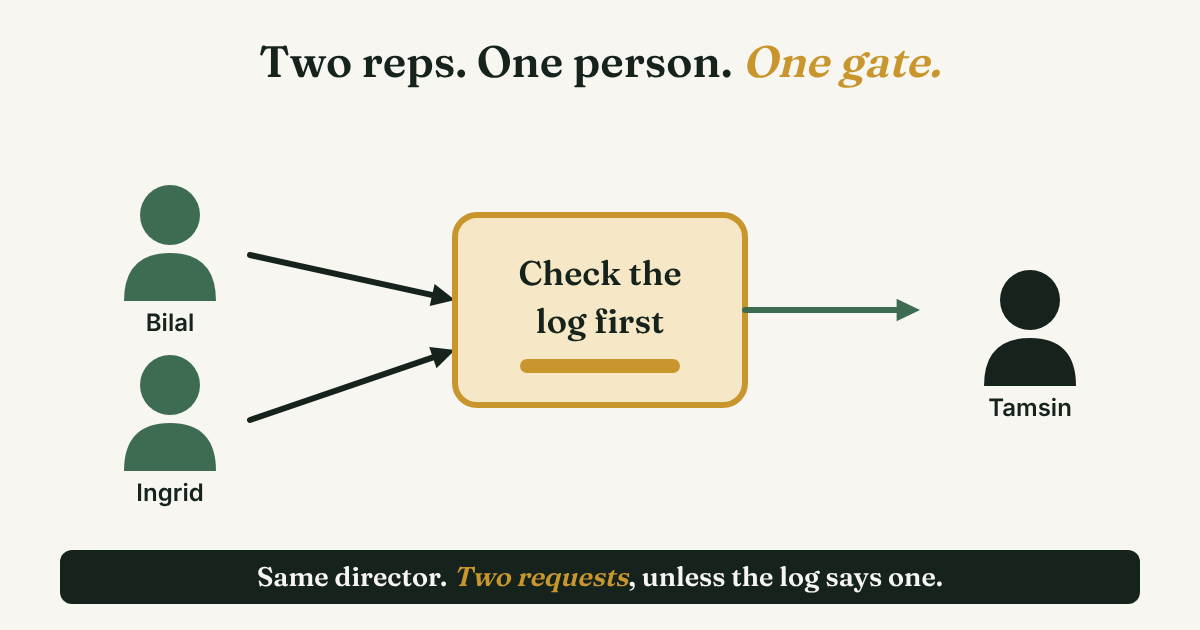
Bilal, Ingrid, Sunil and Chiara (examples, not real people) sell payroll software to restaurant groups. On Monday, Bilal sends a connection request to the operations director of a 12-restaurant group. On Wednesday, Ingrid finds the same director through a post and sends her own request. On Thursday the director accepts one, ignores the other, and answers neither follow-up.
Nobody did anything careless. Each rep had a good reason to write. Nobody could see that someone had already written.
Trellus, which sells a calling tool, describes the same problem for phone calls: "Two reps can have perfectly reasonable call lists and still phone the same person ten minutes apart." PhantomBuster, which sells LinkedIn outreach tools, says two reps messaging the same prospect "looks unprofessional." On LinkedIn the damage is quieter and lasts longer. The person sees two names from one company in a week, and neither name stands out.
This post is about the team layer. If you work alone, start with LinkedIn for sales: a simple weekly routine. If your question is how to reach several people at one buyer on purpose, that is LinkedIn for B2B sales. Here the question runs the other way: how do four people avoid reaching the same person by accident?
Four rules fix most of it. None of them needs new software.
Rule 1: Who owns each account?
Ownership answers one question: who is responsible for this relationship? Trellus puts it the same way: "Record ownership answers who is responsible for the relationship." HubSpot's help page is blunter about how a CRM stores it: "Each record can have one selected owner using the default property." One owner, not two.
Pick one way to decide the owner, and write it down. Three ways work.
- By account. Each named company belongs to one rep. The owner writes first to everyone there, and teammates help only when asked. Best when you sell to a short list of companies.
- By territory or segment. Region, industry or company size decides. It scales to a long list, but borders cause arguments, such as a rep in Dallas finding a person who works in Boston. Add a tiebreaker, for example "the company's head office decides."
- By first logged touch. Whoever logs the first message owns the person. It is quick to start, but it rewards speed over fit. Trellus warns against it: "Don't let the fastest rep to click decide."
For a team of two to six selling to named companies, owning by account is the easiest to explain in one sentence, so start there.
One exception matters in B2B. A buyer is a group, so an owner may need a helper for a role they cannot reach. The helper is named in the log before they write, and the owner agrees. Copy this and fill it in:
Account owner: [rep]. Helpers: [rep] for [role]. Owner is decided by: [account / territory / first logged touch]. If two reps disagree: [manager] decides within [number] days.
Rule 2: Where does the team log every touch?
An owner on paper does nothing if nobody checks it before sending. You need one place where the whole team can see who has already been written to. Apollo, a sales data vendor, says: "Assign record ownership immediately; unowned records create duplicate touches."
A shared sheet is enough for a team of two to six. Use one line per person, with these columns:
Person, company, owner, helper, last touch (date and what you sent), what they said, next step, next date.
Here are two filled lines from the example team, so you can see how small they are:
- Tamsin, operations director, Harbor Group. Owner: Bilal. Helper: none. Last touch: Nov 3, connection request about shift-pay errors. What they said: accepted Nov 5, no reply yet. Next step: one follow-up with a question. Next date: Nov 12.
- Joel, finance lead, Harbor Group. Owner: Bilal. Helper: Ingrid, for payroll-tax questions. Last touch: Ingrid asked Bilal on Nov 6, Bilal said yes, Ingrid wrote on Nov 7. What they said: asked for a price range. Next step: Ingrid answers, tells Bilal. Next date: Nov 13.
One habit does most of the work. Look the person up before you write, and add or update your line before you press send. If the line shows another owner, you message the owner, not the person.
A sheet is not a lock, so say that out loud to the team. Trellus says the same about its own worksheet: "A pre-block review isn't a real-time record lock." Two reps can still add the same person within minutes of each other. The weekly review below is how you catch those.
What can LinkedIn show your team, and what costs extra?
If your team uses Sales Navigator, LinkedIn adds some team features. They sit on the Advanced and Advanced Plus plans. LinkedIn's own Sales Navigator page says "team-collaboration features like TeamLink are only available" on those two plans, and that they fit teams of 2 or more (Advanced) and 10 or more (Advanced Plus). For prices and what each plan includes, see LinkedIn Sales Solution: what you get and who needs it. Here is what the team features do, from LinkedIn's own pages and its community posts:
- TeamLink. It shows license holders on your team account who are first-degree connections to a lead, "even if you're not connected to your teammate." Your teammates get the same view of your connections. A LinkedIn community post says it is on by default in Settings, and a member can opt out. The post is from 2020, edited in 2023.
- TeamLink Extend. It brings in colleagues who do not have a Sales Navigator seat. They have to accept an email invitation, so it is opt-in.
- Shared custom lists. A December 2023 LinkedIn community post says: "Only users on Sales Navigator Advanced or Sales Navigator Advanced Plus accounts can share custom lists." Sharing gives teammates access to the lists and the notes.
- Shared activity alerts. They tell you when a colleague shares a list or comments on one. Also Advanced and Advanced Plus.
- Relationship map. You can build up to 5 maps of 30 key decision makers and share them. The 2023 post says it is available to all Sales Navigator users.
Two things to tell the team before anyone switches these on. First, TeamLink shows your connections to teammates, so people should know. Second, none of the LinkedIn pages we read describe a lock that stops a second rep from messaging someone. TeamLink shows a shared path to a person. It does not claim the person for anyone. The owner rule and the log still do that job.
Rule 3: What do reps agree on, and what stays personal?
Agree on the few things that touch everyone. Leave the words to each rep. Here is a team agreement you can copy, trim and put at the top of the sheet:
- One LinkedIn account per person. No shared logins.
- Check the log before you write. If the person has another owner, message the owner.
- Log your touch before you send it.
- A helper writes to an owned person only after the owner says yes in the log.
- Write every message yourself. Nothing is sent by a tool.
- If an owned person has had no touch for [number] days, the owner keeps them only by writing a reason in the log.
Two lines need a reason behind them.
One person, one account. PhantomBuster says: "One person per account: No shared accounts, passwords, or rotating ownership," and that multiple people on one account "violates LinkedIn's terms." That is a vendor's reading. LinkedIn's own User Agreement and help pages would not open for our fetch tool, so read the terms yourself before anyone shares a login. TeamLink and the shared log exist so you do not need to.
Your own words. PhantomBuster also warns that "Identical messages sent at scale trigger reputation and account flags." That is a vendor's caution, not a measured limit, but the habit it points at is a good one. If your team keeps a shared first line, each rep changes it to fit the person. And no tool sends for you. Why to avoid automating LinkedIn activities has the sourced reasons.
What to do when it already happened. Say Ingrid finds Bilal's line after she has written. She sends this to Bilal:
Hi [owner], I wrote to [person] at [company] on [date] before I saw your line from [date]. I'll leave it with you. Anything you want me to pass on?
If the person also got two requests, the owner can send a short note, in their own words:
Hi [name], two of us at [company] wrote to you this week. That was our mix-up. I'm your contact, and no need to answer the other one.
It costs a few lines and keeps a small mistake small.
Rule 4: What happens to the conversations when a rep leaves?
A LinkedIn conversation sits in the account of the person who had it. Kondo, a LinkedIn messaging vendor, says "All conversation history lives in their private inbox," and that every accepted connection becomes part of the rep's own network. The page gives no legal source, so ask your own lawyer or HR what your contracts say about connections. The practical point does not depend on the law. The next rep cannot read the old rep's inbox, and Rule 3 says nobody shares a login. The only history they get is the history in your log.
Funnelfeedr, a sales software vendor, says it in a line: "When a rep leaves, they don't just take their rolodex." Its point is about notes and threads that were never logged.
So the handover is the log, as long as each line says what was said and what comes next. Add one more line per person, and write it as you go, not in the last week:
[Person], [company]. What we talked about: [one line, in their words]. What I promised: [item, date]. What they asked: [item]. Best next step: [one action]. How they write: [short and formal / friendly and casual].
A few words after each reply is enough. A rescue in the week before someone leaves never holds as much as the habit does.
What does a 25-minute weekly review cover?
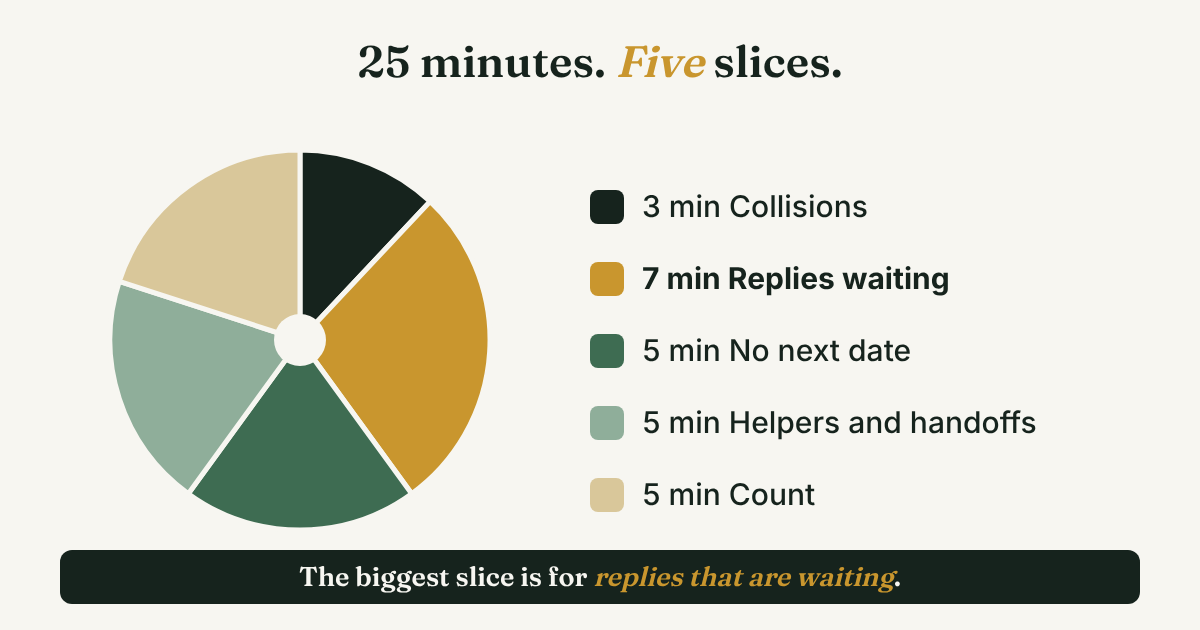
Same slot every week, same five things. SocialKit's guide to a team social-selling program uses a weekly 30-minute Friday meeting with a shared log of "conversations started this week," and says "Commit to two quarters before you judge it." That guide is about posting, not outreach, but the rhythm carries over. Here is a 25-minute version for outreach:
- Collisions (3 minutes). Was anyone written to by two reps? Who keeps them? Fix the owner column.
- Replies waiting (7 minutes). Each rep names the replies they have not answered. A reply is a lead who may be going cold, so this part comes first.
- No next date (5 minutes). Every line without a next date gets one, or gets closed.
- Helpers and handoffs (5 minutes). Does any account need a helper? Is any owner out next week?
- Count (5 minutes). Conversations started this week, per rep, as a plain list. Conversations, not messages. LinkedIn sales lead generation: count conversations, not names explains the count and shows a worked example.
Do not rank reps by messages sent. It rewards the behavior that causes collisions, and a high message count says nothing about who answered.
When does a shared sheet stop being enough?
A sheet works while the team is small and the list is short. Three signs say it is time for more:
- Collisions keep happening. A CRM can lock a person to an owner. Apollo describes the rule: contacts "should be invisible or locked to other reps during active outreach." That is a setting you configure, not something a LinkedIn account gives you.
- You want owners assigned for you. HubSpot has a setting called "Assign unowned contacts to email sender," which its help page says is on by default. It also has a "Rotate record to owner" workflow action that "will evenly distribute assignment to the specified owners," on Sales Hub or Service Hub Professional or Enterprise. Both work on CRM records.
- You need stages, reports or forecasts across the whole team, not just a list of who has been written to.
One warning. None of that reads your LinkedIn messages. Someone still has to log each touch by hand, or you connect a tool that does part of it, and that tool will miss things. For when a CRM fits and when it is overkill, read should you use a CRM for LinkedIn follow-ups?
Where does a simple follow-up tracker fit?
Full disclosure: we make GrowthSeeded, a simple follow-up tracker for LinkedIn. It tells you who to message each day, so you don't forget to follow up. It is built for one person's own follow-ups. It is not a shared team log, an ownership rule or a pipeline, so use the sheet or a CRM for the four rules above. A rep can still keep a personal list in it of the people they need to answer or follow up with. You send every message yourself, and it never touches LinkedIn.
FAQ
How should a sales team use LinkedIn together?
Give each account one owner, log every touch in one shared place before you send, write your own messages, and review the log weekly. Use TeamLink and shared lists only if you have Sales Navigator Advanced or Advanced Plus.
How do you stop two reps from messaging the same prospect?
Check the log before you write, and add your line before you send. Give each account one owner. A sheet does not lock anyone out, so run a weekly collision check. A CRM can lock a person to an owner.
Can two people share one LinkedIn account?
PhantomBuster says shared logins violate LinkedIn's terms, so read LinkedIn's User Agreement yourself before you rely on a shared one. The safer plan is one account per person, with the log or TeamLink to share what each person knows.
Do you need Sales Navigator for a sales team?
No. TeamLink, shared lists and shared alerts need Advanced or Advanced Plus, but a shared sheet covers the owner rule and the log. Read the Sales Solution guide above before you pay.
What happens to a rep's LinkedIn conversations when they leave?
They sit in that rep's inbox, according to Kondo, so the team keeps only what is in the log. Write a handover line per person as you go, and ask HR or a lawyer what your contracts say.
Do this today
- Write the one-sentence owner rule for your team (by account, territory or first logged touch) and send it to everyone.
- Make the shared sheet with the eight columns above and add the ten people you wrote to this week.
- Put a 25-minute slot on the calendar for next week and write "collisions" as the first item.
If your own follow-ups are the part that slips, GrowthSeeded is a simple follow-up tracker for LinkedIn. Each rep can keep a personal list, add why each person matters, and see who to message today. You send every message yourself, it never touches LinkedIn, and the Free plan holds 5 active people at a time.
Sources
- Sell with LinkedIn: Sales Navigator, LinkedIn, checked 2026
- Everything you need to know about TeamLink, TeamLink Groups and TeamLink Extend, LinkedIn Sales Navigator community, 2020, edited 2023
- Four Sales Navigator features to help you maximize your team's productivity, LinkedIn Sales Navigator community, December 2023
- Assign ownership of records, HubSpot Knowledge Base, updated September 2026
- How Do I Prevent Duplicate Outreach When My Sales Team Shares Lists in 2026?, Apollo, May 2026
- Avoid Duplicate Sales Calls: A Rep Ownership Worksheet, Trellus, October 2026
- Using multiple LinkedIn accounts safely: what growth teams need to know, PhantomBuster, July 2026
- How to Prevent Losing 1,000 LinkedIn Leads When Your SDR Quits, Kondo, October 2025
- Sales intelligence belongs to the company, Funnelfeedr, June 2026
- How to Build a B2B Social Selling Program (Beyond One Rep), SocialKit, September 2024
About the author
Anisur Rahman Fagun is a marketing and content strategist with more than 9 years of experience in SEO, content, paid advertising and brand growth. He holds a master's degree in mass communication and journalism, and has led content and SEO strategy, built editorial teams and worked with product, design and sales teams. He also builds simple tools that turn marketing data into clear decisions. He writes the GrowthSeeded blog, which shares practical ways to build professional relationships on LinkedIn.