Networking
How to Find Recruiters on LinkedIn: Match the Person to the Job
15 min read
Key takeaways
- Start on the job post. Look under the description for a hiring team box. If it names a recruiter or hiring manager, your search is over. Career guides from Jobscan and Shippensburg University describe the box, but some posts show no one.
- If the box is empty, open the company page, click People, and search for "recruiter" or "talent acquisition" plus your job's field and city. A recruiter who hires for your field is a better pick than the first "recruiter" in the list.
- Know whose side the person is on. In-house recruiters work for one company. Agency recruiters are hired by a company and, in the NRWA's words, are often paid only if a candidate they submit is hired.
- Write to one well-chosen person, not five. A comment in a 2026 survey of agency recruiters says LinkedIn members are "overtouched and less responsive."
- Cap the search at 20 minutes per job: one target card, three profiles, one message, one follow-up date.
Short answer: Open the job post and look for a hiring team box. If there is none, open the company page, click People, and search "recruiter" or "talent acquisition" plus your job's field and your city. Choose the recruiter whose work matches your role, write one short note that names the job, and put a follow-up date in your log.
In this article
Who are you trying to find: the recruiter, the hiring manager or someone else?
Where is the hiring team box, and what if it is empty?
How do you search the company page for a recruiter?
What does one full search look like?
What do you send: before you apply or after?
What if no recruiter turns up?
What should you not do?
What does a 20-minute session look like?
How do you keep track of who you wrote to?
FAQ
Do this today
Who are you trying to find: the recruiter, the hiring manager or someone else?
Bao (an example, not a real person) applied late on a Sunday for a Supply Chain Analyst job at Brightwater Logistics (an invented company). By Wednesday he had heard nothing. The post showed no names. He wants one thing: a person who can tell him whether his application reached anyone.
There is a reason to look for that person. LinkedIn's January 2026 talent research says its data shows US applicants per open role have doubled since spring 2022. That figure counts applicants, not replies, so it cannot tell you your odds. It is one reason to look for a person instead of relying on the application alone.
If your question is the wider one, how to find any person on LinkedIn, the guide to finding people on LinkedIn matches each kind of clue to a place to look. This post is for one case: you want a human for one particular job.
First decide which kind of person you need, because they want different things.
- An in-house recruiter works for one company and hires only for it. The Muse (2020) says in-house recruiters will identify themselves as employees of the company they are hiring for. For a job you applied to, this is usually the first person to look for.
- An agency recruiter is hired by companies that lack the capacity to recruit. The National Résumé Writers' Association (NRWA, 2026) says they often work on contingency and are paid only if a candidate they submit is hired, so their focus is speed and role fit. The Muse says the same about payment. If the company posted the job itself, an agency recruiter is not the person who can say where your application is.
- A hiring manager decides who gets the job. The Muse says they are usually not full-time recruiters, and that they do not reach out to candidates until they have decided to hire someone. Go to them when no recruiter can be found, and read the job post first: EntertainmentCareers.Net says to respect any line telling applicants not to contact hiring managers.
- A team member does the work the job sits in. FrogHire (2026) lists an employee or an alum as a contact you pick by need. They cannot decide, but they can tell you what the work is like.
Match the person to what you want. To check on an application you sent, look for the in-house recruiter. To hear about roles you cannot see, look for an agency recruiter in your field. To ask whether the job suits you before you apply, a team member or the hiring manager may be better. For finding that manager, titles are only clues, and the same goes for hiring managers.
Where is the hiring team box, and what if it is empty?
Open the job post and scroll below the description. Jobscan says to check the "Meet the hiring team" section and message the hiring manager or recruiter from there. A Forage guide republished by Shippensburg University says the same: sometimes this section sits under the job description and may include the hiring manager and the recruiter.
Notice the word "sometimes." A question in the Personio community says that "occasionally" LinkedIn names the recruiter for a role. Tellent Recruitee's help center describes Basic Jobs as posts that LinkedIn gathers, and says the poster's email is not shown to candidates. That may be one reason a box is empty, but none of these pages says why, and LinkedIn's own help page on the box would not open for us. If your screen shows no box, the post may not have one. Do not wait for it. Go to the company page.
One more clue costs a minute. EntertainmentCareers.Net (2026) says tags at the bottom of a post, such as #LI-JS, often stand for the initials of the recruiter or hiring manager. Its page gives no source for that. If a tag matches the initials of a recruiter you find in the next step, treat it as a hint, not proof.
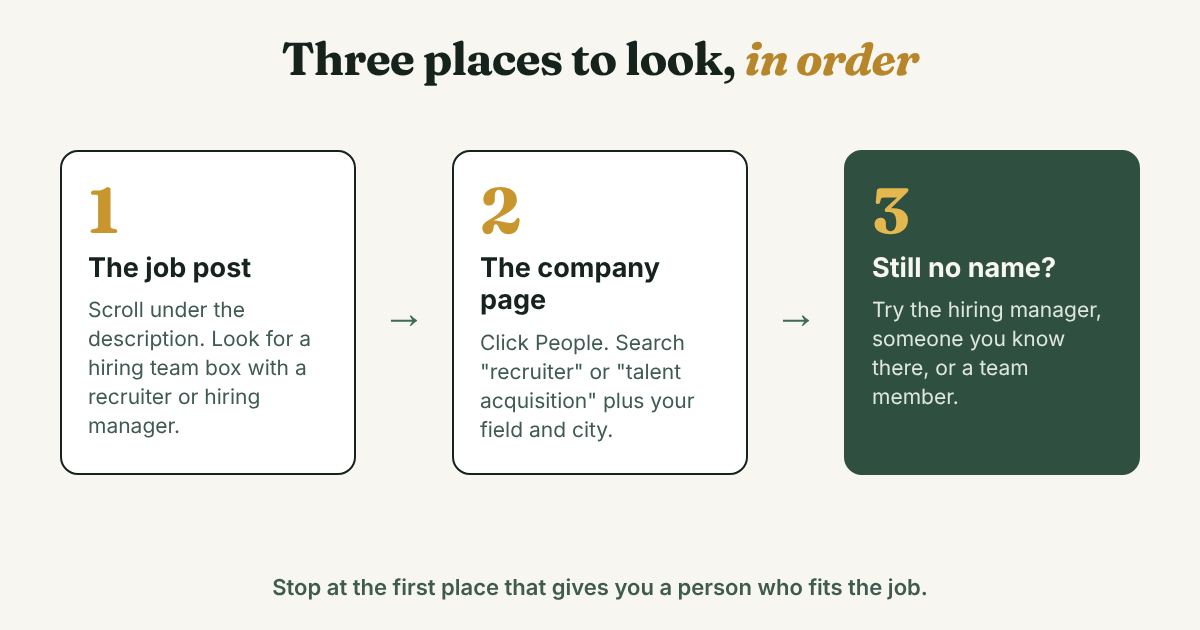
How do you search the company page for a recruiter?
Write a target card first. FrogHire says to record the company, the exact job title, the department, the city, the seniority and the posting date before you search. Five lines in a notes app are enough, and they stop you from messaging the wrong person later.
Then search in this order:
- Open the company page and click People. Resume Worded says to open the company profile and choose "See all employees on LinkedIn."
- Type a recruiting word in the search box. The guides give recruiter, recruitment, recruiting, talent acquisition, staffing, headhunter and human resources. Forage adds "recruiter AND company name" in the main search bar with the People filter.
- Add your field and your city. FrogHire gives these examples: "[company] technical recruiter," "[company] talent acquisition data," "[company] recruiter [location]" and "[company] product recruiting." Jobscan's example typed "recruiter product management" and cut a very large company's list down to 314 people.
- Open three profiles. Do not message anyone from the search results page.
Why not message the first name? FrogHire puts it plainly: messaging the first person with "recruiter" in their title feels random because it is. A recruiter for software roles in another city cannot help with your logistics job. Resume Worded also says to search your first-degree connections first.
If LinkedIn starts warning you about searches, the LinkedIn search limit guide explains the two limits. One narrow company search uses less of your budget than five wide ones.
What does one full search look like?
Here is Bao's target card:
Company: Brightwater Logistics. Job: Supply Chain Analyst. Field: supply chain and logistics. City: Columbus. Level: entry, one to three years. Posted: November 10. Applied: November 15.
The post has no hiring team box. He opens the Brightwater page, clicks People, and runs three searches: "recruiter," then "talent acquisition logistics," then "recruiter Columbus." In ten minutes he opens three profiles. All three people are made up for this example.
- Elise Hartmann, talent acquisition partner for supply chain and operations. Based in Columbus. In the job two years. Posted last month about hiring warehouse supervisors.
- Samir Qureshi, technical recruiter for software roles. Based in Seattle. In the job one year. No recent posts.
- Joanna Pike, recruiting coordinator. Based in Columbus. In the job three months. Her profile does not say which teams she supports.
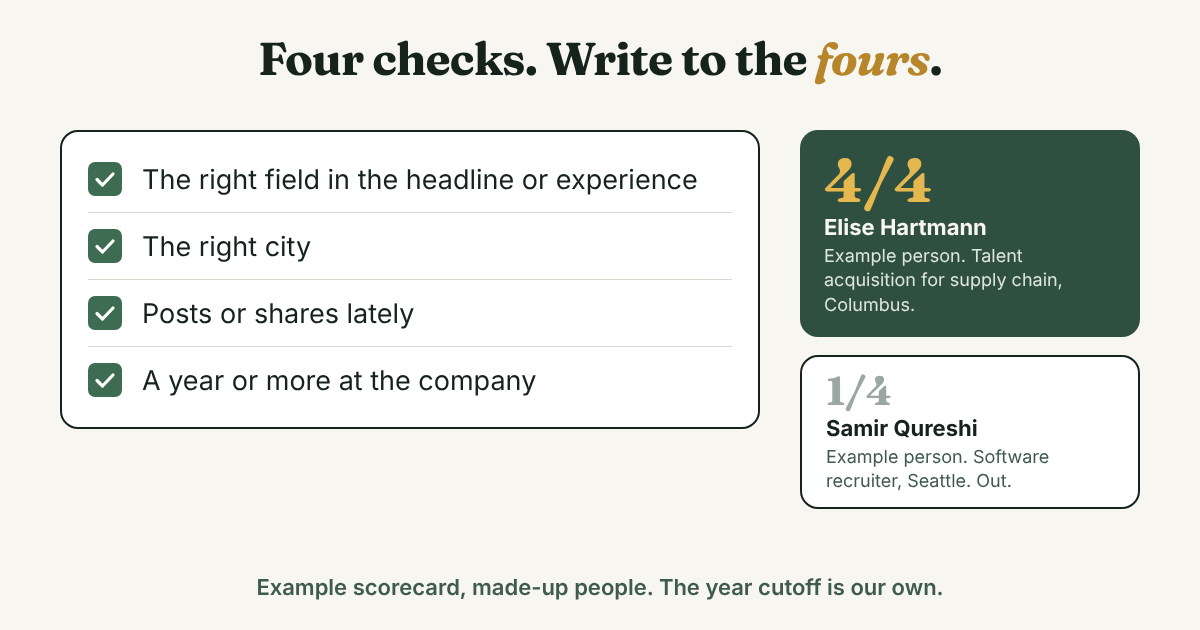
He scores each one on the four checks FrogHire lists: the right field in the headline or experience, the right location, recent posts, and time at the company. A year or more counts as a yes here, though that cutoff is ours, not FrogHire's. Elise gets four of four. Samir and Joanna get one each: Samir has been there a year but is in the wrong field and city, and Joanna is in the right city but her teams are unclear and she started three months ago.
Bao writes to Elise. Joanna stays on the list as a backup if Elise does not reply after one follow-up. Samir is out.
The check ignores job title and the size of someone's network. It asks only whether this person is likely to be working on your job.
What do you send: before you apply or after?
FrogHire gives a short pattern for each case. Before you apply, name the exact role, give one qualification, ask one question, and add the job link or the requisition number. After you apply, say that you already applied. Either way, follow up once after several business days. The Muse says about a week is fine and pestering can take you out of the running, so pick a date near a week and write it down.
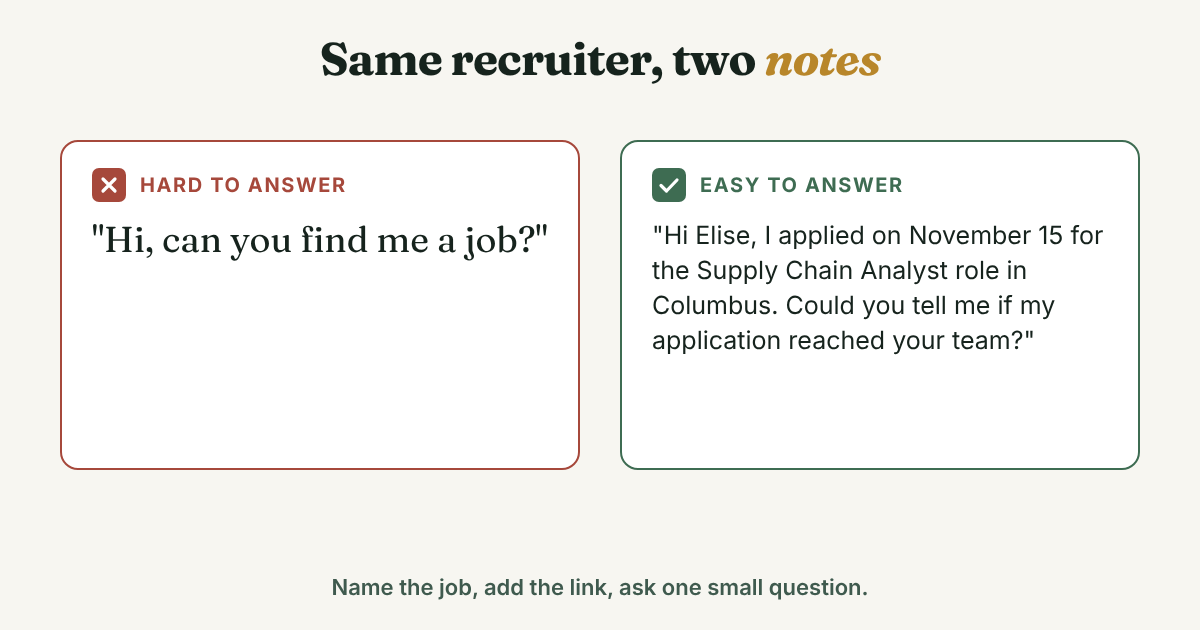
Do not ask a stranger to find you a job. Forage's advice for students is to leave out "hi, can you find me a job?" and give the role, a link and your resume instead.
After you applied (Bao's note to Elise, sent once she accepts his connection request):
Hi Elise, I applied on November 15 for the Supply Chain Analyst role in Columbus (link below). I spent two years on route planning at a regional carrier, so the job caught my eye. Could you tell me if my application reached your team? [job link]
Before you apply:
Hi [Name], I'm planning to apply for the [job title] role in [city] ([link or job ID]). I [one qualification, one line]. Is [one specific question, such as whether the role is open to people moving from another field]? Thanks either way.
The connection request itself is a separate, shorter message, and its length limit differs by source, so check your own invitation box. The four notes for a recruiter cover that step. When the recruiter goes quiet, the recruiter follow-up examples give you the wording for the second message.
What if no recruiter turns up?
Some companies have no recruiter on LinkedIn. Resume Worded says larger companies are more likely to have internal recruiters. Work down this list and stop when you find a person who fits:
- Try the other words. Forage suggests recruitment, talent acquisition and staffing when "recruiter" gives nothing. Add the field to each.
- Look for the hiring manager. FrogHire says to guess the title one or two levels above the job and search it inside the company. For a Supply Chain Analyst that might be a supply chain manager or a logistics lead. Great Resumes Fast (2015, updated 2022) says to use the advanced people search for that title and check whether the person is a first, second or third connection.
- Use someone you know. The same page says a first-degree connection at the company can tell you who the right contact is, and a second-degree connection can introduce you. It is the oldest source here, so check that the steps match your screen.
- Ask a team member or an alum. Ask one question about the team. Do not ask for a referral in the first message.
- Find an agency recruiter in your field. Forage gives this People search: "recruiter OR recruitment OR headhunter OR talent acquisition OR staffing," then add a specialty such as "technical." Remember that the company pays them, not you.
If none of these gives you a name in 20 minutes, apply anyway and move on. Come back to the search if the job is still open in a week.
What should you not do?
- Guessing work email addresses. Great Resumes Fast suggests finding the company's email pattern and sending an email. FrogHire's own tool builds "possible work email" addresses, and its page calls them unconfirmed. A guessed address can land with the wrong person. Use a LinkedIn message.
- Messaging every recruiter at the company. One well-matched person beats five random ones. The 2026 State of the Recruiting Industry report from Top Echelon, a survey sent to agency recruiters, says LinkedIn is still number one for quality candidates. A comment in it adds that members are getting "overtouched and less responsive." The report does not give the number of people who replied, so treat it as the view of one group of recruiters.
- Bots, scrapers and auto-message tools. You need three names, not three hundred. Skip any tool that sends messages for you.
- Writing before you have a reason. The Muse says to resist the urge to reach out the moment you identify someone. Know the job, know why this person, and know your one question first.
- Asking for a job in the first message. Ask about the application or the team.
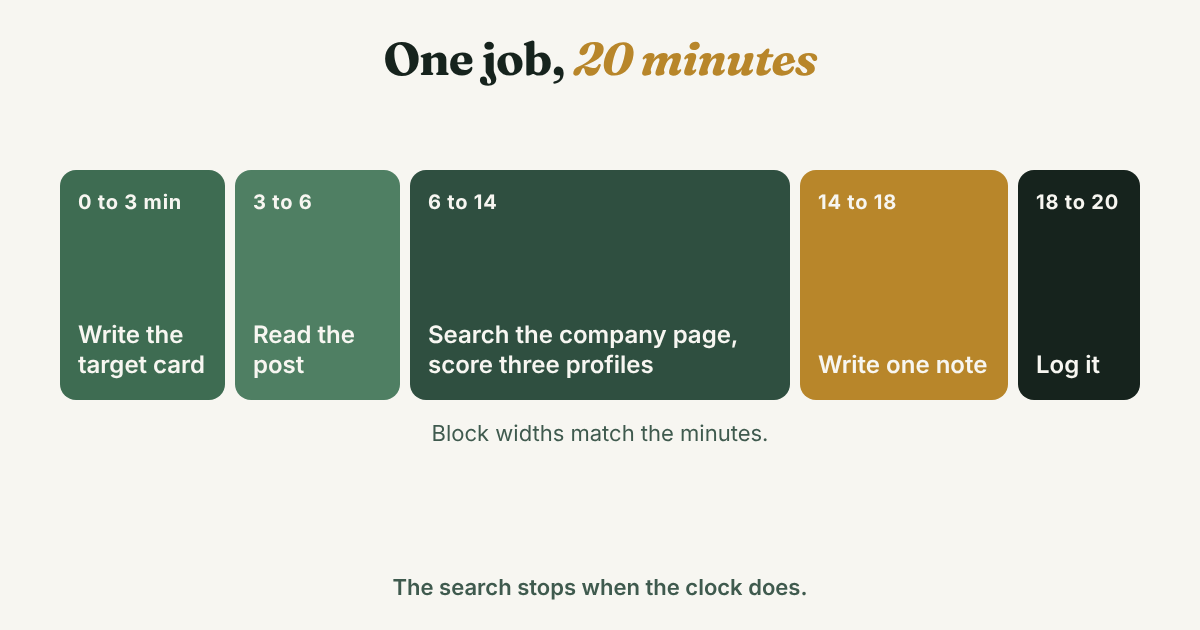
What does a 20-minute session look like?
Keep a clock next to you. A people search never runs out of results, so you need a stopping point.
- Minutes 0 to 3: write the target card. Five lines: company, exact title, field, city, level.
- Minutes 3 to 6: read the post. Check the hiring team box. Look for a line about contacting the company. Note any #LI- tag.
- Minutes 6 to 14: search the company page. Run two or three searches and open three profiles. Score each on the four checks.
- Minutes 14 to 18: write one note. Use the template for your case. Name the job and add the link.
- Minutes 18 to 20: log it. One line per person, with the follow-up date.
How do you keep track of who you wrote to?
A job search quickly means several recruiters at several companies. Write one line for each person:
[Name] · [role, company] · [which job, link] · [why you picked them] · [date sent] · [follow-up date]
For Elise: Elise Hartmann · talent acquisition partner, Brightwater Logistics · Supply Chain Analyst, Columbus · field and city match, posted about hiring last month · sent Nov 18 · follow up Nov 25.
Full disclosure: we make GrowthSeeded, a simple follow-up tracker for LinkedIn. It does not search for recruiters or read job posts. You add the people you want to stay in touch with, and each day it tells you who to message, so you don't forget to follow up. You send every message yourself. If you only wrote to one or two people, a note on your phone will do. It gets harder around the fifth or sixth recruiter, when the dates blur.
If a recruiter does help, keep the connection warm before you need them again. The guide to networking with recruiters covers how.
FAQ
How do I find the recruiter for a specific job on LinkedIn?
Open the job post and look for a hiring team box under the description. If it is not there, open the company page, click People, and search "recruiter" or "talent acquisition" plus your job's field and city. Open three profiles and write to the one whose work matches your job.
Can I see who posted a job on LinkedIn?
Sometimes. Career guides say a "Meet the hiring team" section may show the recruiter or hiring manager, and a Personio community post says LinkedIn only occasionally names the recruiter. Tellent Recruitee says the poster's email is not shown to candidates. If no name appears, search the company page.
What titles should I search for?
Recruiter, recruiting, recruitment, talent acquisition, staffing and human resources. Add your field, such as "talent acquisition logistics," and your city. For agency recruiters, add "headhunter" and a specialty.
Do I need LinkedIn Premium to find a recruiter?
None of the guides we read says you need Premium to find a recruiter's profile or to search a company's People tab. Whether you can message someone you are not connected to is a different question, so check what your own screen offers. A connection request with a short note is the usual first step.
Should I message a recruiter before or after I apply?
Both can work. FrogHire gives a pattern for each: before you apply, ask one specific question about the role, and after you apply, say you already did. Follow up once after about a week.
How many recruiters at one company should I write to?
Start with one. If there is no reply after your follow-up, you can try a second person whose work also matches your job. No source gives a number, so the rule is fit first, count second.
Do this today
- Pick one job you applied to or plan to apply for, and write the five-line target card.
- Check the post for a hiring team box. If it is empty, search the company's People tab for "recruiter" plus your field and city, and score three profiles.
- Send one note to the best match and write the follow-up date, about a week out, in your log.
Writing to one recruiter now and two more next week? Add each person to GrowthSeeded, a simple follow-up tracker for LinkedIn, with the job you asked about and a short reason. Each day it tells you who to message, so you don't forget to follow up. You send every message yourself, and it never connects to your LinkedIn account. The Free plan holds 5 active people at a time.
Sources
- LinkedIn Research: Talent 2026, LinkedIn Pressroom, January 2026
- 2026 State of the Recruiting Industry Report, Top Echelon, 2026
- Headhunters, Recruiters, and Hiring Managers: What's the Difference?, The Muse, 2020
- Agency and In-House Recruiters and How to Work With Them, National Résumé Writers' Association, 2026
- Posting jobs on LinkedIn Basic Jobs, Tellent Recruitee Help Center, 2026
- How to Find the Recruiter for a Job Posting on LinkedIn, FrogHire, July 2026
- How to Find and Reach Out to Recruiters on LinkedIn, Jobscan, 2023, updated 2026
- How to Find and Reach Out to Recruiters on LinkedIn, Shippensburg University Career Center, republished from Forage, 2022
- Make The Most of LinkedIn With These Strategies For Finding Recruiters, Resume Worded, 2021
- Who Posted That Job on LinkedIn? How to Find the Right Contact Person, Great Resumes Fast, 2015, updated 2022
- How to "Hack" Job Postings to Uncover Recruiter Information, EntertainmentCareers.Net, updated May 2026
- How to automatically add recruiting team to LinkedIn postings, Personio Community, checked 2026
About the author
Anisur Rahman Fagun is a marketing and content strategist with more than 9 years of experience in SEO, content, paid advertising and brand growth. He holds a master's degree in mass communication and journalism, and has led content and SEO strategy, built editorial teams and worked with product, design and sales teams. He also builds simple tools that turn marketing data into clear decisions. He writes the GrowthSeeded blog, which shares practical ways to build professional relationships on LinkedIn.