LinkedIn basics
Best LinkedIn CRM: Pick by Job, Then Score Your Top Two
18 min read
Key takeaways
- There's no one best LinkedIn CRM. The right pick depends on who uses it, how LinkedIn details get in and what you need to see each morning.
- A "from" price can mislead. Salesflare's help article shows $29 a user a month on annual billing and $39 on monthly billing for the same Growth plan.
- Check three pass or fail points before you compare features: nothing sends without you, your plan includes LinkedIn capture, and you can export your notes and dates.
- Score two tools on the same five people. In the worked example below, one extra line for team ownership changes the winner.
Short answer: The best LinkedIn CRM is the one that fits your job. If you mostly forget to follow up, try a spreadsheet or simple follow-up tracker. For a large personal network, look at Dex. For a small sales team, trial folk or Salesflare. Already have a CRM? Add LinkedIn capture to it.
In this article
- Why do "best LinkedIn CRM" lists disagree?
- Which job do you need the tool to do?
- What do these tools cost, and how do LinkedIn people get in?
- Which tool should you try first?
- What should you check before a tool touches your LinkedIn account?
- How do you score two tools in one hour?
- What does a finished scorecard look like?
- What will the first year cost?
- When is a new CRM the wrong buy?
- Can a follow-up tracker pass the same test?
- FAQ
- Do this today
You have six tabs open. Each one ranks a different tool first. One says $29, another says $39, and you still don't know which one will help you answer the person who wrote to you last week.
Start with the job, then check the price at the source, then test two tools with real people. This post gives you a shortlist, today's vendor prices and a scorecard you can copy. If you're still unsure what belongs in a record, read the LinkedIn CRM guide on fields and setup first, because every test below uses those basics.
Why do "best LinkedIn CRM" lists disagree?
Look at who wrote the list. folk's ranking of five tools, last updated June 24, 2026, puts folk first. Breakcold's list of nine, updated September 14, 2026, is written by its co-founder and puts Breakcold first. Expandi's list of 15 comes from a company that sells LinkedIn automation, and it suggests pairing a CRM with that kind of tool. A vendor can still give useful facts. But none of the three gives you a scorecard you can run again with your own people.
Prices are the other problem. Here's what turned up on November 26, 2026:
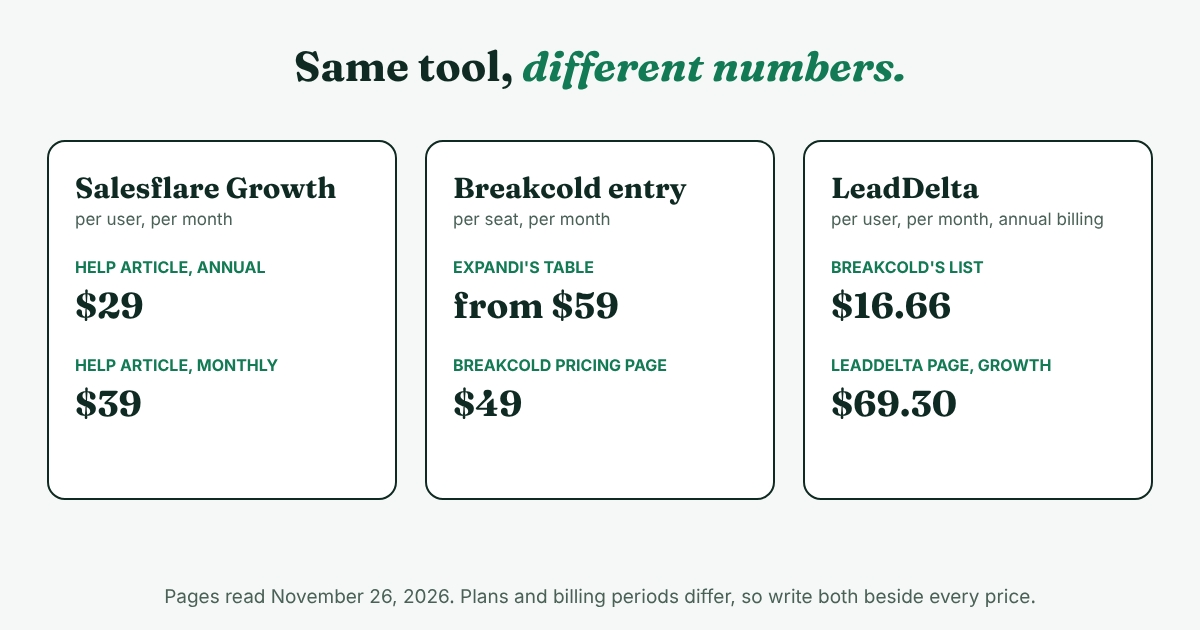
- Salesflare Growth. Expandi shows "from $29" in its table, while its text says from $39 billed annually. Salesflare's own help article, last updated January 15, 2026, says $29 a user a month billed annually and $39 billed monthly.
- Breakcold. Expandi's table says from $59. Breakcold's pricing page starts at $49 a seat a month.
- LeadDelta. Breakcold's list gives $16.66 a month on annual billing. LeadDelta's pricing page showed its Growth plan at $69.30 a user a month, billed yearly.
Some of these gaps may come from plan changes after an article went up. Either way, the fix is the same. Take names from lists, and take prices from the vendor. Write down the date, the billing period and the plan name beside each number.
Watch the timing too. On November 26, Breakcold's pricing page and LeadDelta's homepage both showed Black Friday offers on yearly plans. Compare the regular price, and ask what you'll pay at renewal.
Which job do you need the tool to do?
CRM means customer relationship management. In practice, people who search for a LinkedIn CRM often want quite different things. Pick the sentence that sounds most like you:
- I forget to follow up. You work alone. You need a name, a reason, a next date and a list of who's due.
- I want to remember my network. You have thousands of connections and want their job changes and your history in one place. This is often called a personal CRM.
- My small team sells. Two to ten people need shared records, one owner per person and deal stages.
- My company already has a CRM. The records exist. The missing part is getting LinkedIn people and notes into them.
- I live in Sales Navigator. You need saved people, account alerts and, perhaps, a link to the company CRM.
If two sentences fit, choose the one that costs you more when it fails. A founder who tracks 20 investors and loses track of replies has a follow-up problem, even if a pipeline board looks nice. Not sure you need a CRM at all? These four questions about CRMs and LinkedIn follow-ups take a few minutes.
Then list the LinkedIn contact management features you'd use every week. For most people it's a short list: add a person fast, keep a note, set a next date and see who's due. Anything else can wait until you miss it.
What do these tools cost, and how do LinkedIn people get in?
The prices below are the dollar figures shown on vendor pages or help articles, checked on November 26, 2026. Prices, plan names and offers change, so open the page before you decide. This is a shortlist, not every tool on the market. This blog belongs to a company that sells a follow-up tracker, covered near the end, so test the picks yourself.
folk
- Price: the folk pricing page showed Standard at $24, Premium at $48 and Enterprise at $80 a user a month. Enterprise is annual only. The page advertises 20% off for paying yearly, so confirm the monthly figure at checkout. There's a 14-day trial with no card.
- LinkedIn way in: the folkX Chrome extension is on all three plans. folk's Sales Navigator help article says you can add up to 25 contacts at once from search results.
- Watch for: Standard shows only the last 30 interactions per contact. Full history is on Premium.
Salesflare
- Price: Growth is $29 a user a month on annual billing or $39 monthly. Pro is $49 or $64. Enterprise is $99 or $124.
- LinkedIn way in: a Chrome extension shows a side panel on profiles. Salesflare's LinkedIn help article shows you adding people yourself, and says you can copy LinkedIn messages over as internal notes. Finding a business email uses credits.
- Watch for: don't assume your LinkedIn chats will appear by themselves.
Pipedrive
- Price: the Pipedrive pricing page showed Lite at $14, Growth at $39, Premium at $59 and Ultimate at $79 a seat a month, billed annually, before VAT. There's a 14-day trial with no card.
- LinkedIn way in: add an app from another company. The Surfe listing in Pipedrive's marketplace describes one-click contact adding and LinkedIn message sync. LinkMatch's listing describes profile import and message sync.
- Watch for: the app has its own terms and may have its own bill. The guide to connecting LinkedIn and Pipedrive walks through the routes.
HubSpot
- Price: HubSpot's CRM pricing page says its free tools are free for up to two users, with no card.
- LinkedIn way in: HubSpot's Sales Navigator card is not part of that free setup. HubSpot's card guide, updated November 3, 2026, requires a Sales Hub Professional or Enterprise seat and Sales Navigator Advanced Plus.
- Watch for: the same guide says you can't import contacts from LinkedIn through that card.
Breakcold
- Price: X1 is $49, X5 is $99 and X20 is $199 a seat a month. The 14-day trial asks for a card.
- LinkedIn way in: each seat includes two connected accounts, and LinkedIn can be one. Breakcold's list describes automatic sync.
- Watch for: the pricing page says you approve every send and "nothing sends without you." Confirm that in your trial, and ask exactly which messages sync.
LeadDelta
- Price: the Growth plan showed $69.30 a user a month, billed yearly as $831.60. There's a 7-day trial with no card.
- LinkedIn way in: its homepage describes importing every LinkedIn connection in one click, plus a sidebar for adding people from profiles and searches.
- Watch for: the pricing page also lists unlimited LinkedIn and email sequences, while the homepage says "No bots, no spam." Before you pay, ask who or what sends each LinkedIn step.
Dex
- Price: the Dex pricing page lists Premium at $12 a month billed annually or $20 monthly, and Professional at $20 or $34. The 7-day trial needs a card, and there's no permanent free plan.
- LinkedIn way in: a sync, with up to 2,500 connections on Premium and 9,000 on Professional. Dex's LinkedIn sync article says you set it up in the desktop or mobile app. It refreshes about daily while the desktop app runs, and about every two days when it isn't running.
- Watch for: count your connections first. Dex also lists keep-in-touch reminders.
Sales Navigator
- Price: LinkedIn's plan page, updated September 27, 2026, showed Core at $119.99 a month or $1,079.88 a year per license. Advanced was $159.99 or $1,799.88. Advanced Plus is quoted on request.
- What it does: LinkedIn's product page describes saved people, notes on lead and account pages, and alerts when a saved person changes job or role.
- Watch for: that page lists creating CRM records and advanced CRM integrations as Advanced Plus features. For Salesforce teams, first work out which LinkedIn Salesforce integration you mean.
Which tool should you try first?
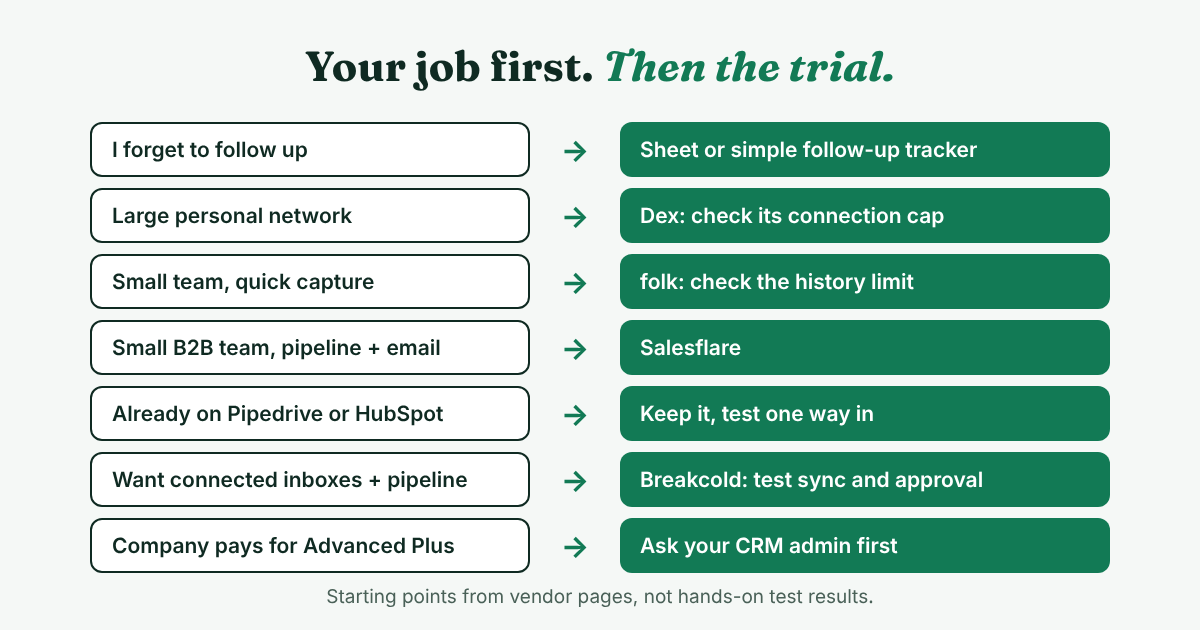
These are starting points for a trial, drawn from vendor pages. They aren't results from hands-on testing, so let your own scorecard make the final call.
- You work alone and forget: a spreadsheet with a due-today filter, or a simple follow-up tracker. Add a CRM when you need deal values or stages.
- You have a large personal network: Dex, if its connection cap covers you and you're happy to run its app.
- Your small team needs quick profile capture: folk. Check whether 30 past interactions is enough, or price Premium instead.
- Your small B2B team wants pipeline and email together: Salesflare. Test how much typing a LinkedIn conversation takes.
- You already run Pipedrive or HubSpot: stay where you are. Test one way of getting LinkedIn people in before you think about moving.
- You want connected inboxes beside the pipeline: Breakcold. Test the sync and the approval step with a few conversations.
- Your company pays for Sales Navigator Advanced Plus: ask your CRM admin what's already included before you add another tool.
Pick two, not five. One should be the plainest option that could work, even if that's your current spreadsheet. It gives the paid tool something honest to beat.
What should you check before a tool touches your LinkedIn account?
A tool can read a profile when you click, sync data in the background or act on LinkedIn for you. Those are different things, and a sales page may not make the line obvious. Ask these questions in writing:
- Does anything go out on LinkedIn that I didn't write and send? This includes requests, messages, comments and profile visits.
- Do you need my LinkedIn password or a signed-in browser session?
- Does it run when I'm away from my computer?
- Which data does it copy, how often, and where is it stored?
- What happens to that data when I cancel?
Before you install anything, read LinkedIn's User Agreement and its Help page on prohibited software and extensions. A vendor's "safe" label doesn't replace those rules. A listing in a CRM company's marketplace isn't a statement from LinkedIn. If a setup sends or clicks for you, skip it. Here's why automating LinkedIn activity is a bad trade, and what to do by hand.
How do you score two tools in one hour?
A demo shows the vendor's tidy data. Your trial should use yours. Pick five real people with something open: one new connection, one who owes you a reply, one you owe, one past client and one you should stop chasing.
Step 1: Run the three gates
Any "no" removes the tool, however good it looks.
- Gate A: nothing goes out on LinkedIn unless you write it and send it.
- Gate B: the plan you'd pay for includes the LinkedIn capture you plan to use.
- Gate C: you can export names, notes and next dates.
Step 2: Spend 30 minutes in each tool
- Minutes 0 to 5: check the three gates on the pricing and help pages. If the trial takes a card, put its end date in your calendar.
- Minutes 5 to 15: add your five people. Time the first and the fifth. Add one of them twice and see if the tool warns you.
- Minutes 15 to 20: give each person a next date, or park them. Open the view that shows who's due.
- Minutes 20 to 25: ask a teammate to find what happened last with one person. Working alone? Take a break, then find it without searching your inbox.
- Minutes 25 to 30: export the five records, open the file and find the cancel button.
Step 3: Copy this scorecard
Score each line 1, 3 or 5, using 2 or 4 when it falls between. Multiply by the weight and add the results.
Each line below has a weight, what earns a 5 and what earns a 1.
- Adding a person (x2). 5: under a minute, with your reason. 1: more than three minutes.
- Seeing who is due (x3). 5: one click, oldest date first. 1: no dependable view.
- Finding history (x2). 5: the last event is on the record, and your plan keeps old ones. 1: you search another app.
- Learning it (x2). 5: a new person adds a record without help. 1: it needs a training session.
- First-year cost (x1). 5: no new spend. 1: hard to justify for this job.
- Team only: ownership (x3). 5: one clear owner, visible to all. 1: two people can easily write to the same person.
The top score is 50 for one person and 65 for a team. If two tools finish within four points, take the cheaper one. Change the weights before you start if your job differs. Changing them afterward only helps the tool you already liked.
Give ease of use real weight. In monday.com's 2025 sales technology report, a complicated interface tied for the top CRM challenge, named by 30% of respondents, and 25% named user adoption issues. The survey, run in October 2024, covered 500 sales leaders in the US and UK who used a CRM daily. monday.com sells CRM software, and the numbers don't tell you how any one tool will feel.
What does a finished scorecard look like?
Noor and Felix (an example, not real people) run a two-person translation studio. They compare Tool A, a small CRM with browser capture, with Tool B, a shared spreadsheet. The tools and scores are made up to show the math. Both pass all three gates.
- Adding a person (x2): A scores 5, so 10 points. B scores 3, so 6.
- Seeing who is due (x3): A scores 4, so 12. B has a working formula and also scores 4, so 12.
- Finding history (x2): A scores 4, so 8. B scores 2, so 4.
- Learning it (x2): A scores 3, so 6. B scores 5, so 10.
- First-year cost (x1): A scores 2, so 2. B scores 5, so 5.
- Ownership (x3): A scores 5, so 15. B scores 2, so 6.
Tool A finishes with 53 out of 65. Tool B gets 43. The 10-point gap is wider than four, so the team takes A. Most of the gap comes from ownership, where B lets both of them message the same client.
Now suppose Noor works alone. Remove the ownership line. A has 38 out of 50, and B has 37. They're one point apart, so she keeps the spreadsheet. The tools didn't change. The job did.
Write one sentence under your own total: "I chose this because..." If you can't finish it without listing features you haven't used, run the trial again.
What will the first year cost?
LinkedIn CRM software is usually priced per person, so work out the whole year before you compare. Use this line:
[seats] x [monthly price per seat] x 12, plus [required LinkedIn plan or app], plus [add-ons]
Two examples from the prices above:
- Two Salesflare Growth users on annual billing: 2 x $29 x 12 = $696. Two on monthly billing for all 12 months: 2 x $39 x 12 = $936.
- Two Pipedrive Growth seats on annual billing: 2 x $39 x 12 = $936 before VAT, before any paid LinkedIn app.
A per-seat price can be only part of the bill. HubSpot's Sales Navigator card needs a paid seat on both sides. Before you sign, ask for a written quote that names the plan, number of seats, billing period, renewal price and every add-on in your test.
When is a new CRM the wrong buy?
- Your list is short. If you can see everyone on one screen, a sheet with a next-date column may be enough.
- Your company already has a CRM. A second system splits the history. Agree on a few LinkedIn fields in the one you have.
- Nobody owns the upkeep. Name who checks blank next dates each week before you buy anything.
- You want it to write to people for you. That isn't a record problem, and automated sending is a reason to walk away.
Can a follow-up tracker pass the same test?
Full disclosure: we make GrowthSeeded, a simple follow-up tracker for LinkedIn. It tells you who to message each day, so you don't forget to follow up. It's not a complex CRM.
It's for the first job on the list: one person who forgets. You add someone and why they matter, write a note after each conversation, and the next step follows what happened, such as an accepted connection or a reply. You send every message yourself. It never sends anything and never connects to LinkedIn, so it adds no risk to your LinkedIn account.
Run it through the same three gates and scorecard. There's no LinkedIn capture or sync to test, so you add each person yourself. If one-click capture is essential, it fails Gate B. For Gate C, its security page says you can export everything to a spreadsheet at any time. Pick something else if you need deal values, a team pipeline or email sync. The pricing page, checked November 26, 2026, showed a free plan with 5 active people, up to 20 with invites. Pro is $15 a month and Max is $29 a month. The free plan doesn't include aiWrite, the paid writing feature. For another honest side by side, see folk compared with a simple follow-up tracker.
FAQ
What is the best LinkedIn CRM?
No single tool is best for every job. A solo user who forgets to follow up needs less than a sales team with shared accounts. Choose by job, remove any tool that fails your must-haves, then score two options with the same five people.
Is there a free LinkedIn CRM?
You can start free with a spreadsheet. HubSpot's pricing page also lists free CRM tools for up to two users, though its Sales Navigator card needs paid plans. Free trials of other tools are temporary, so check what happens to your data when one ends.
How do I choose a CRM for LinkedIn?
Write the one thing you need to see each day or week. Check how LinkedIn details get in, what your plan includes and what you can export. Test five real people, work out the first-year price and ask whether anything can send without you.
What is a personal CRM for LinkedIn?
It's a private system for remembering people, your history with them and when to check in. Dex is one product in this group and lists LinkedIn sync and keep-in-touch reminders. A well-kept spreadsheet can do a smaller version of the same job.
Which LinkedIn CRM features matter most?
Look for quick adding with your own note, a next date, a view of who's due, duplicate warnings, usable history and export. Teams also need one visible owner for each person. Add sync or pipeline features only if your weekly work uses them.
Do I need Sales Navigator to use a LinkedIn CRM?
Not for every setup. You can type records by hand with a free LinkedIn account. HubSpot's Sales Navigator card requires Advanced Plus. Other tools use their own extensions or syncs, so check the current requirement for the exact feature you want.
Do this today
- Circle your job from the five sentences above, and write the one view you need each morning.
- Pick two options, open their pricing pages and run the three gates. Note the date and billing period.
- Copy the scorecard, choose five real people and book one hour for the trial.
If your sheet or trial shows that forgetting is the whole problem, try those five people in GrowthSeeded. They fit on the Free plan, so you can score it beside your other pick. You'll type each person in, and you'll write and send each follow-up yourself.
Sources
- folk pricing, folk, checked November 26, 2026
- Import contacts from LinkedIn Sales Navigator with folkX, folk Help Center, checked 2026
- What is the cost to add a user to my Salesflare account?, Salesflare Help, updated 2026
- Can I use Salesflare with LinkedIn?, Salesflare Help, updated 2026
- Pipedrive pricing, Pipedrive, checked November 26, 2026
- Surfe app listing, Pipedrive Marketplace, checked 2026
- LinkMatch for Pipedrive app listing, Pipedrive Marketplace, checked 2026
- HubSpot CRM pricing, HubSpot, checked November 26, 2026
- Connect HubSpot and LinkedIn Sales Navigator, HubSpot Knowledge Base, updated 2026
- Breakcold pricing, Breakcold, checked November 26, 2026
- LeadDelta pricing, LeadDelta, checked November 26, 2026
- LeadDelta homepage, LeadDelta, checked November 26, 2026
- Dex pricing, Dex, checked November 26, 2026
- Sync LinkedIn, Dex Docs, checked 2026
- Sales Navigator plans and pricing, LinkedIn, updated 2026
- LinkedIn Sales Navigator, LinkedIn, updated 2026
- The state of sales technology 2025, monday.com, 2025
- The 5 best LinkedIn CRM in 2026, folk, 2026
- The 9 Best LinkedIn CRM Software in 2026, Breakcold, 2026
- 15 Best LinkedIn CRM Tools for 2026, Expandi, 2026
About the author
Anisur Rahman Fagun is a marketing and content strategist with more than 9 years of experience in SEO, content, paid advertising and brand growth. He holds a master's degree in mass communication and journalism, and has led content and SEO strategy, built editorial teams and worked with product, design and sales teams. He also builds simple tools that turn marketing data into clear decisions. He writes the GrowthSeeded blog, which shares practical ways to build professional relationships on LinkedIn.