Networking
LinkedIn Connection Request Message: 5 Examples to Edit
11 min read
Key takeaways
- A good note has three parts: a reason for writing, one detail that fits only that person, and a close that asks for nothing.
- Most sources we opened give 200 characters for a free account, and free accounts get only a few notes a month. Spend them on people where you have a real detail.
- Write it long, then cut. The greeting and the "I would love to" go first.
- We found no study that tested which words work. Treat every template, ours included, as a start you edit.
- Keep a copy of what you wrote. You will want it the day they accept.
Short answer: A good LinkedIn connection request message has three parts: why you are writing, one specific detail about that person, and a calm close with no ask. Keep it under 200 characters. If you cannot name a real detail, send the request blank and put your reason in the first message after they accept.
In this article
What should a connection request message say?
How long can a connection request message be?
How do you fit a good message in the box?
Which message fits your situation?
What should you leave out?
What do you do once someone accepts?
What do we not know?
FAQ
Do this today
What should a connection request message say?
Maya (an example, not a real person) opens the note box under a stranger's profile and types, "Hi, I came across your profile and would love to add you to my network." Then she stops. That line could go to anyone. It tells this person nothing about why Maya picked them.
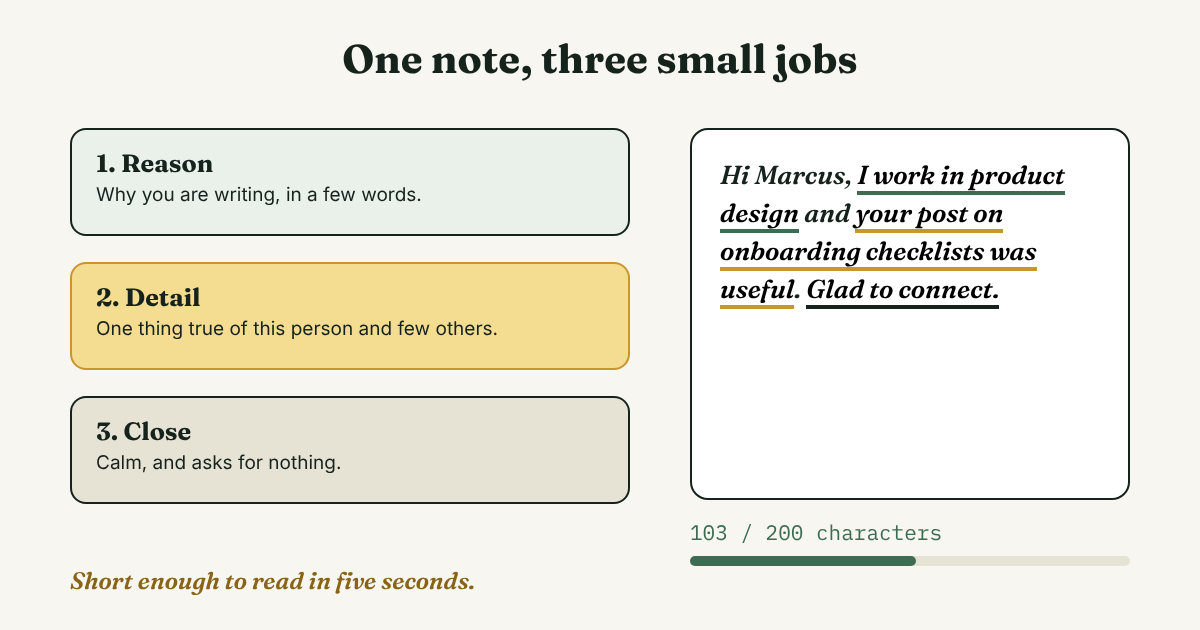
That is the problem with most notes. The words are polite, but they fit every request. A better note does three small jobs:
- Reason. Why you are writing, in a few words. "I work in [field]" or "I was at [event]."
- Detail. One thing that is true of this person and few others: a talk, a post, a project, a school you share.
- Close. A calm ending that asks for nothing, such as "Glad to connect" or "I'd like to stay in touch."
This frame is our suggestion, not a study result. It borrows from Careery, which calls the opening "specific plus curious," and from folk, which says to end softly. If you are still deciding whether to add a note at all, our guide to the LinkedIn connection request has a one-sentence test for it. This page is about the words once you have decided.
How long can a connection request message be?
Most of the sources we opened say 200 characters on a free account. HubLead, which cites LinkedIn's help page (checked September 19, 2026), gives 200 for every account and warns that older articles say 300. LinkedInsider says 200 free and 300 paid. Careery (January 2026) and an undated Boston University Questrom sample sheet still say 300. On November 5, 2026, we checked the note box on a profile with Sales Navigator, and it counted to 300 characters. We could not confirm the limit for other accounts, including free ones.
Free accounts also get a limited number of notes each month, and the sources disagree on how many. HubLead says three. Pettauer says five. LinkedInsider says roughly 5 to 10. After you use them, the request goes out without a note. LinkedIn's help pages block our tool, so we could not read the number ourselves. Check your own account before you plan around any of these figures.
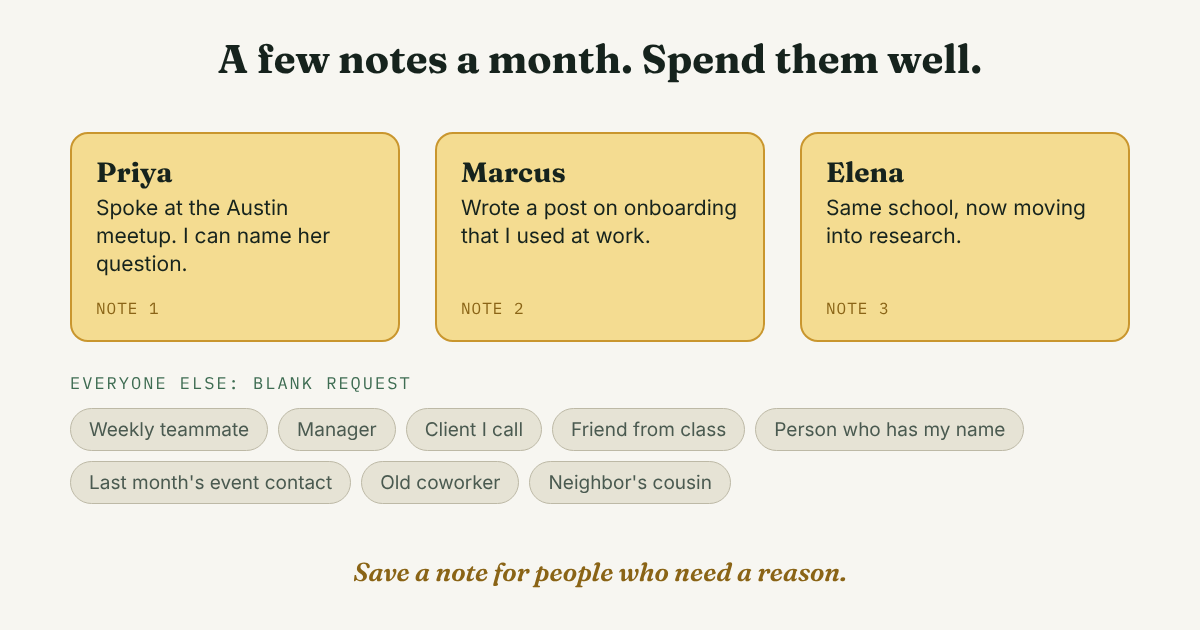
Spend your notes on the people who need one
- Use a note for someone who has never heard of you, or who may not place your name.
- Skip the note for a colleague you talk to every week, or someone you just met who has your name on a badge or a call invite.
Advice splits here. Cake says a blank request can look like spam, yet most requests in the Reachium data below went out blank. Pick by the person, not by a rule.
How do you fit a good message in the box?
Write it as long as you like. Then cut. Here is a note that is too long, with a real detail in it:
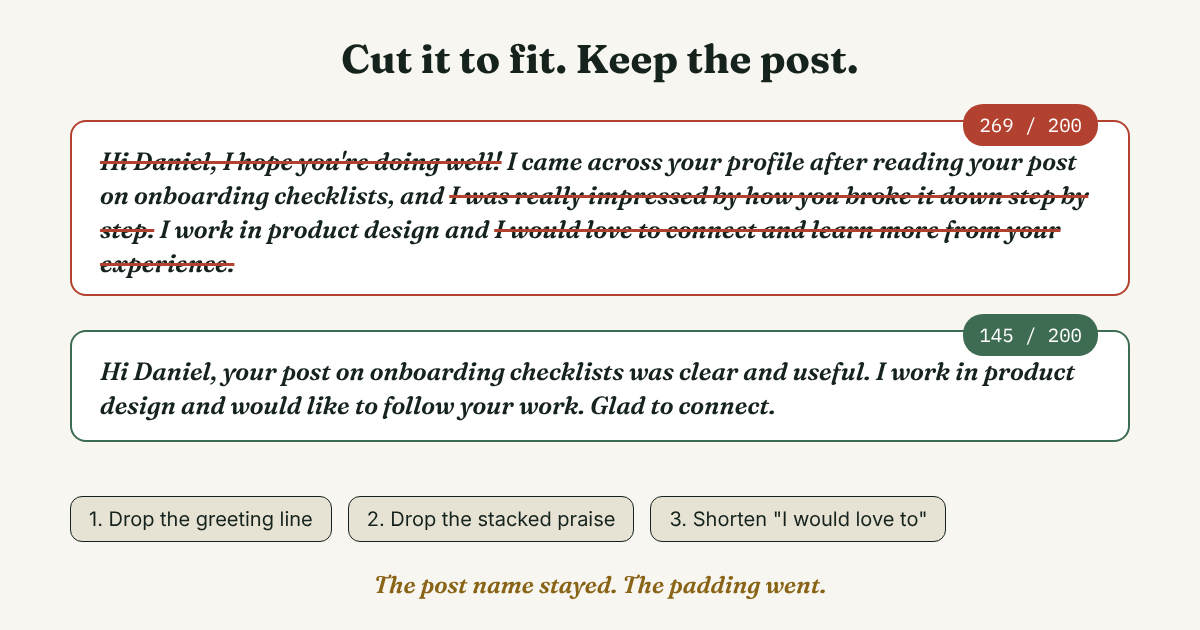
Hi Daniel, I hope you're doing well! I came across your profile after reading your post on onboarding checklists, and I was really impressed by how you broke it down step by step. I work in product design and I would love to connect and learn more from your experience.
That runs 269 characters, over the 200 limit. Here is the same note after three cuts:
Hi Daniel, your post on onboarding checklists was clear and useful. I work in product design and would like to follow your work. Glad to connect.
That is 145 characters. The cuts, in order:
- The greeting line. "I hope you're doing well" says nothing about him.
- The stacked praise. "Really impressed" and "step by step" tell Daniel less than the name of his post does. Keep the name of the post.
- "I would love to connect and learn more." It became "would like to follow your work," which is shorter and promises less.
What stayed: the post, your field, and a plain close. If a cut removes the detail, put it back and cut something else.
Try the swap test before you send. Imagine pasting your note into a request to someone else. If it still works, it is too general. Rewrite it, or send the request blank.
Which message fits your situation?
Five templates follow. Fill in the brackets, then check the length. With typical words filled in, each one ran between 112 and 154 characters when we counted. Change the wording so it sounds like you wrote it, because you did.
You heard them speak or met at an event
Hi [Name], I was in the room for your session on [topic]. The part about [one detail] was useful for my work in [field]. Glad to connect.
You read their post or article
Hi [Name], your post on [topic] answered something I was stuck on: [one thing]. I'd like to follow your work, so I'm connecting.
You share a school, group or employer
Hi [Name], I see we both studied [subject] at [school]. I now work in [field], and your move into [their field] caught my eye. Glad to be connected.
You know them from work or class
Hi [Name], it's [your name] from [team or class]. I'd like us to stay in touch now that we're in different places.
For someone who knows you well, this short version may be all you need, or you may skip the note.
You want to follow someone's career path
Hi [Name], I'm [your role] working toward [their kind of role]. I read how you moved from [A] to [B]. I'd like to follow your path.
None of these ask for a job, a call or a favor. The Boston University Questrom sample sheet says the same: never ask for a job in the request. Save your one question for the first message after they accept. For examples of that message, see our guide to what to send after someone connects. For tone with someone you know little, see our 4-part frame for a professional LinkedIn message.
What should you leave out?
- A pitch. LeadLoft sent 200 requests with a note and 200 without to Y Combinator founders from one profile over two weeks in 2023. 38 people accepted with the note and 72 without, which is 19% and 36%. The note was a casual, generic line, and it was a small test of sales outreach, so do not read it as a rule for everyone. It does show that a note can cost you if it says nothing.
- Flattery. "Really impressed by your background" is the same sentence for everybody. Name the thing you liked.
- One note for many people. Write each one for one person. We do not recommend bulk or automated requests, and we do not recommend tools that send them for you.
- A question that needs work to answer. A request is not the place for "Can we talk this week?" Ask after they accept.
Do notes help at all? Reachium, an outreach software maker, looked at 180,155 requests. Acceptance was 22.60% with a note and 27.66% without, but the three accounts it could compare against themselves disagreed, so the study calls that gap inconclusive. People who accepted a request with a note replied more often: 47.80% against 25.54%. Nobody was randomly assigned a note, so the note may not be the cause. Of the requests, 160,639 went out blank.
What do you do once someone accepts?
Your note made a small promise, such as "I'd like to follow your work." The first message after they accept should pick up that thread. A week later, the exact words are easy to lose, so save them next to the name. One line is enough:
[Name], [where I found them]. Note I sent: [paste it]. Sent [date]. Next: [first message by this date, or let go at 30 days].
Here is one filled in (not a real person): Tom, spoke at the Leeds design meetup. Note: asked about his onboarding checklist. Sent Nov 5. Next: if he accepts, thank him and ask which step was hardest.
Then follow through. Our guide to follow-up messages and when to send them covers the timing.
Full disclosure: we make GrowthSeeded, a simple follow-up tracker for LinkedIn. It tells you who to message each day, so you don't forget to follow up. You add the person and why you wrote to them, and the next step follows what happened, such as an accepted request or a reply. You send every message yourself. A notes app or a spreadsheet works fine if you send only a few requests a month.
What do we not know?
We have not tested note wording on a real account. We found no study that compared different words in a note. Reachium says it did not analyze note content, and it dropped note length from its results because each length band was dominated by one or two customers. The character limit and the monthly note count come from third-party sources that disagree, and LinkedIn's own help pages were not open to us. All the acceptance figures come from outreach software vendors and mostly describe sales, not job seekers.
FAQ
How many characters can a connection request message have?
Most sources we opened say 200 characters on a free account, and some older guides say 300. Check the box on your own account, since the limit and the number of notes you get each month can change.
Do I have to write a message with a connection request?
No. A blank request is normal, and most requests in the Reachium data had no note. Add one when you can name something specific about the person.
What if I have nothing specific to say?
Send the request blank, or spend two minutes on their profile to find a real detail. Put your reason in the first message after they accept.
Do this today
- Pick three people you want to ask this week.
- For each one, finish this sentence: "I am writing because [one specific thing about you]." If you cannot, plan a blank request.
- Write the first note, count it, cut it to fit, and save a copy next to the name.
Writing the note is half the job. Remembering what you promised in it is the other half. GrowthSeeded can keep the reason next to each name, and each day it shows you who to message. You send every message yourself, and it never sends anything or touches your LinkedIn account. The Free plan holds 5 people at a time.
Sources
- Do connection notes work? An analysis of 180,155 LinkedIn requests, Reachium, 2026
- Add notes with LinkedIn connection requests? We tested it, LeadLoft, 2023
- Should you add a note to a LinkedIn connection request?, LinkedInsider, 2026
- LinkedIn character limits 2026, HubLead, checked 2026
- Optional connection message limited for free accounts, Pettauer, 2023, updated 2026
- Sample connection requests by situation, Boston University Questrom, no date shown, checked 2026
- LinkedIn connection message examples: how to reach out to hiring managers, Careery, 2026
- LinkedIn connection messages, Cake, 2025
- LinkedIn connection request message template, folk, 2026
About the author
Anisur Rahman Fagun is a marketing and content strategist with more than 9 years of experience in SEO, content, paid advertising and brand growth. He holds a master's degree in mass communication and journalism, and has led content and SEO strategy, built editorial teams and worked with product, design and sales teams. He also builds simple tools that turn marketing data into clear decisions. He writes the GrowthSeeded blog, which shares practical ways to follow up and stay in touch with people on LinkedIn.