Networking
Sent Invitations on LinkedIn: Find Them, Then Decide
10 min read
Key takeaways
- Your sent invitations sit under My Network, then Invitations (or Manage), then the Sent tab. It lists only people who have not answered yet.
- Most people who accept do it fast. In a 2026 study of 152,636 contacts, 62% of connections happened in the first 24 hours and 91% by day 14.
- Withdrawing is quiet. The person is not told. But you cannot undo it, and you cannot invite the same person again for up to three weeks.
- If you leave a request alone, it expires after six months, and LinkedIn may remind the person up to twice.
- Write one line when you send each request, with a check date 14 days later. The Sent tab does not remember your reasons.
Short answer: Open My Network, then Invitations or Manage, then the Sent tab. It lists requests nobody has answered. Check it after two weeks, because 91% of the people who eventually connected in the largest timing study we found had done so by then. Withdraw only the people you have decided to let go.
In this article
Where do you find the invitations you sent?
How long should you wait before you call a request ignored?
Should you withdraw a request nobody has answered?
What do you do with requests nobody accepted?
How do you keep track so nothing slips?
What do we not know?
FAQ
Do this today
Where do you find the invitations you sent?
Sana (an example, not a real person) sent a dozen requests after a conference two weeks ago. Today she wants to know who said yes. Her notifications show a few accepts. They do not show who is still waiting, and she can't remember who she asked.
The answer is the Sent tab. It lives inside the page that holds your invitations. If you want the basics first, our guide to LinkedIn connection requests covers what a request is and when to add a note.
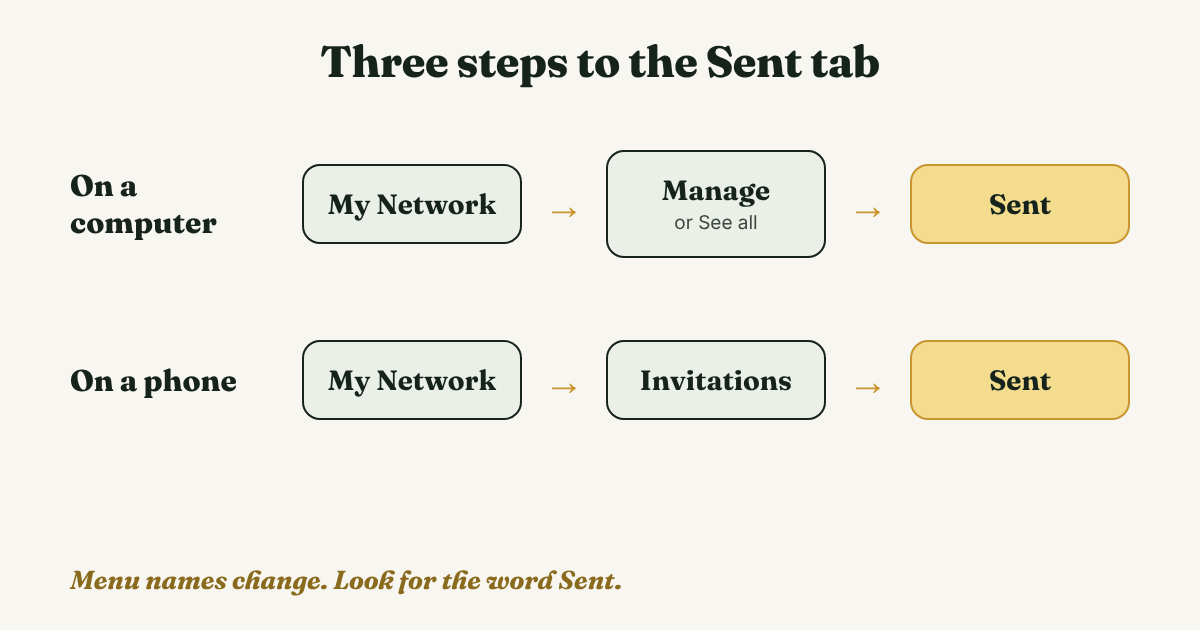
On a computer
- Click My Network in the top bar.
- Open the invitations page. Alphr (2022) calls the link Manage. Evaboot (2026) calls it See all.
- Choose the Sent tab. Evaboot says the page opens on Received, so you may need to switch.
On a phone
- Tap My Network.
- Tap Invitations.
- Tap Sent.
Alphr and Evaboot both say the Sent tab shows only people who have not responded. So it is a list of who is still waiting. It does not tell you what happened to the rest. For that, look at your connections list.
Menu names differ between sources, and LinkedIn changes the layout now and then. If your screen looks different, look for the word Sent.
How long should you wait before you call a request ignored?
Guides do not agree. LexBlog (2020, updated 2021) says two weeks. Kondo (2025) says one to two weeks for fast networkers, a month as a general rule, and 60 days for sales. Evaboot says 30 days in one place and 60 in another. None show data for their number.
Two studies do show timing:
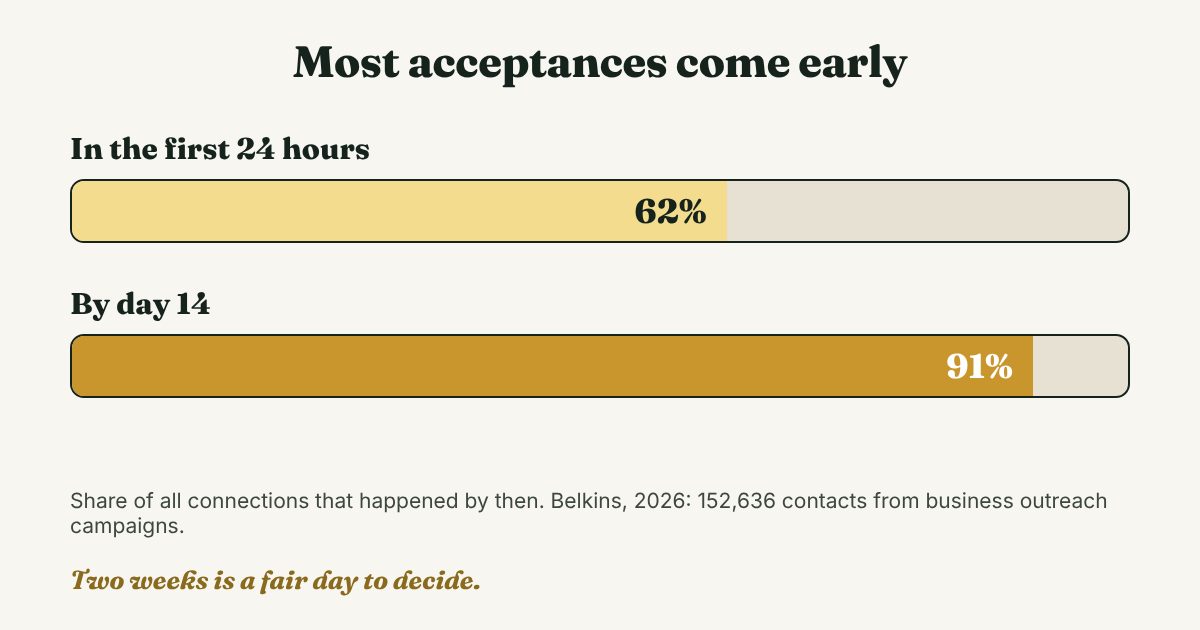
- Belkins (2026) looked at 152,636 contacts from 53 of its client campaigns, sent between March 2025 and February 2026. The median time to connect was one day. More than 62% of connections happened within 24 hours. The study says that by the two-week mark, 91% of everyone who will ever connect has already done so. Seniority did not change the median.
- BotDog, through an Indie Hackers post (2024), looked at 16,492 invitations sent in May 2024. Of the ones accepted, 63% were accepted within a day, 88% within a week and 99% within 30 days. Overall, 37% were accepted.
Both samples come from sales outreach, and both companies sell outreach services or tools. We do not recommend automation or mass sending. We use these numbers only for timing, and your own contacts may behave differently.
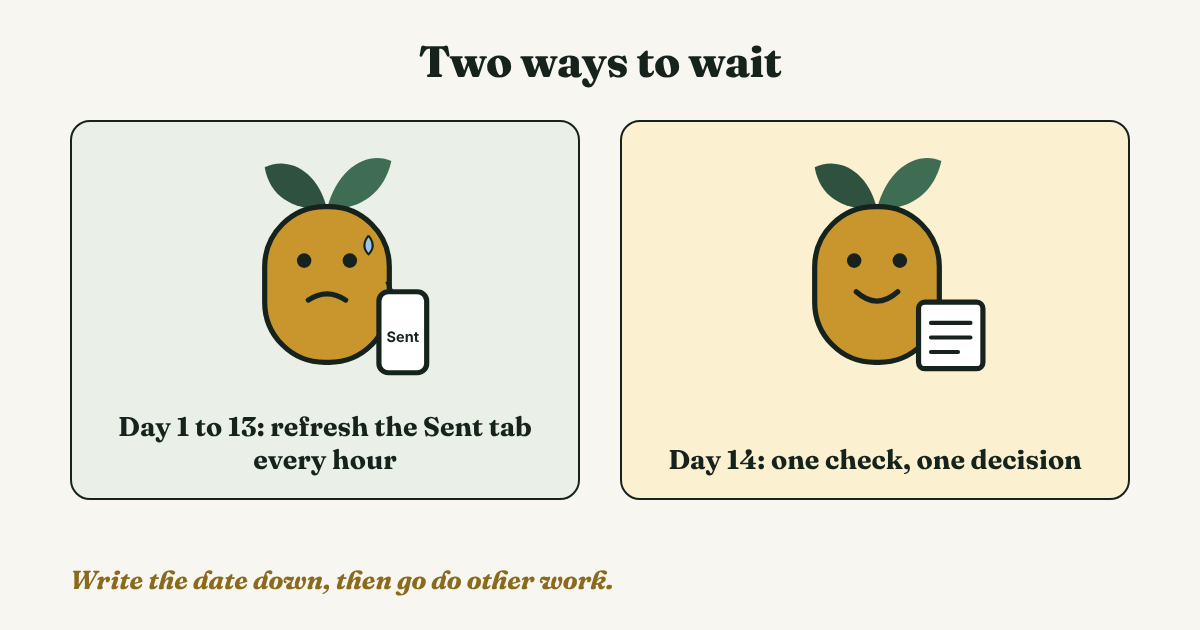
Our reading: two weeks is a fair point to decide. By then most of the people who will accept already have, so waiting longer rarely changes the answer. That is our reading of two studies, not a LinkedIn rule. Write the date, 14 days after you send, next to each name.
Should you withdraw a request nobody has answered?
Here is what is known. Linked API (checked 2026) quotes LinkedIn's help pages on all of it:
- The person is not told when you withdraw. LexBlog says the same.
- A withdrawn request cannot be restored.
- You cannot invite the same person again for up to three weeks.
- A request you leave alone expires after six months, and LinkedIn sends up to two reminders to the person before then. LexBlog adds that withdrawing stops those reminders.
So the choice depends on the person.
Withdraw when it was a typo, the wrong person, someone you no longer want to contact, or a note that now reads badly. Leave it when you would still be glad to connect. The request is not dead. It sits in front of them until it expires.
There is one reason to tidy up. Linked API quotes a LinkedIn page that lists "Many of your invitations have been ignored, left pending, or marked as spam by the recipients" among the reasons an account can be restricted. A long pile of old requests is worth clearing. A handful is not a worry.
Kondo says to space out withdrawals. We could not confirm that with LinkedIn. Do it by hand, one person at a time, and never with a tool.
What do you do with requests nobody accepted?
The rule we suggest is one follow-up, then let it go. You pick which one.
- Show up in public once. Follow the person and leave one comment that adds something to a post of theirs. Kondo notes you can still follow and engage with public posts after a withdrawal.
- Send one new request, later. If you withdrew, wait the three weeks. Then write a note with a real detail. Our guide to the note shows how.
- Use another channel, if they gave you one. Belkins suggests moving to a different channel after two weeks, such as email. Use only one the person gave you, or lists for work. Do not hunt for a private address.
A second request can mention the first:
Hi [Name], I sent a request a while ago and it may have been buried. I still read your posts on [topic], and [one detail]. Glad to connect if it makes sense.
Then stop. Belkins says that past day 60, repeating the same steps brings little return. When someone does accept, send your first message within a few days. This guide to follow-up messages covers what to write and when.
How do you keep track so nothing slips?
The Sent tab shows names. It does not show why you asked or what you planned to do next. Two weeks later, that is the part you have lost. So write one line when you send each request:
[Name], [where I found them]. Why I asked: [one reason]. Sent [date]. Check on [date plus 14 days]. If still waiting: [leave it, withdraw, or one new note].
Here is one filled in (not a real person): Ines, organizer of a product meetup in Lisbon. Why I asked: I want to ask about next spring's event. Sent Nov 5. Check on Nov 19. If still waiting: follow her page and comment once, then let it go.
Once a week, open the Sent tab with your lines next to it. Anyone past their check date gets one decision.
Full disclosure: we make GrowthSeeded, a simple follow-up tracker for LinkedIn. It tells you who to message each day, so you don't forget to follow up. You add the person and why you wrote to them, and the next step follows what happened, such as an accepted request or a reply. You send every message yourself. A notes app or a spreadsheet works fine if you send only a few requests a month.
What do we not know?
- LinkedIn's own words. We could not open LinkedIn's help pages. The three-week wait, the six-month expiry and the restriction wording come from Linked API, which quotes them. Menu names differ between sources.
- The cap on pending requests. Sources disagree. Kondo says 500. Evaboot says roughly 3,000 and gives no source. Linked API says LinkedIn does not publish a number. We give none.
- Whether withdrawing helps your account. We found no source that tested it.
- Timing for your own contacts. Both studies cover sales outreach, and one is a single tool in a single month. Your contacts may answer faster or slower.
FAQ
Does the person know when I withdraw a LinkedIn invitation?
No. LinkedIn does not notify them, according to Linked API, which quotes LinkedIn's help page, and LexBlog. If they open the Invitations page later, the request is simply gone.
How long does a LinkedIn invitation stay pending?
Six months, according to a LinkedIn FAQ quoted by Linked API. Before that, LinkedIn sends up to two reminders. After it expires, the request no longer shows as pending, and you can send a new one.
Can I resend an invitation after I withdraw it?
Not to the same person for up to three weeks, according to LinkedIn's help page as quoted by Linked API. After that you can send a new one.
Is there a limit on pending invitations?
Probably, but sources disagree on the number, and we could not confirm any with LinkedIn. What LinkedIn does list, as quoted by Linked API, is that leaving many invitations pending can lead to a restriction. Keep the list tidy.
Does the Sent tab show people who accepted?
No. Alphr and Evaboot both say it shows only people who have not responded. Look for accepted people in your connections list.
Do this today
- Open the Sent tab and count how many requests are waiting.
- Write one line for each: who, why, the date you sent it, and a check date 14 days later.
- Pick one request older than two weeks and decide: leave it, withdraw it, or plan one new note in three weeks.
A list of sent requests only tells you who is waiting. GrowthSeeded keeps the reason and the date beside each name, and each day it shows you who to follow up with. You send every message yourself, and it never sends anything or touches your LinkedIn account. The Free plan holds 5 people at a time.
Sources
- How to view pending connections in LinkedIn, Alphr, 2022
- How and why you should withdraw some LinkedIn connection requests, LexBlog, 2020, updated 2021
- LinkedIn pending invitations: how to see, withdraw, and manage them, Linked API, checked 2026
- Should I withdraw unaccepted LinkedIn connection requests?, Kondo, 2025
- How to see pending connections on LinkedIn, Evaboot, updated 2026
- LinkedIn response time study, Belkins, 2026
- How long does it take for LinkedIn invitations to be accepted on average? Our study on 16,492 invitations, BotDog, via Indie Hackers, 2024
About the author
Anisur Rahman Fagun is a marketing and content strategist with more than 9 years of experience in SEO, content, paid advertising and brand growth. He holds a master's degree in mass communication and journalism, and has led content and SEO strategy, built editorial teams and worked with product, design and sales teams. He also builds simple tools that turn marketing data into clear decisions. He writes the GrowthSeeded blog, which shares practical ways to follow up and stay in touch with people on LinkedIn.