Networking
How to Ask for an Introduction on LinkedIn: Ask the Mutual First
17 min read
Key takeaways
- Write to your mutual connection first, not to the person you want to reach. Ask if they are open to an introduction, and give them an easy way to say no.
- Check that the mutual really knows the person. Overlapping jobs, a recommendation or a shared project are quick signs. If the link is thin, ask for a forward instead of a vouch.
- Put a short blurb in your note that your mutual can paste and send. It saves them the work of explaining who you are.
- Ask in plain words. A 2008 study found that people say yes more often than askers expect, and that a direct ask works better than a hint.
- Thank them the same day, tell them how the first conversation went, and send one reminder after about a week if you hear nothing.
Short answer: Message your mutual connection first. Name the person you want to reach and one specific reason, ask whether they are open to introducing you, and add a short blurb they can forward. Wait about a week, send one reminder, then move on. Thank them either way.
In this article
Should you ask for an introduction, or write to the person yourself?
Does LinkedIn still have an introduction button?
How do you check that your mutual really knows the person?
What do you send your mutual connection?
What does the full exchange look like?
How long do you wait, and what if the answer is no?
How do you thank them and close the loop?
Which mistakes make people say no?
What do you write down once you hit send?
FAQ
Do this today
Should you ask for an introduction, or write to the person yourself?
Lucia (an example, not a real person) is a product designer. She wants 15 minutes with a design lead who runs a design systems team. She finds his profile, and LinkedIn shows one mutual connection: Hamza, a former coworker. She types, Hi Hamza, can you introduce me to Naveen? Then she stops. Does Hamza know Naveen well? What would he say to him? Will it look like she is using him?
Those three doubts are the whole problem, and you can settle each one before you send anything. This post gives you the check, the message, a full example and a timeline. If you are still looking for the person, the guide to finding people on LinkedIn matches each clue you have to a place to look.
First, is an introduction the right tool? Use this as a rough guide. It is our own rule, not a study result.
- Ask for an introduction when the person is busy and probably ignores strangers, your mutual knows them well enough that their word counts, and your ask is bigger than one question: a 15-minute call, advice on a move, a referral.
- Write to the person yourself when your mutual barely knows them, your ask is one small question, or you already share something with the person, such as a school or an event. The notes for writing to a stranger and the guide to the connection request cover that case.
Many people hold back because asking feels like a burden. In a set of studies written up by Stanford Graduate School of Business in 2008, people trying to get strangers to say yes overestimated by 50 percent how many people they would have to ask. The researchers say askers miss the pull of social obligation that the person being asked feels. The helpers also said they were more likely to say yes when asked point blank than when given a hint. The studies used campus tasks and charity fundraising, not introductions, so read this as a reason to ask plainly, not as a promise.
You may see claims that warm introductions get 30 to 40 percent replies. The page that says so is a vendor blog that sells introduction tools, and it does not say where the figure comes from, so we left it out. None of the sources we opened compares introductions with direct messages on LinkedIn.
Does LinkedIn still have an introduction button?
Older guides tell you to click "Get introduced" on a second-degree profile. LinkedIn's own Sales Solutions blog (2018) and a Dummies chapter (2016) describe it. A HuffPost UK piece, which shows no date, reports that LinkedIn removed introduction requests to third-degree connections and took the option off the profile page for second-degree ones. An August 2026 article from an introductions vendor says there is no introduction button on a profile today.
Look at the profile in front of you. If you see a button, the message advice below fits its note box. If you do not, nothing is lost. Your mutual is already your connection, and the same August 2026 article says you can message your own connections for free. LinkedIn's Help pages do not open for our tools, so check the current rules on LinkedIn yourself. The plan in this post is an ordinary message and does not depend on any button.
How do you check that your mutual really knows the person?
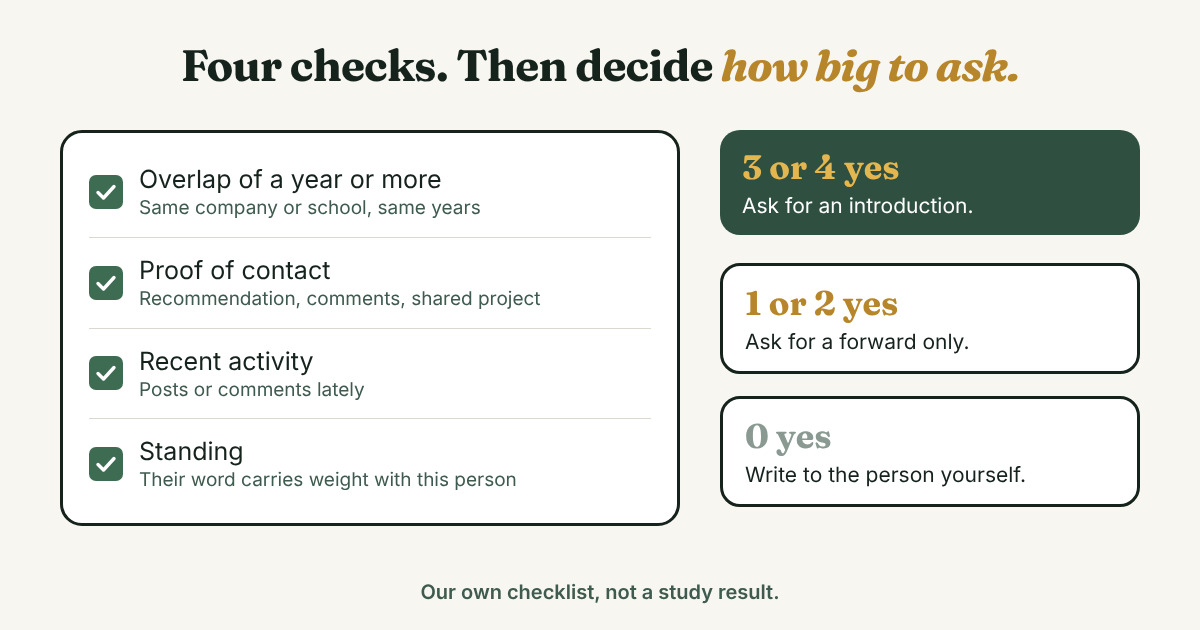
A mutual connection label tells you the link exists. It does not tell you how strong it is. You read the strength from clues, and it takes about two minutes. Open your mutual's profile and the target's profile side by side, then run four checks:
- Overlap. Did they work at the same company, or study at the same school, in years that overlap by a year or more? Two people at a 5,000-person company who never worked together do not count.
- Proof of contact. Look for a recommendation, comments on each other's posts, a shared project, a talk or a group they both belong to.
- Recency. Has your mutual posted, commented or changed their profile lately? A mutual who has not been on LinkedIn for a year may not see your note.
- Standing. Would your mutual's word carry weight with this person? A former junior colleague can vouch for your work. They may be less able to vouch for you with a vice president.
Three or four yes answers: ask for an introduction. One or two: ask for a forward only (the second template below). Zero: write to the person yourself.
A thin link is not a dead end. In the 2022 LinkedIn experiments published in Science, researchers varied which people LinkedIn suggested to over 20 million users across five years. Science News reports that tie strength was measured by the number of mutual connections and direct messages, and that moderately weak ties, who share roughly 10 connections and seldom interact, produced the most job moves in highly digital fields. Strong ties did better in less digital fields. The study counted job changes, not introductions, so it does not say that a distant mutual will agree to introduce you. It does say not to write off an acquaintance as a door. Match your ask to the link: the weaker the tie, the smaller the ask.
What do you send your mutual connection?
Four published guides agree on the core. Next Avenue says to make clear how you and your mutual know each other, be specific about why you want the introduction, and be gracious. Computerworld (2013) warns against a bare subject line such as "Need an introduction," and says not to make the reader guess who you are. The Muse (2020) suggests adding a short paragraph about yourself that the introducer can paste. The LinkedIn Sales Solutions post tells you to state the reason in one or two sentences and to supply the email for the connector to send.
The fifth idea changes who does what. In a double opt-in introduction, your mutual asks the other person first, before anyone is connected. Alexander Jarvis describes it as asking both people for permission, with a specific reason the connection helps both. CB Insights shows the same note sent to one side only, with a way out: "If not or just too busy, no worries." This is why your first message goes to the mutual, and why you do not write to the target until they have said yes.
Template A: you know your mutual well.
Hi [Mutual], a favor, and no pressure. I'd like 15 minutes with [Name], [role] at [company], to ask about [one specific topic]. I saw you're connected. Do you know them well enough to introduce me? If it's awkward, tell me and I'll write to them myself. Here's a blurb you can forward: [blurb]. Thank you either way. [Your first name]
Template B: you know your mutual only a little.
Hi [Mutual], we connected in [month] after [how]. I'm trying to learn about [topic] and I noticed you know [Name]. Would you be open to forwarding a short note from me? It's no problem if not. The note is below, ready to send. [Your first name]
The blurb. Three or four sentences your mutual can paste without editing:
[Your name] is a [role] who [one line of proof, such as what you built or did]. They would like 15 minutes to ask you about [topic]. They read [one specific thing the person wrote or said], and that is why they asked. If a call is too much, one written answer would help just as much.
Three details do most of the work. Ask for one small thing, such as 15 minutes or one question. Leave a clear way out. And write to one mutual at a time.
One more choice: how you send it. In a 2017 study by Roghanizad and Bohns, students asked 10 strangers each to complete a 44-item questionnaire. Face to face, strangers agreed to about 7 of 10 requests, and by email about 0.2 of 10. The students had predicted about 5.5 of 10 for email. The people were strangers, the task was long, and the sample was one university, so it is no match for a friendly note to a connection. The lesson is still useful. If you see your mutual in person or can call them, ask out loud, then send the blurb in writing.
Optional warm-up: the LinkedIn Sales Solutions post suggests liking or commenting on the person's posts before you ask. Do it only if you have something to say. A comment that exists to be noticed is easy to spot.
What does the full exchange look like?
Here is Lucia's whole exchange with made-up people. Her goal is 15 minutes with Naveen about moving from product design to design systems work.
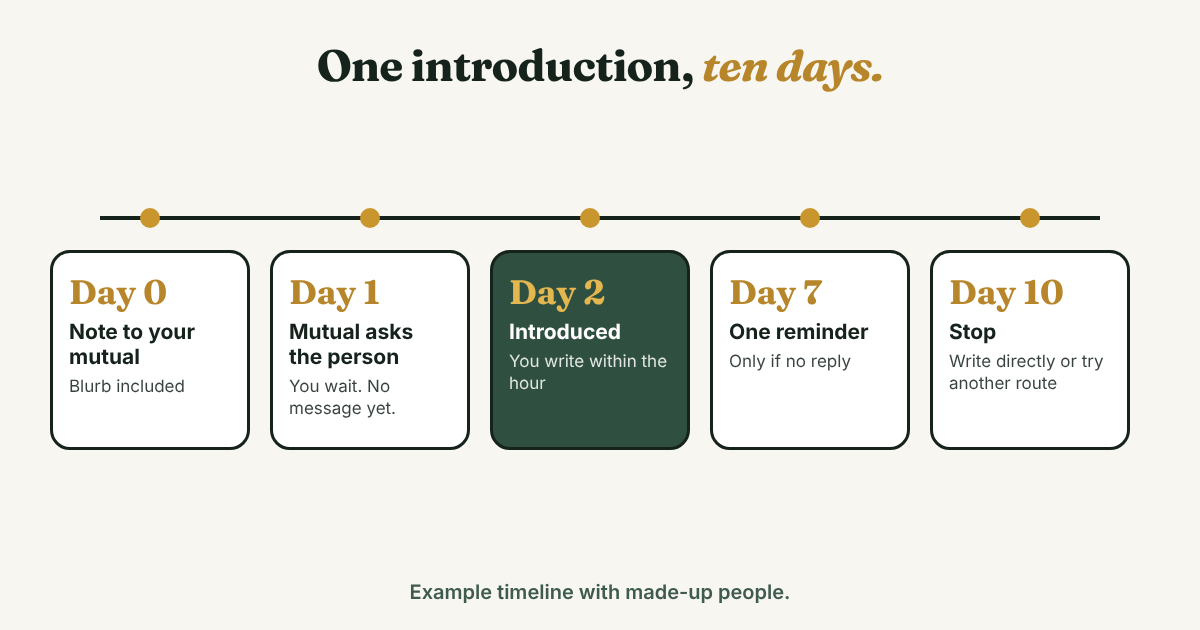
Day 0. Lucia to Hamza. She had checked: Hamza and Naveen sat on a conference committee together two years ago, and Hamza commented on his talk. That is overlap and proof of contact, so she used Template A.
Hi Hamza, a favor, and no pressure. I'd like 15 minutes with Naveen, who leads design systems at a software company, to ask how he reviews portfolios for systems roles. I saw you're connected from the conference committee. Do you know him well enough to introduce me? If it's awkward, tell me and I'll write to him myself. Here's a blurb you can forward: Lucia is a product designer who rebuilt her team's component library last year. She would like 15 minutes to ask you about moving into design systems. She read your talk on tokens, and that is why she asked. If a call is too much, one written answer would help just as much. Thank you either way. Lucia
Day 1. Hamza writes to Naveen alone. Lucia sees none of this, and she does not message Naveen yet.
Naveen, a friend of mine, Lucia, is moving from product design toward design systems and wants 15 minutes with you on portfolios. I worked with her for three years and I'd vouch for her. Okay if I connect you?
Day 2. Naveen says yes, Hamza makes the introduction. Naveen, this is Lucia. Lucia, this is Naveen. Over to you two.
Day 2, an hour later. Lucia to Naveen. She answers fast and gives him two sizes of ask.
Hi Naveen, thanks for saying yes to Hamza. I'd like 15 minutes to ask how you review portfolios for design systems roles. I can do Tuesday or Thursday afternoon, in your time zone. If a call is too much, I'd be glad of one written answer: what makes a systems case study different from a product one? Lucia
Day 2, same day. Lucia to Hamza. Thank you, Hamza. That blurb saved you a long email, and I know it. I'll tell you how it goes.
How long do you wait, and what if the answer is no?
Give your mutual time, then stop. Next Avenue says to follow up once after about a week and no more. Dummies says to give the introducer ten days to act or not before moving on. Put both dates in your log the day you send.
- Day 0: send the note to your mutual.
- Day 7: if there is no reply, send one short reminder. Hi [Mutual], a quick nudge on my note above. If now is a bad time, no problem at all, and I'll write to [Name] directly.
- Day 10: no reply to the reminder. Stop. Their silence is an answer, and you owe them nothing but thanks.
Then pick one of these:
- Write to the person yourself. Do not name your mutual unless they said they are fine with it. The notes for writing to a stranger give four starting points.
- Try a different mutual, one at a time. If two people both pass your request, the person gets two introductions and you look careless.
- Ask for advice instead. Next Avenue says to be ready to accept a non-introduction, such as a few lines of advice from your mutual about the person.
If the introduction happens and Naveen goes quiet, send one note about a week after it. The LinkedIn follow-up message guide has templates and timing for that.
If your mutual says no, answer with one line: Thanks for telling me, Hamza. I'll write to him myself. Keep it friendly. You may want to ask them again someday.
How do you thank them and close the loop?
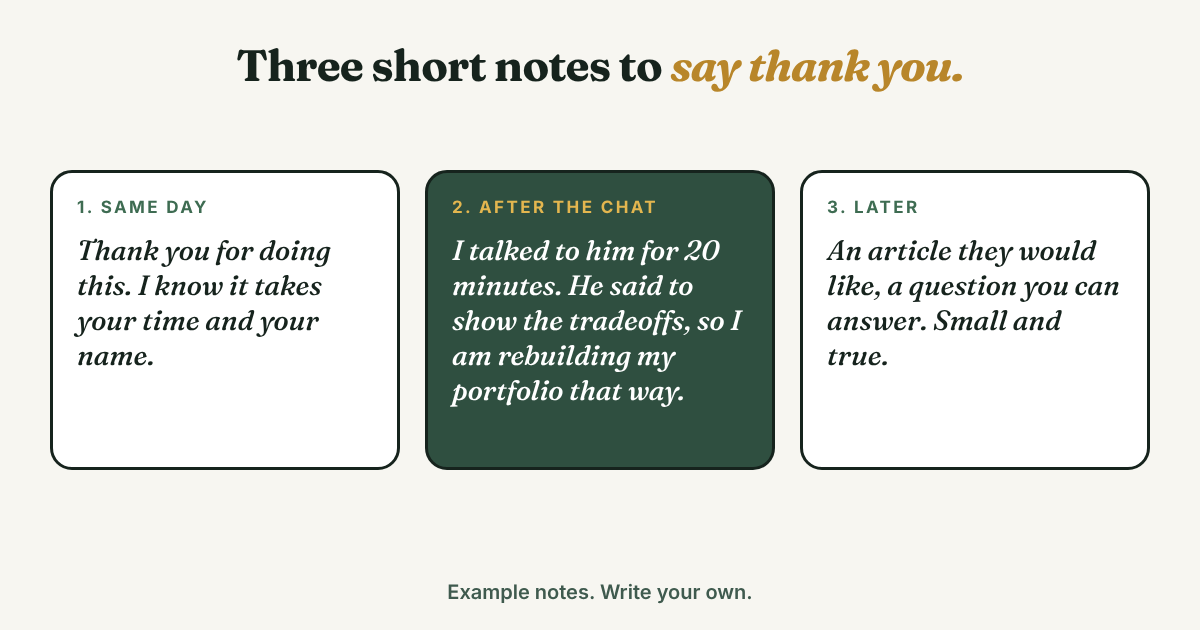
Most of the guides we read end when the introduction is made. Your mutual put their name next to yours, and a long silence afterward leaves them wondering how it went. The LinkedIn Sales Solutions post ends with a step it calls extending the favor: thank the connector and offer to return it. Make it three short messages.
- The same day, before any result. Thank you for doing this. I know it takes your time and your name.
- After the first conversation. Tell them what happened and one thing you learned. Hamza, I talked to Naveen for 20 minutes. He said to show two systems cases with the tradeoffs written out, so I'm rebuilding my portfolio that way. Thanks again.
- Later, with something useful. An article they would like, a question you can answer, an introduction of your own. Offer it only if it is true and small.
Do not skip the second message. It takes a minute, and it tells your mutual their favor was worth it.
Which mistakes make people say no?
- A one-line ask. Can you introduce me to Naveen? says nothing about why. Name the topic and the reason, as in Template A.
- Asking for a job in the first note. The Dummies chapter tells you to say you are not asking for a job when you ask the introducer. Ask about the work or the field, and let a job conversation come later.
- Writing to three mutuals at once. It is hard on them and the person you want to reach.
- Doing the mutual's work. A blurb they have to rewrite is a chore. Write it so they can paste it.
- Skipping the thank-you. It costs a minute and decides whether they help again.
- Using a tool that sends requests for you. Skip any bot, scraper or auto-message tool. An introduction means something because one person asked, in their own words, one at a time.
What do you write down once you hit send?
A pending introduction has three dates in it: your reminder, a possible follow-up to the target, and a thank-you after the call. Write one line for each ask:
[Target] · [mutual] · [what you asked for] · [date sent] · [reminder date] · [status]
For Lucia: Naveen · via Hamza · 15 minutes on systems portfolios · sent Nov 18 · nudge Nov 25 · introduced Nov 20, call Nov 23.
Full disclosure: we make GrowthSeeded, a simple follow-up tracker for LinkedIn. It does not find mutual connections or ask anyone for an introduction. You add the people you want to stay in touch with, and each day it tells you who to message, so you don't forget to follow up. You send every message yourself. One open ask is easy to hold in your head. A reminder starts to help when you have several asks open and a thank-you or two still owed.
FAQ
Can I ask for an introduction on LinkedIn without Premium?
Yes, if your mutual is your connection. You can message your own connections for free, according to the August 2026 vendor article. Paid InMail is for people you are not connected to, and you do not need it for this plan. Check LinkedIn's current limits yourself.
Should I ask more than one mutual at the same time?
No. Ask one, wait about a week, send one reminder, then try another. Two mutuals passing the same request is hard on the person you want to reach.
What if my mutual barely knows the person?
Use Template B and ask for a forward instead of a vouch. Or write to the person yourself. A thin link can still work, but your ask should be small.
Is it rude to ask for an introduction?
Not if you make it easy to decline. Research written up by Stanford GSB found that people overestimate how hard it is to get a yes and that a direct ask works better than a hint. That work covered other tasks, not introductions.
How long should I wait for an answer?
Send one reminder after about a week, and stop around ten days, as Next Avenue and Dummies suggest. Then write to the person directly or try a different route.
What if the person I want is a third-degree connection?
Next Avenue says these requests tend to fail, because the mutual has to pass them to someone they do not know well. Look for a closer path, or write to the person yourself.
Do this today
- Pick one person you want to reach. Open their profile and your mutual's, and run the four checks.
- Write Template A or B with a four-sentence blurb. Send it to one mutual, in your own words.
- Write the reminder date, seven days out, in your log.
Asking one mutual this week and another next month? Add each person to GrowthSeeded, a simple follow-up tracker for LinkedIn, with who you asked and the date you will nudge them. Each day it tells you who to message, so you don't forget to follow up. You send every message yourself, and it never connects to your LinkedIn account.
Sources
- Francis Flynn: If You Want Something, Ask For It, Stanford Graduate School of Business, 2008 (write-up of Flynn and Lake, Journal of Personality and Social Psychology, 2008)
- Ask in person: You're less persuasive than you think over email, Roghanizad and Bohns, Journal of Experimental Social Psychology, 2017
- A Causal Test of the Strength of Weak Ties, Aral and coauthors, Science, 2022 (Stanford Digital Economy Lab listing)
- Looking for a job? Lean more on weak ties than strong relationships, Science News, September 2022
- Get Introduced to Your Sales Prospects in 4 Simple Steps, LinkedIn Sales Solutions blog, 2018
- The Double Opt-In Email Introduction, Alexander Jarvis, 2017, updated 2025
- Double opt-in intro, CB Insights blog, checked 2026
- How to Ask for a LinkedIn Introduction and Get One, Next Avenue, checked 2026
- The Default LinkedIn Feature You Need to Avoid (and the Templates to Use Instead), The Muse, 2020
- How to craft the perfect LinkedIn introduction request, Computerworld, 2013
- How to Get Introduced to Hiring Managers on LinkedIn, Dummies, 2016
- How to ask for an introduction on LinkedIn, Happenstance (vendor), August 2026
- Have LinkedIn taken away one of the most powerful tools on the site?, HuffPost UK, undated
- Warm Intros vs Cold Email: The 2026 Benchmarks, Draftboard (vendor), August 2026
About the author
Anisur Rahman Fagun is a marketing and content strategist with more than 9 years of experience in SEO, content, paid advertising and brand growth. He holds a master's degree in mass communication and journalism, and has led content and SEO strategy, built editorial teams and worked with product, design and sales teams. He also builds simple tools that turn marketing data into clear decisions. He writes the GrowthSeeded blog, which shares practical ways to build professional relationships on LinkedIn.