Networking
Mapping Your Professional Network: 4 Steps on One Page
12 min read
Key takeaways
- A network map is one page with about 25 names, sorted into groups, each marked close, in between or distant, with the month you last talked.
- The point is to find gaps: a group with no one in it, or a page where every name comes from the same place.
- Research on managers moving into leadership found most were comfortable with the people they work with every day and underused wider contacts. A map shows which way you lean.
- End the map by picking three people to write to this week. A map you do not act on is only a picture.
Short answer: To map your professional network, write 25 to 30 names on one page, sort them into groups such as work, school and community, and mark each person close, in between or distant, with the month you last talked. Then look for empty groups and old gaps, and pick three people to write to.
In this article
What is a network map, and why draw one?
How many people should go on the map?
How do you draw the map in four steps?
What should you look for on the finished map?
How do you turn the map into three messages?
How do you keep the map up to date?
FAQ
Do this today
What is a network map, and why draw one?
Priya (an example, not a real person) has been a product designer for six years, and she wants to move toward user research. A friend asks who she knows in research. She thinks of herself as well connected, yet she cannot name one person who does that work. She knows plenty of people. They are mostly designers who sit near her.
A network map is a one-page picture of the people you know: who they are, how you know them and how close you are. It will not add a single contact. It shows where you already stand, so you can pick where to go next. If you have very few contacts so far, start with building a professional network from zero, then come back to draw the map.
In Harvard Business Review, Herminia Ibarra and Mark Hunter sort a leader's contacts into three kinds. Operational contacts are the people you work with every day. Personal contacts are outside your job, such as alumni and professional groups. Strategic contacts are people in other parts of your field who help you see the bigger picture. The authors studied managers stepping into leadership roles. Most were at ease with the first kind and underused the third. Priya fits: her page will probably be mostly the first.
Rob Cross, who studies how people work together, writes for SHRM that his research across several hundred organizations linked networks that reach different perspectives and kinds of expertise to higher individual performance. That is his own summary of his research, and it shows a link, not a guarantee.
How many people should go on the map?
Fewer than you think. Start with 25 to 30 names. That number is our suggestion, not a research result.
Robin Dunbar's work on how many people we can keep in touch with explains why a short list works. In a 2016 analysis of phone records, reported by MIT Technology Review, about 27,000 heavy callers showed layers that averaged roughly 4, 11, 30 and 129 people, each layer less close than the one inside it. The data came from one country in 2007 and counted phone contacts of all kinds, and the authors saw large differences in the middle layers. Read it as a rough shape, not a rule: a few people you talk to all the time, a larger group now and then, and a long tail.
Your 500 LinkedIn connections are mostly the tail. A map of all of them would be a list you never read. Cross adds that a bigger network is typically not a better one, because a sprawling network is hard to manage. Put on the page only people you could write to by name today.
How do you draw the map in four steps?
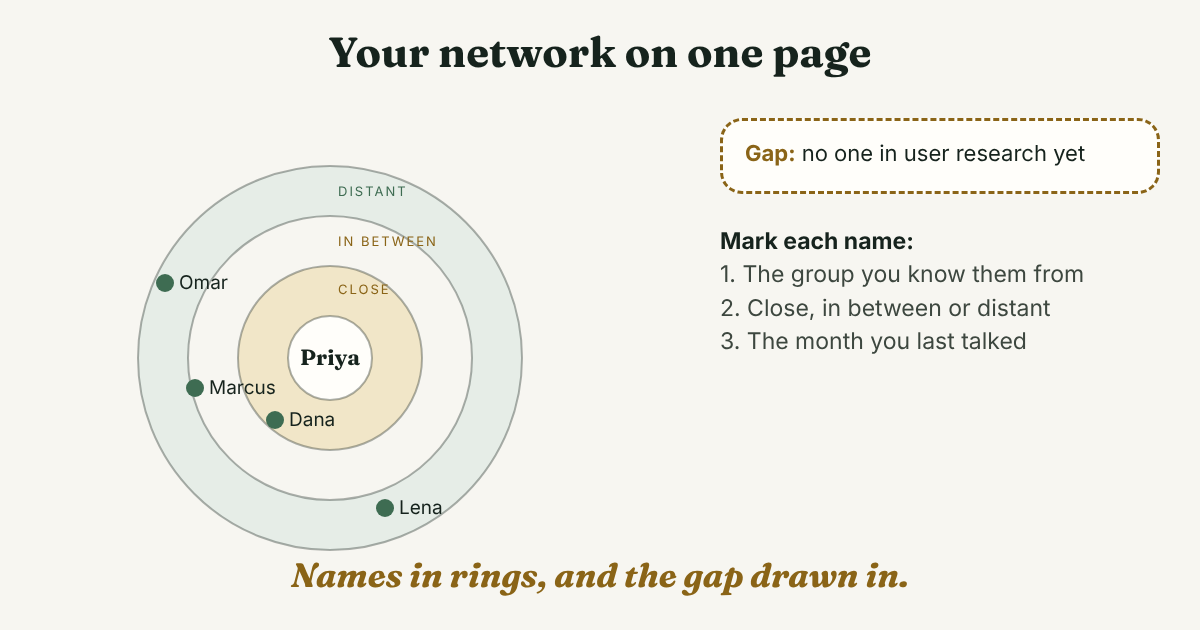
Use paper, a spreadsheet or a notes page. The alumni career center at Wake Forest University suggests a circle with your name in the middle and rings outward: the spaces you spend time in, the groups inside them, then one or two people from each group. We keep that and add two marks that make the page useful: how close each person is, and when you last talked.
Step 1: List your spaces
Write where you spend time: your job, your school or alumni group, a volunteer role, a hobby community, a professional association. Four to six is enough.
Step 2: Split each space into groups
A job can be your team, the team next door and a former company. A school can be your class and one teacher you liked. Groups are what let you see a gap later, so give each one a plain name.
Step 3: Add names, one line each
Under each group, write two to five people. For each one, write four things: the group, how close you are, the month and year you last talked, and one thing you could do for them. Close means you would tell them bad news. Distant means you would have to remind them who you are. In between is everyone else. These are our definitions, so change them if they do not fit. Here is the line:
[Name], [group], [close, in between or distant], last talked [month and year], I could [one useful thing].
And here is a slice of Priya's page:
- Dana, my team, close, last talked last week. I could review her next design.
- Marcus, my former manager, in between, last talked in March. I could send him the article we discussed.
- Lena, design school classmate, distant, last talked two years ago. I could congratulate her on her new job.
- Omar, a researcher I met at a meetup, distant, talked once in June. I could send him the slides he asked about.
Step 4: Draw the gaps
Add the groups you wish you had, as empty boxes. For Priya that is "user research," and it holds one name she barely knows. This step is the one most map templates skip, and it is the most useful part of the page.
What should you look for on the finished map?
Look for four things.
- One color. If most names come from one group, you have drawn a floor plan. Priya's page is mostly her team, which is the pattern Ibarra and Hunter saw in their managers: strong on the people nearby.
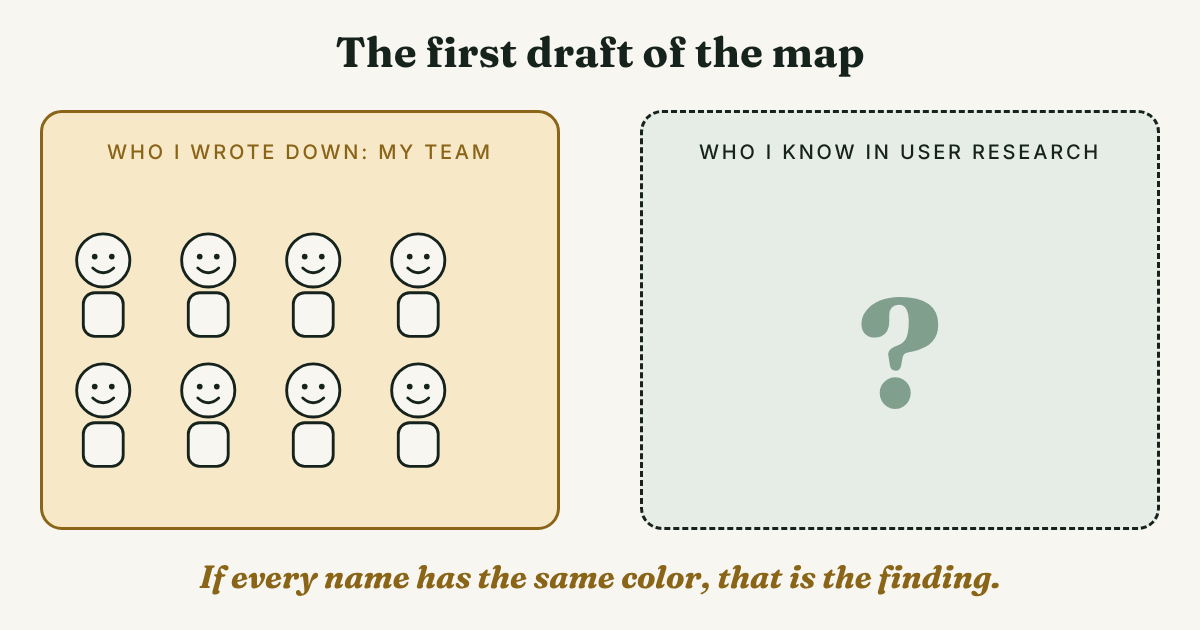
- Empty or thin groups. A box with no one in it is where your next conversation should come from. Cross's research is a reason to care about breadth, not just size.
- A missing middle. A page with only close friends and long-lost names lacks the people in between. In a five-year experiment on LinkedIn that changed which "People You May Know" suggestions users saw, reported by MIT News, moderately weak ties produced the most job moves, not the weakest and not the strongest. It involved about 20 million users and measured job moves on one platform, so it does not tell you what works for every goal. Stanford News notes the idea goes back to Mark Granovetter in 1973, and that large experimental tests of it had been missing.
- Old dates. A distant name you last talked to years ago is a good first message. Our guide to networking for career advancement covers the research on reconnecting and the wording.
The common mistake is to draw the map and stop. A drawing feels like progress. Priya's page showed her research gap on day one, and it will still show it in a year unless she writes to someone.
How do you turn the map into three messages?
Pick three people: one in the gap, one who might know someone in the gap, and one distant name with an old date. For Priya, that is Omar, Marcus and Lena. Write each message yourself, to one person at a time. Never send one message to many people, and skip any tool that offers to do it for you. Here is a first message to someone in your gap:
Hi [Name], we talked at [event] in [month]. I am a [role] moving toward [field], and I remembered what you said about [specific thing]. Could I ask you two questions about how you got into it? A short reply here is fine.
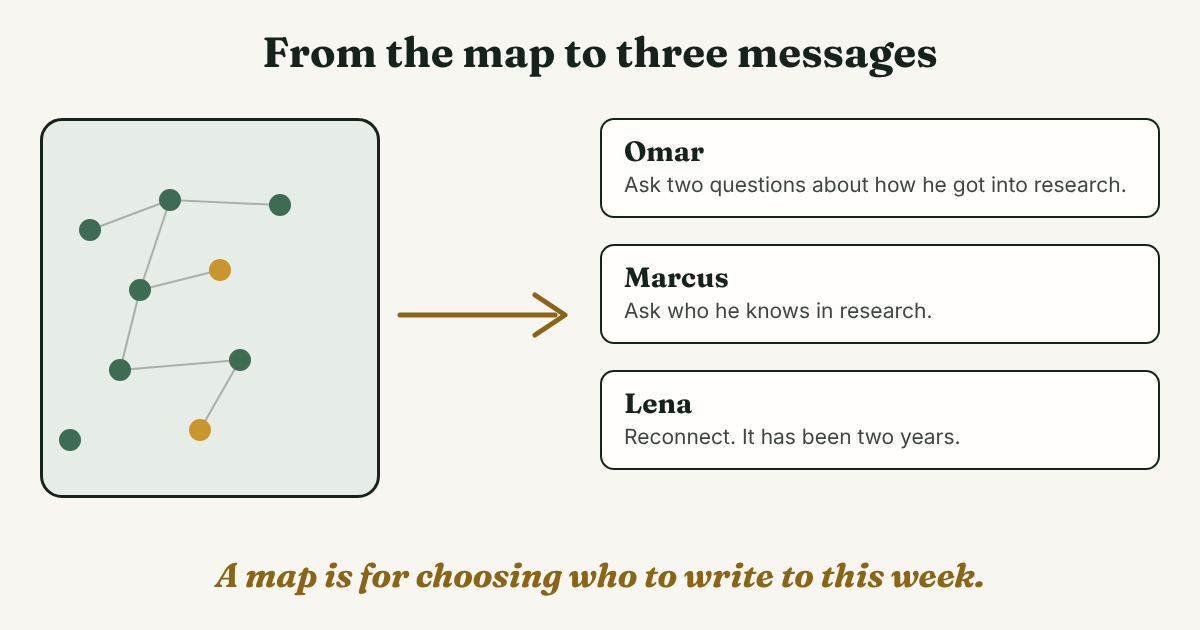
For the reply and the timing, see our guide to LinkedIn follow-up messages. Then write the next step and a date beside each name on the page, for example "Omar: write by Friday." If you want to turn the page into a standing plan, our guide to networking strategy tools shows how to plan first and pick a tool second.
How do you keep the map up to date?
Once a month, spend 10 minutes. Update the last-talked date for anyone you wrote to, move people between close, in between and distant, and add one name to your thinnest group. Do not delete anyone. This is our suggestion, not a finding. To check progress, count conversations held, not names on the page. If you want to track numbers, see our guide to three numbers to track for LinkedIn growth.
A notes page or spreadsheet is enough for the map. Full disclosure: we make GrowthSeeded, a simple follow-up tracker for LinkedIn, built for the part people drop after the drawing: the follow-up. You write a note after each conversation, and a due-today view shows who is waiting for a reply. It does not find people or write messages for you.
FAQ
What is a professional network map?
It is a one-page picture of the people you could write to for work reasons, sorted into groups and marked by how close you are and when you last talked. Its job is to show gaps and choose your next conversations.
How many people should be on it?
We found no research number for a map. Our suggestion is 25 to 30 names. For comparison, one analysis of phone records found layers that averaged about 4, 11, 30 and 129 people, though it measured calls, not work contacts.
Is a network map the same as my LinkedIn connections list?
No. A connections list holds everyone you accepted. A map holds only people you could write to by name, grouped, with closeness and last contact. Most of your connections will not be on it, and that is fine.
Should I include people I barely know?
Only if you could write to them today and say how you know them. For people you want to reach but do not know yet, keep a separate short list, and move a name onto the map once you have talked.
How often should I update the map?
We suggest once a month for about 10 minutes: update dates, move people between close, in between and distant, and add one name where the page is thin.
Do this today
- Set a 20 minute timer. Write four to six spaces you spend time in, and the groups inside each.
- Write 20 to 25 names, each with a group, how close you are and when you last talked.
- Draw one empty box for a group you wish you had, and write the name of one person to write to first.
A map tells you who to write to, and GrowthSeeded keeps track of what happens next: a note for each person and a list of who is due for a follow-up. Start with your three people on the Free plan, which is $0 for 5 active people at a time (checked October 2026, and plans change). You send every message yourself, and it never sends anything or touches LinkedIn.
Sources
- How Leaders Create and Use Networks, Herminia Ibarra and Mark Hunter, Harvard Business Review, 2007 (copy on Herminia Ibarra's site)
- Article by Rob Cross on how successful people build networks, SHRM, 2021 (adapted from his book Beyond Collaboration Overload)
- Your Brain Limits You to Just Five BFFs, MIT Technology Review, 2016 (on a 2016 paper by Robin Dunbar and colleagues)
- Your Network Should Be "Weak", Megan Bosworth Hoyt, Wake Forest University Alumni Personal and Career Development Center, 2019
- The power of weak ties in gaining new employment, MIT News, 2022 (on a study in Science)
- Stanford News report on the weak ties experiment, Stanford University, report on a study published in Science in 2022
About the author
Anisur Rahman Fagun is a marketing and content strategist with more than 9 years of experience in SEO, content, paid advertising and brand growth. He holds a master's degree in mass communication and journalism, and has led content and SEO strategy, built editorial teams and worked with product, design and sales teams. He also builds simple tools that turn marketing data into clear decisions. He writes the GrowthSeeded blog, which shares practical ways to follow up and stay in touch with people on LinkedIn.